EasyManua.ls Logo

Marantz SD4000 - LED Peak Level Meter Adjustment; Recording Bias Current Adjustment

Marantz SD4000
47 pages
Print Icon
To Next Page IconTo Next Page
To Previous Page IconTo Previous Page
Loading...
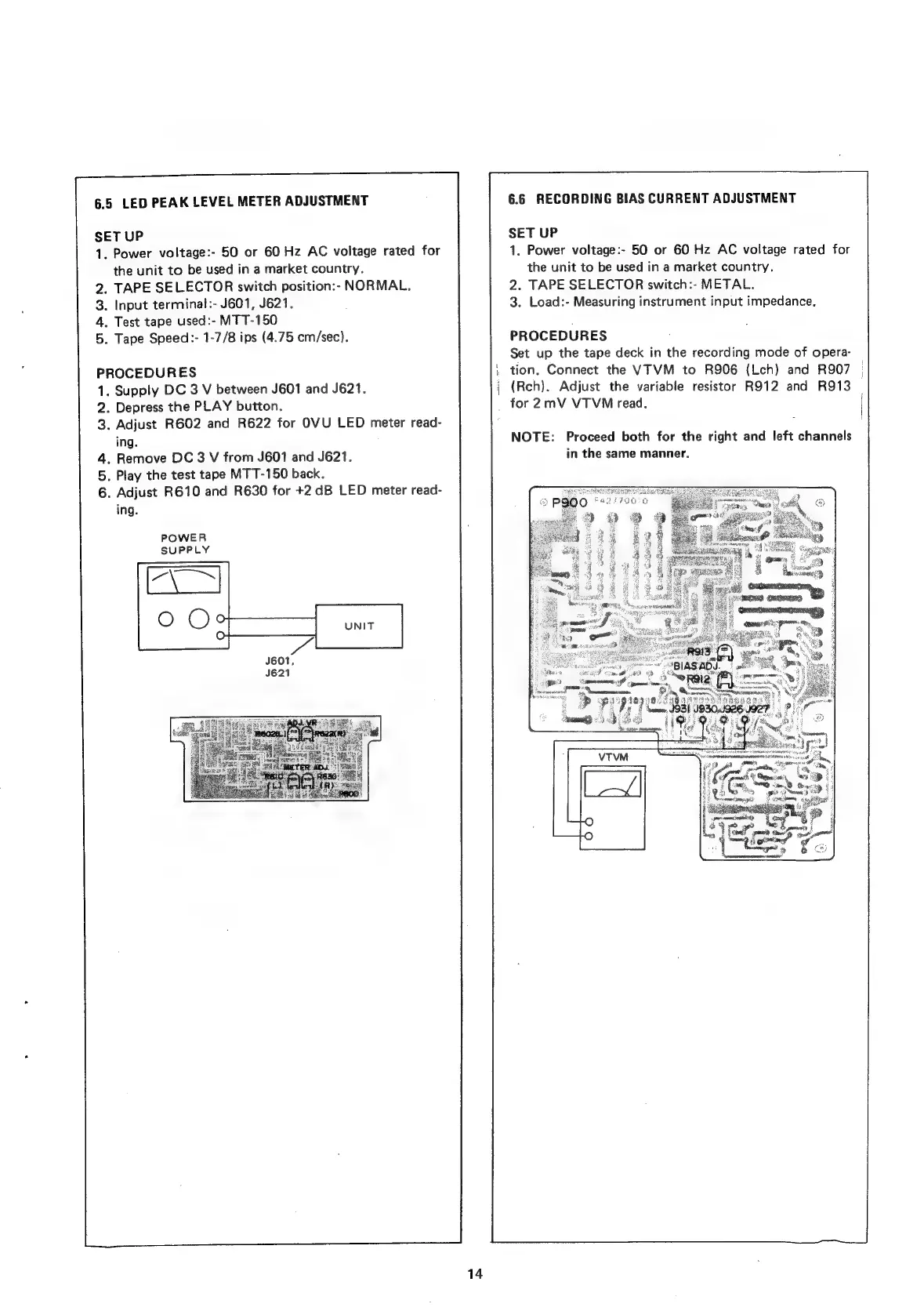
6.5
LED
PEAK
LEVEL
METER
ADJUSTMENT
SET
UP
1.
Power
voltage:-
50
or
60
Hz
AC
voltage
rated
for
the
unit
to
be
used
in
a
market
country.
.
TAPE
SELECTOR
switch
position:-
NORMAL.
.
Input
terminal
:-
J601,
J621.
.
Test
tape
used:-
MTT-150
.
Tape
Speed:-
1-7/8
ips
(4.75
cm/sec).
PROCEDURES
.
Supply
DC
3
V
between
J601
and
J621.
.
Depress
the
PLAY
button.
.
Adjust
R602
and
R622
for
OVU
LED
meter
read-
ing.
.
Remove
DC
3
V
from
J601
and
J621.
.
Play
the
test
tape
MTT-150
back.
.
Adjust
R610
and
R630
for
+2
dB
LED
meter
read-
ing.
POWER
SUPPLY
14
6.6
RECORDING
BIAS
CURRENT
ADJUSTMENT
SET
UP
1.
Power
voltage:-
50
or
60
Hz
AC
voltage
rated
for
the
unit
to
be
used
in
a
market
country.
2.
TAPE
SELECTOR
switch:-
METAL.
3.
Load:-
Measuring
instrument
input
impedance.
PROCEDURES
Set
up
the
tape
deck
in
the
recording
mode
of
opera-
;
tion.
Connect
the
VTVM
to
R906
(Lch)
and
R907
|
(Reh).
Adjust
the
variable
resistor
R912
and
R913
_
for
2mV
VTVM
read.
NOTE:
Proceed
both
for
the
right
and
left
channels
in
the
same
manner.

Related product manuals