800.840.1228 / MARATHONHARDWARE.COM
Technical Specifications & Assembly
MAX BIN WASTE STORAGE SYSTEM
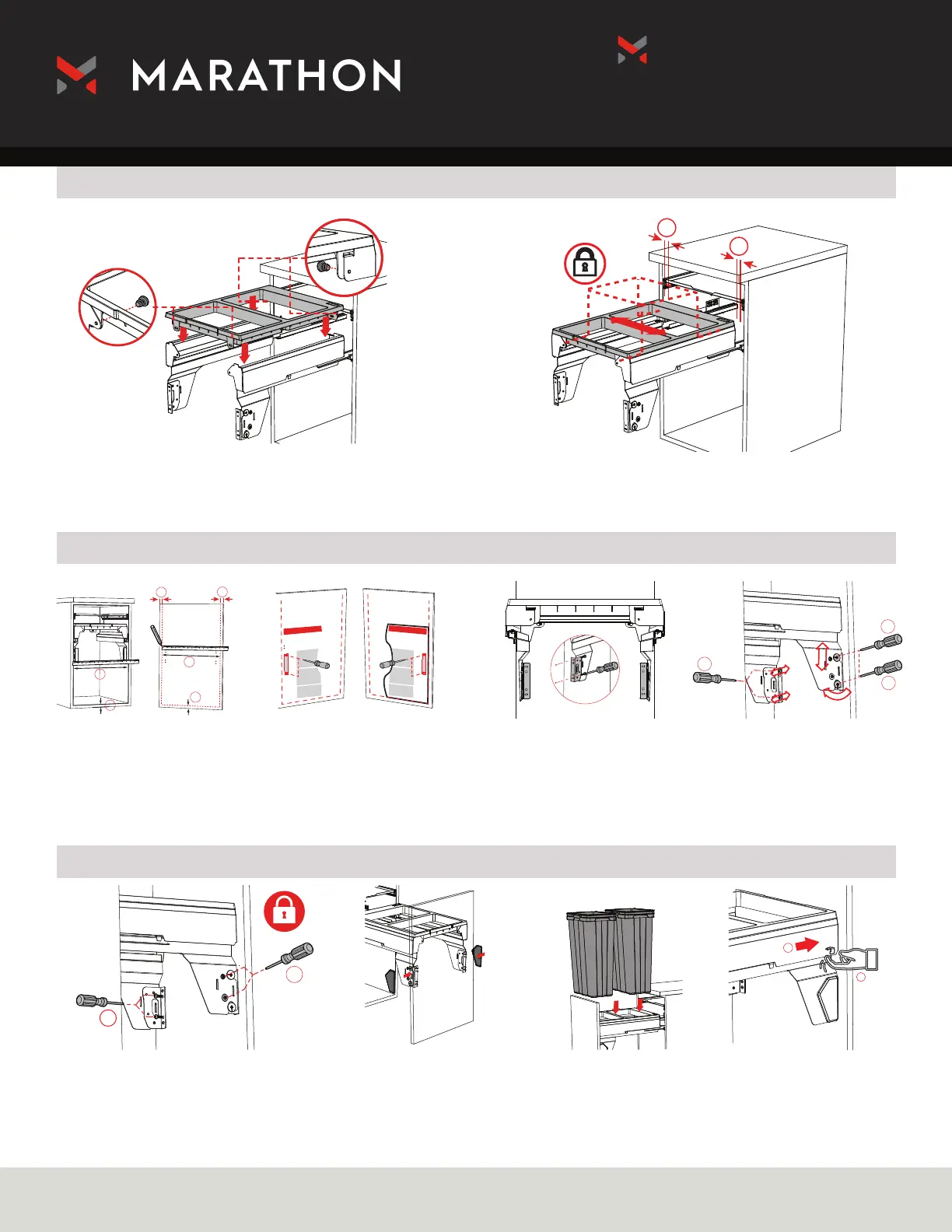
Waste Bin Bracket Installation
Door Bracket Installation
Fix Bracket Cover
=
=
1
2
3
1
2
2
1
Install waste bin holder onto waste system brackets. Loosely
insert corresponding screws.
Use template to mark
bracket holes on the door.
1 Screw the front bracket to the door 2
Lock vertical and tilt adjustment
Once the bin holder is in place, tighten screws.
Screw door arms to
cabinet using the
slotted holes.
Install screw covers.
Adjust left and right
1 then tighten. Adjust
vertical 2 and tilt 3.
Install Bins. To release brackets from the
runners, click switch 1 on the
sides of the brackets and slide
out 2.
=
=
A
A
B
B
Measure and mark the cabinet
bottom and side edge on the
door.


 To Previous Page
 Loading...