12 13
TIME AND DATE SETTING
1. Pull crown out to position 2.
2. Rotate crown clockwise until the previous day’s date is shown in
the date window.
3. Pull crown out to position 3.
4. Rotate crown clockwise until the correct date is shown in the
date window.
5. Continue to rotate crown to set correct am/pm time.
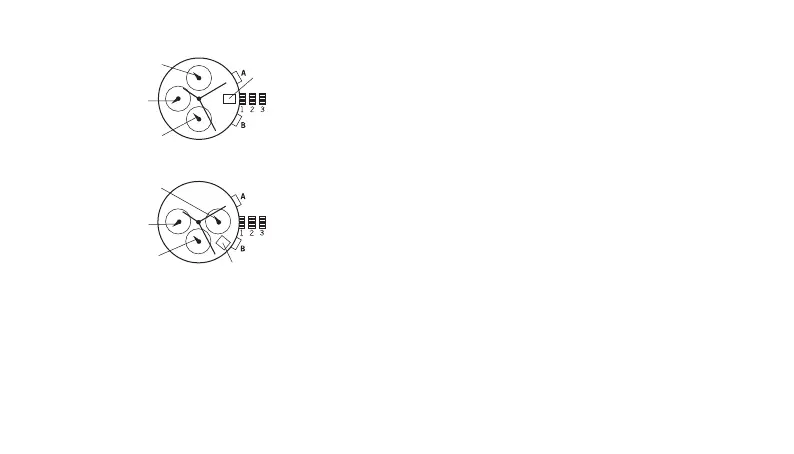
CHRONOGRAPH JS16 / JS26
NOTE: 24-hour hand moves correspondingly with the hour and
minute hands. When setting the time be sure to check that the 24-
hour hand is set properly.
6. Return crown to position 1.
NOTE: When the crown is in position 2, do not press the pushers.
Otherwise the chronograph hands will move.
NOTE: Do not set the date between 9:00 p.m. and 1:00 a.m. to
ensure accuracy.
CHRONOGRAPH
1. Press A to start/stop the chronograph.
2. Press B to reset to zero.
CHRONOGRAPH ZERO RESET
1. If either of the chronograph hands is not at the zero (12:00) position,
pull crown out to position 3.
2. Press A to move hands clockwise; press B to move hands counter-
clockwise. Each press of A or B will move the chronograph hands
by one increment/decrement. Or press and hold A or B for fast
increment/decrement.
3. When both hands are in the zero position, reset time and return
crown to position 1.
NOTE: Chronograph minute hand will synchronize with chronograph
second hand during chronograph zero reset.
24-HOUR HAND
24-HOUR HAND
DATE
DATE
JS16
JS26
CHRONOGRAPH
MINUTE HAND
CHRONOGRAPH
MINUTE HAND
CHRONOGRAPH
SECOND HAND
CHRONOGRAPH
SECOND HAND


 To Next Page
 Loading...