6
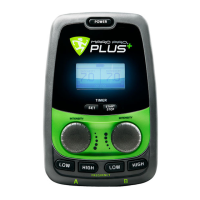
Power Button
To power on or off device; push the “POWER” button
at the top of the device
Frequency Control
Frequency buttons are located in the section above the word
‘FREQUENCY;’ each button is equipped with its’ own LED to
light up when pressed as an aesthetic feature.
Each channel has its own frequency control. From here you
can adjust frequency by pushing “LOW” to lower and “HIGH”
to raise your frequency.
Knobs
Once desired frequency is reached output is controlled by 1
1/4” knob per channel. Each knob is individually marked with
diagrams stating “INTENSITY” at the top and a semi-circle
reducing in thickness to “OFF;” thus indicating the direction
in which to spin the knob to reach desired level. To raise
intensity which has a maximum of “9.0” spin to right, to lower
and turn off spin to left.
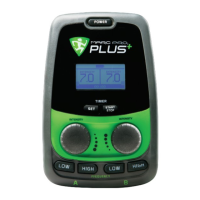
Timer
Timer buttons are located under display in an outlined section
labeled “TIMER.” To use time; press “SET” until desired
treatment time is shown on display, then you may press
“START STOP” to start or stop your timer.
Output Jacks
Output Jacks are located at front of device; directly above
channel A’s jack is labeled “A” and directly above channel B’s
jack is labeled “B.”
Custom connector on device has a shape similar to a
sideways 8 or innity symbol; which is ¾” end to end, simply
insert plug into device’s jack when desired. (There is no up/
down or polarity to achieve)
For more information on use and or recommendations
for device, electrodes or other accessories please see
“Instructions” or “Care of your Marc Pro Plus” sections
Controls:


 To Next Page
 Loading...