EasyManua.ls Logo

Marconi Instruments 2955 - Page 77

Marconi Instruments 2955
84 pages
Print Icon
To Next Page IconTo Next Page
To Previous Page IconTo Previous Page
Loading...
OPERATION
Note...
The rightmost
two
squares
arc
used for
the
point
of the
arrow and
are
not available
for
characters.
Thus
a
box
of icneth 6 tv")
contain,
c.si.
RETURN
w
ill have
an apparent
icnath
of
8 .
'
'
To
prim a box ot
length
10
as
shown
in Fig.
3-16
but against
the
SCOPE
key,
the command
strina
would
bc;-
SX3Z. I
iy'
To dear the
screen
prior
to the
boxes being
printed,
add
64
to
m.
For
the example
above
m
=
10
-r
64
=
74.
Since
CONTINUE
and
RETURN are
commonly
used for menu
displays, the facility
exists
to call
these labels
up by
simply
adding
fixed values
to m.
Note
that
the
position of each arrow
is
fixed,
i.e.
CONTINUE
againsnhe
SCOPE key. and
RETURN against the
HOLD DISPLAY
key.
CONTINUE:
To Call
Up the
CONTINUE
label,
add
32
to m. But
ensure t^at
there
is
sufficient
room
for the word
in the
box.
i.e. m
must
be
at least
32
+
8
=
40 othen-vise
CONTINUE
will
not
be
printed. Thus
to display
CONTINUE
in a
box
of length
6
against
the
BAR
CHART
key. the
command
string
would
be “BX
16.40“,
RETURN:
To
Call up
the RETURN
label
against
the HOLD
DISPLAY
key. add
I2S
to m.
Ensure
that m is
at
least
128
+ 6
—
134
otherwise
RETURN
will not be printed.
Fig,
16
shows
an
example
of the use
of
this
facility.
To
prim
inside
a box,
other
than for
CONTINUE
and
RETURN
which
appear at fixed positions,
use the
WR
command.
Coiumn
I
a<
1
'
U--iniiiiir
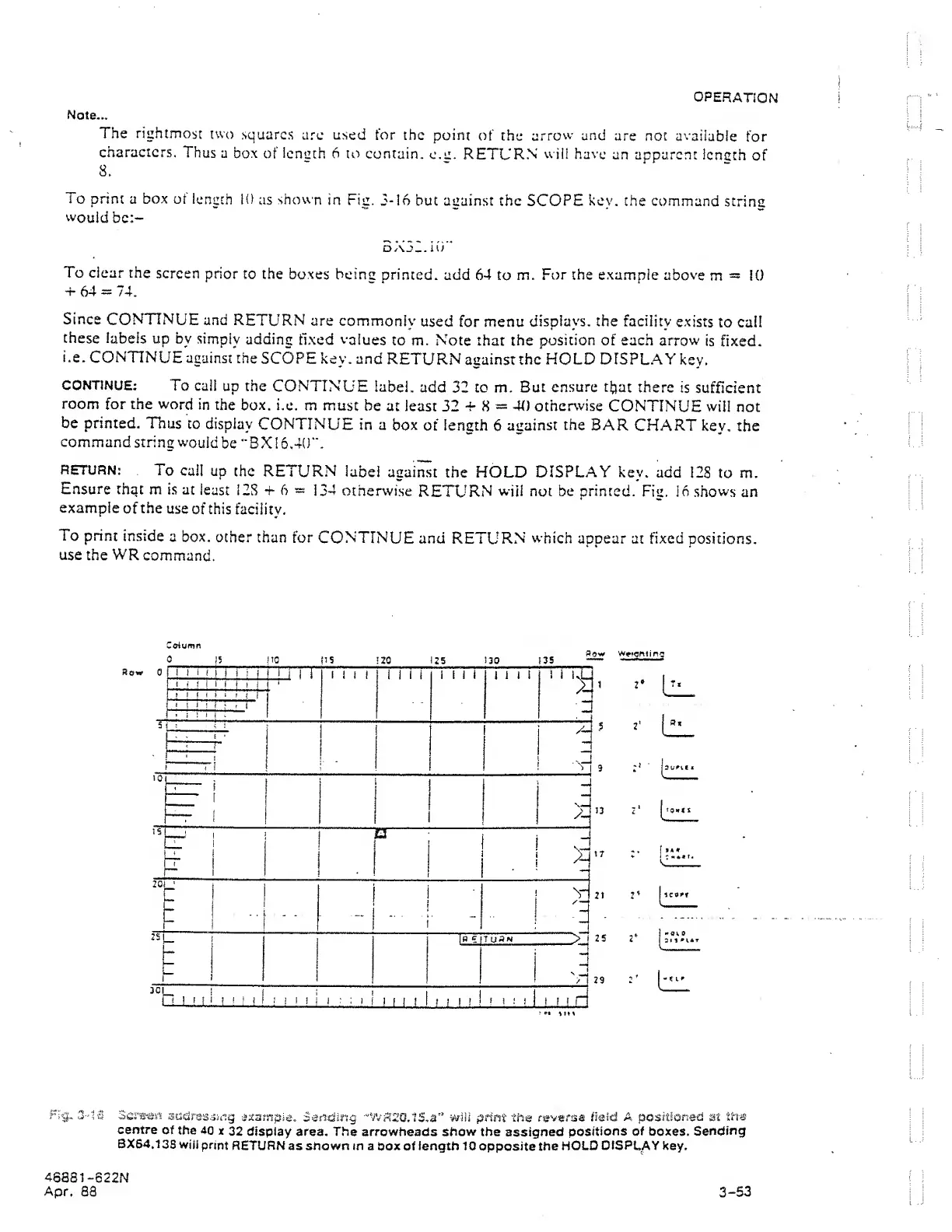
Screen
sdclras4in§
jxampie. Sending
•'’WR20.1S,a'’ wjU print
tri«
reverse
field
A
positioned
at
th«
centre
of the
40
x
32 display
area.
The
arrowheads show the
assigned
positions of boxes.
Sending
BXS4.138
will
print
RETURN
as shown in a
box of
length
10
opposite the
HOLD
DISPLAY
key.
46881
-622N
Apr.
88
3-53