0P ERATS
O
WR
(WRite)
command
This
command
is
used
to
write
the
data
I'oIIawing
the command untii a delimiter
is
seen.
The
.start
location
is
c
-
column
and r
-
row.
Ft>r
example,
to
print
a
reverse field
A at
the
centre
of the
screen
at
column
20.
row
1 5 as
shown
in Fie.
3-
In
use;-
“WR20.
15 .”:CHRS(97) or
“
WR20. i 5a*”
Note
that
anything
immediately hdlowing
WRc.r
i.s
treated
as a
literal.
Thus
for
multiple WR
statements,
end
each
one
with
<LF>
or
other
terminator,
e.g,
-WR20.i5.a";CHRS(10)"WR20J6.b‘';CHR5n0)^7or-WR2UJ5-a-WR.2a.!6.b**;CHRS(10)
The
command
is
also
used to print a label
inside
a
box
produced
using the
BX
command.
Refer
to Fig.
3-16
to
find
the column (variable)
and the row
(fixed).
For
example,
to
print
RETURN
as
shown
in Fig. 3-16
but against
the
SCOPE key the
command
strinc
would bc;-
or inside
a box:-
‘WR28,2i
RETURN'”
••
B X3
2
, 1 U
W
R28
.2 1 RETU RN
"
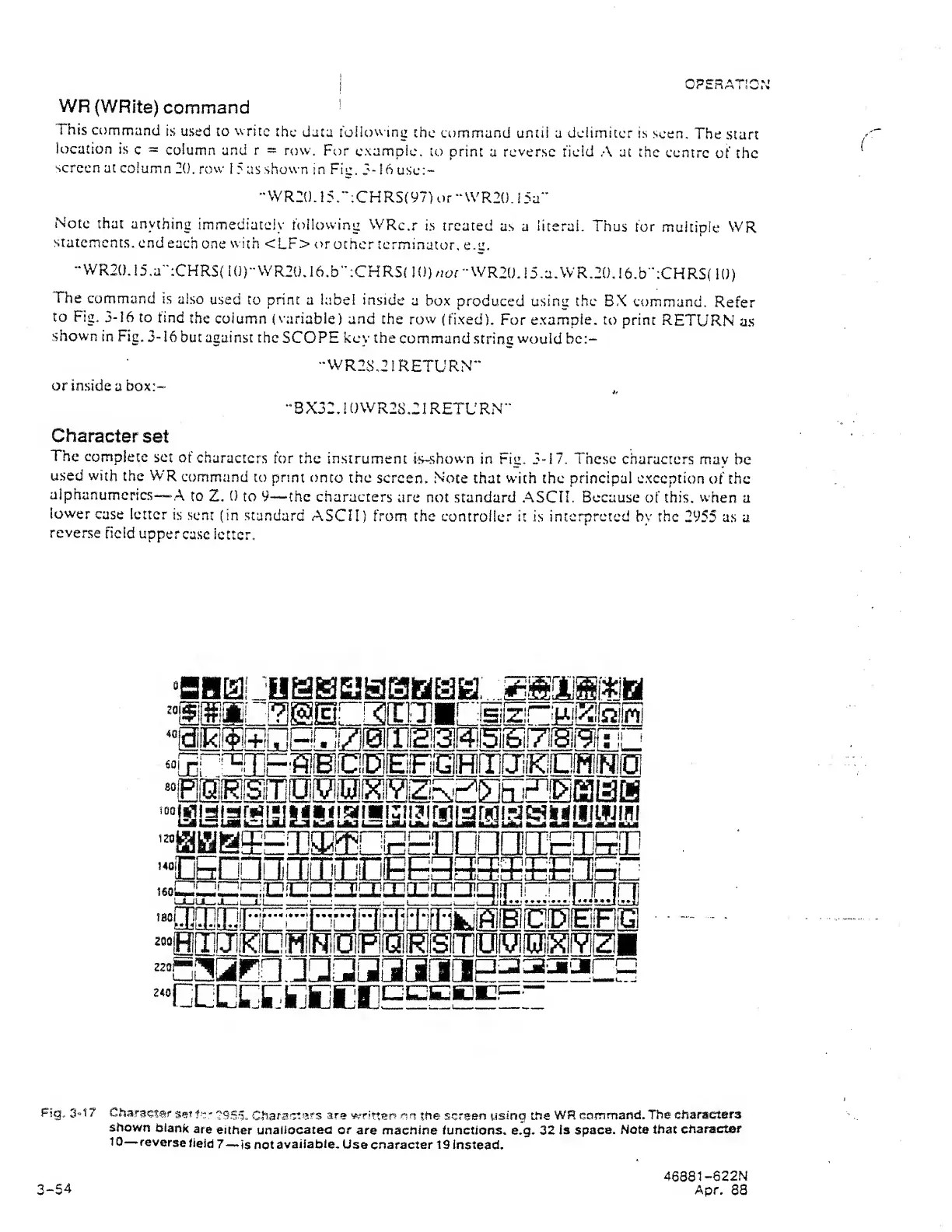
Character
set
The
complete
set
at
characters
for
the instrument
is~shown in
Fig.
3-17.
These
characters mav
be
used
with
the WR
command
to
print onto
the
screen.
Note that
with
the principal exception
of the
aiphanumerics—A
to Z. 0
to
9
—the characters
are not standard
ASCII.
Because
of
this, when
a
lower
case
letter
is
sent
(in
standard
ASCII)
from the
controller it
is
interpreted by
the
2955 as
a
reverse
field
upperca.se
letter.
0iRr
40
601
m II
sr[?[]]E'aEO0EEffl!i]ajiEO0eo
'“HaBS^LDaEffiDEPConaiiETSon
-«60na[3jCIiajOBEg33S'EE[lBG
i 6ql
2^^
—
'r~T.T~irrT
r~i'^i
Urn
irT^
frTrTmRrni
—
rrnnrfl
^”HlI]aEEEa[SOEOHilT000i™(a
3“t7
Character
set
f
.«'
Charset
afs are
writter?
rm
the sc'sen
using the
WR cammand.
The
characters
shown
blank
are
either unallocated or
are machine functions,
e.g.
32 is space.
Note that
character
to
—
reverse
field 7
—
is
not
available.
Use cnaracter 19
Instead,
3-54
46881
-822N
Apr.
88


 To Next Page
 Loading...