14
Mareli Systems
S
ESC
SET
P1
P2
P3
P4
P5
P6
P0
50
65 C
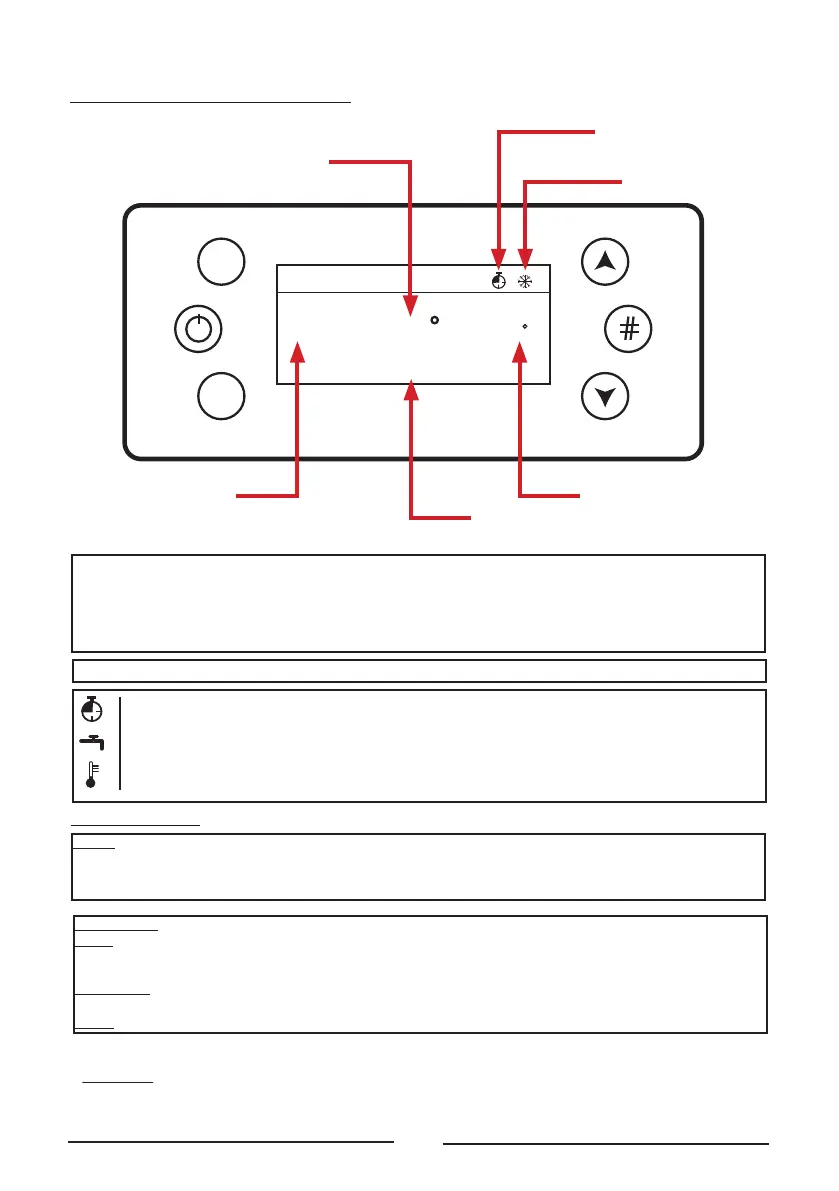
RUN MODE
CONTROL PANEL K500 NG21
Main ermostat
Main Temperature
Chrono
Winter / Summer
State
Power
P1 - Exit from menu/submenu rell Function (push for 3 seconds)
P2 - Ignition, extinguishing and errors reset (push for 3 seconds) Enable/Disable Chrono
P3 - Access to User Menu 1/ submenu / Access to user 2 menu (push for 3 seconds) / Save Data
P4 - Access to combustion power / Menu Increase
P5 - Enable chrono time slot /Access to the Info Menu
P6 - Access to Room ermostat / Boiler ermostat / Menu Decrease
G - Daily Chrono on / S - Weekly chrono on / FS - Week End Chrono On
DHW demand or buer tank thermostat not reached
Local room heating target reached
P3 + P5 - Direct access to the Secondary Information menu inside the Service menu. (push for 3 seconds)
USER MENU 1
Power - Pellet Menu to modify the combustion power of the system in Pellet mode. It is possible to set it
in auto or manual mode: in the rst case the system chooses the power combustion, while in the second
one, the user selects the power. On the le of the display the combustion mode is reported (A= automatic
combustion, M=manual combustion) and the system working power.
ermostats
Boiler - Menu to modify the Boiler ermostat value. You can program the minimum and maximum value
by setting the ermostats 26 and 27. With climatic function switched on the thermostat value cannot
be modied, because it is automatically computed by the system.
Buer Tank - Menu that allows to modify the Buer tank ermostat value; it is shown if; it is displayed if a
hydraulic plant requiring it has been selected.
DHW - Menu to edit the DHW thermostat value.
CHRONO
This Manu allows selecting the programming modalities and and the Ignition/Extinguishing time slots.
Disable
Daily
Weekly
Week
-
End
Modality - It allows selecting the disired modality, or disable all set programming.
1. Enter modication mode through the key P3.
2. Select the chosen modality (Daily, Weekly or Week end).
3. Enable/disable chrono modality through the keys P2.
4. Save the settings through the keys P3.
Programming
The system includes three type of programming: Daily, Weekly, Week end.
After selecting the desired kind of programming:
1. Select the programming time through the keys P4/P6.
2. Enterthe adjustment modality (selected time will be ashing) through the keys P3.
3. Change the time via keys P4/P6.
4. Save the programmong with the keys P3.
5. Enable (a “V” is displayed) or disable the time slot (a “V” is not displayed”) by
pressing the keys P5.
Daily
Select the day of the week to program and set the ignition and extinguishing times.
Programs around midnight
Set the clock On of the previous day at the desired time: Ex. 20.30
Set the clock of OFF of the previous day at: 23:59
Set the clock On of the following day at 00:00
Set the clock of OFF of the following day at the desired time: Ex. 6:30
The system turns on at 20.30 on Tuesday and turns o at 6.30 on Wednesday
Weekly
The programs are the same for all days of the week.
Week-end
Choose between 'Monday-Friday' and 'Saturday-Sunday' and then set the switching
on and o times.
Monday
ON OFF
09:30 11:15 V
00:00 00:00
00:00 00:00
Tuesday
Wednesday
Thrusday
USER MENU 2
Menu is accessed by pressing the P3 buttons for 3 seconds .
Settings
Time and Date - Used to set the day, month, year and current time.
Language - Menu to modify the language of the LCD board.
Display Menu
Contrast - Menu used to regulate the display contrast.
Brightness - It allows you to adjust the screen brightness.
Minimum Brightness - Menu used to regulate the lighting of the display when the command aren’t used.
Keyboard Address - This Menu is protected by a password (the password is 1810), that allows you to set the RS485
node address. With the bus 485 it is not possible to have more nodes with the same address.
Sound - It allows you to enable or disable sound from the control panel.
Node List - This menu shows: communication address of the board, typology of the board, rmware code and
rmware version. Data are not modiable. The typologies of board that can appear are:
MSTR - Master; INP - Input ; KEYB - Keyboard; OUT - Output;
CMPS - Composite; SENS - Sensor; COM - Communication;
Acoustic Alarm - It allows to enable or disable the acoustic alarm of the keyboard.
Auger Calibration - It allows to modify the value set in rm of Auger’s speed or On times. The values are in the
range – 7 ÷ 7. The rm’s value is 0.
Fan Calibration - It allows to modify the value set in rm of Combustion Fan’s speed. The values are in the range
– 7 ÷ 7. The rm’s value is 0.
Summer-Winter - This Menu allows you to modify the hydraulic plant functioning depending on the season.


 To Next Page
 Loading...