The Sentinel2 is an advanced new generation marine base station magnetometer designed to measure background noise caused by fluctuations in the Earth's magnetic field. By removing this noise from mobile magnetometer readings, it helps reveal signals from surveyed areas, making data interpretation easier. It features a Wi-Fi wireless interface for ease of operation, integrated GPS for precise time synchronization, and an integrated tripod for both land and underwater deployments, with a maximum depth rating of 1000m.
At its core, the Sentinel2 utilizes an Overhauser-effect magnetometer sensor, which is omni-directional, offering high sensitivity and absolute accuracy without requiring maintenance. This sensor ensures a drift-free reference correction for daily variations in Earth's ambient field. The device communicates its status through high-visibility three-color RGB LEDs on its base, using a combination of colors and pulse durations. For example, these LEDs signal each reading and indicate excessive magnetic gradients caused by nearby magnetic sources.
The Sentinel2 creates its own Wi-Fi access point, allowing any device with a browser to connect and access a web-based user interface. This interface enables users to monitor readings, configure settings, and download collected data. For underwater mooring deployments, buoy and ballast line attachment points are provided.
Included with the Sentinel2 are an on/off wet-mate dongle (mag key), a charger cable with an optional USB download connector, and a universal charger adapter. An optional cable is available for operation while connected to external battery power.
Technical Specifications:
- Height on tripod: 1.29 m (50.7 in)
- Length (without tripod): 1.05 m (41.5 in)
- Weight on land: 17.7 kg (39 lbs)
- Weight in water: 5.9 kg (13 lbs)
- Depth rating: 1000 m (3,280 ft)
- Battery life:
- 30 hrs at 1 Hz (1 sample/sec)
- 40 hrs at 0.2 Hz (1 sample / 5 sec)
- 45 hrs at 0.1 Hz (1 sample / 10 sec)
- Charging time: 8-12 hours
- Sensor type: Overhauser
- Sensitivity: 0.01 nT
- Absolute accuracy: 0.1 nT
- Range: 18,000-120,000 nT
- Sampling range: 0.1 Hz-4.0 Hz
Usage Features:
- Deployment Considerations: For optimal effectiveness, the base station magnetometer should be located relatively close to the survey area, deployed away from sources of magnetic interference, kept stationary throughout the survey, and synchronized with the mobile survey magnetometer. It is recommended to select a location with similar regional geology and within < 100 km of the survey site. For shallow depths near shore, land-based deployment is suitable. For remote or significant depths, underwater deployment at a similar depth to the survey site is advised.
- Magnetic Interference Avoidance: The Sentinel2 must be located away from local sources of magnetic interference and magnetic gradients. Objects containing magnetic metals or minerals, or electric currents, can cause strong gradients. It is recommended to set up the base station at least 100m away from buildings or vehicles, 200m from major roadways or marine traffic, and 1000m from high-voltage power lines, transformer stations, railroads, commercial shipping lanes, or industrial facilities. All rigging materials within 5m of the instrument must be non-magnetic (rope, plastic, titanium, brass, or aluminum fittings). Stainless steel is too magnetic for highly sensitive magnetometers and should be kept at least 5m away. Iron or regular steel must be kept at least 10 meters away.
- Stationary Deployment: The device must remain stationary during operation. The integrated tripod should be used on a firm, level surface (slope not exceeding 15 degrees). In strong currents, additional non-magnetic ballast (e.g., lead, brass/bronze) should be tied to the anchor point to ensure stability. For underwater deployments, mechanisms to isolate the Sentinel2 from surface wave energy are recommended, such as attaching the surface buoy to a non-magnetic anchor weight rather than directly to the Sentinel2.
- Time Synchronization: Both base station and mobile magnetometers should be synchronized to within 1 second of GPS UTC time before surveying. The integrated GPS ensures accurate time synchronization. If GPS signal is unavailable, it is recommended to power up the device in an open area for GPS sync, then transport it to the deployment location. The magnetometer can be set to idle mode during transport.
- Operating Modes: The Sentinel2 has five operating modes: OFF, Starting-up, ON, Shutting down, and Charging only. LED colors indicate the current mode and status (e.g., blue for power-up, cyan for GPS search, orange for start-up completion, green for sampling with good sync, yellow for internal clock sync only, purple for poor reading quality, red for idle or problem detected, white for charging).
- Turning ON/OFF: The device is turned on by connecting the mag key to the wet-mate connector. The power-up sequence takes 1-1.5 minutes. To turn off, simply unplug the mag key; the shutdown process takes 30 seconds to 1 minute.
- Charging: Connect the charging cable to the wet-mate connector and the universal charger. The device should be placed in the shade or indoors to prevent overheating during charging. Simultaneous charging and operation require an optional external power cable.
- Web User Interface (UI): After power-up, connect to the Sentinel2's Wi-Fi network using the provided password. Access the web UI by navigating to
http://192.168.42.1 in a browser. The main screen provides a summary of magnetometer data, status, battery life, sampling rate, and GPS information. The GPS screen shows real-time GPS data streams and fix quality. The settings screen allows configuration of sampling controls, LED settings, tuning parameters, log and profile graph settings, and time synchronization.
- Mag Sampling Rate: Selectable from 0.1 Hz (one reading every 10 seconds) to 4 Hz (4 readings per second). 1 Hz is generally considered high resolution, while 0.2-0.3 Hz provides good resolution with improved battery life.
- Auto-Tuning: This feature automatically adjusts the magnetometer to the local magnetic field strength for optimal signal strength and should generally remain enabled.
- Data Logging: The Logs screen provides access to data log files (Mag.csv and Status.csv) in plain text CSV format. Diagnostic logs (hal.log, rawGPS, rawMag, rawPower) can be enabled for troubleshooting. Logs can be downloaded individually or as a ZIP/TAR file.
- Mag Terminal View: Available from the main mag screen, it displays raw data readings in SeaSPY format, including date, time, magnetic field value, signal strength, depth, and signal quality. Signal strength (S:140-200 is normal) indicates data accuracy and magnetic quietness of the location.
Maintenance Features:
- Emergency Pressure Relief Valve: The Sentinel2 has a pressure relief valve to prevent internal pressure build-up. Always check its status before deployment. If tripped (open), do not use the device and contact Marine Magnetics technical support.
- Storage and Caring: For long-term storage, ensure battery charge is 50-75% for longevity. Store the device dry and clean. After underwater use, especially in salt water, rinse with fresh water and ensure connectors are dry. Avoid sand, mud, or dirt accumulation in crevices. Protect from direct and prolonged UV exposure and overheating. Prevent drops or falls onto hard surfaces. Never bring strong magnets near the device.
- Transporting: Always transport the Sentinel2 in its shipping case to prevent damage to internal components or pressure seals.
- Software Updates: Register the Sentinel2 to receive email notifications for updates. Software updates can be downloaded from the Marine Magnetics website and uploaded via the Web UI Settings screen.

 Need help?
 General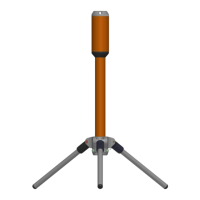

 To Next Page
