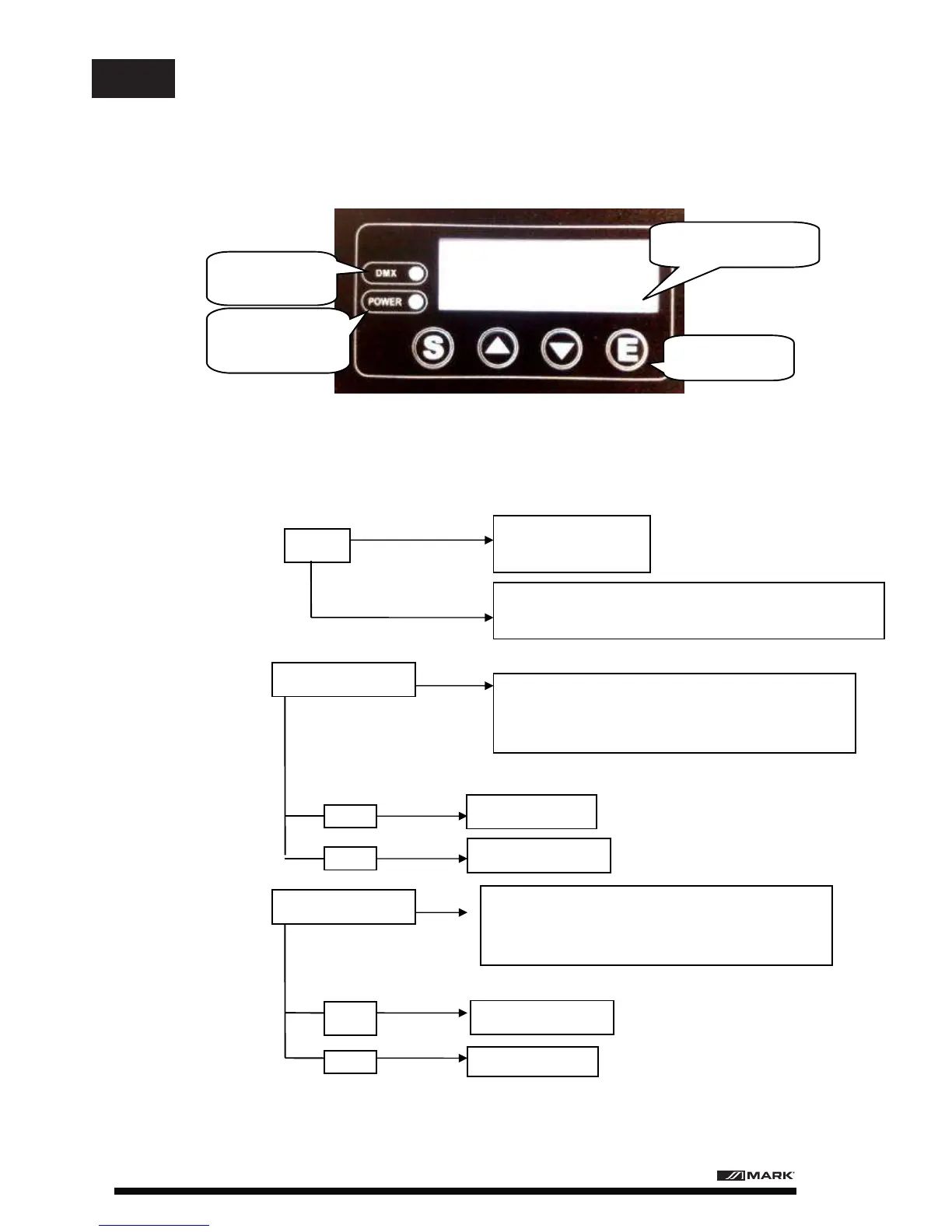
7. CONTROL PANEL
A001
Rpan: X axis reverse
ON X axis reverse on
OFF X axis reverse off
Rtil: Y axis reverse
ON Y axis reverse on
OFF Y axis reverse off
POWER SIGNAL
LIGHT
DMX SIGNAL
LIGHT
DISPLAY SCREEN
BUTTON
DMX address: 001
Press E button to enter the DMX address set. Click "up" and
"down" button to adjust 0-255 address. Press "E" saved.
Click "up" button to enter this model, "E" button
confirm.
Click "up" & "down" button to adjust state. Press "E"
for confirm
Click "up" button to enter this model, "E" button
confirm.
Click "up" & "down" button to adjust state. Press "E"
for confirm
7.1 CONTROL PANEL INTRODUCTION
8.1. DMX ADDRESS AND X, Y AXIS CONTROL
8. BEAM 201 CONTROL
BEAM 201 User Manual/Manual de uso Page 7
EN


 To Next Page