15
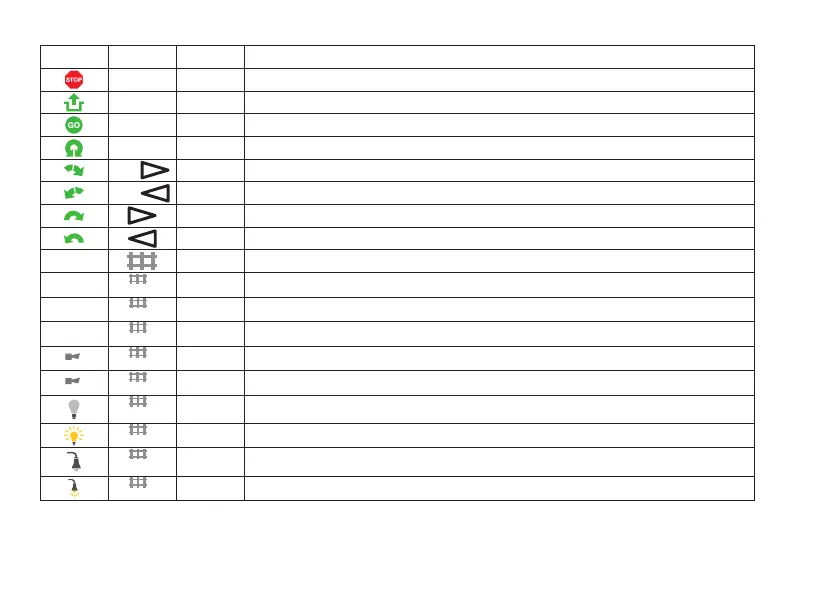
CS3 CS2/6021 72760 Function
end Rotation is ended at the next track
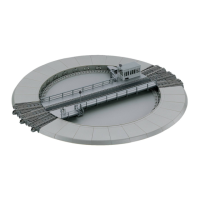
input Button 1 Unlocking/Locking the turntable deck (on = unlock)
clear Continuing to run after STOP
turn Button 2 Rotating 180°
step
Button 4 Deck rotates clockwise to the next track
step
Button 3 Deck rotates counterclockwise to the next track
Preselection of the rotation direction clockwise
Preselection of the rotation direction counterclockwise
* Destination track to be stopped at
Sound: Announcement of the turntable operator
Operating sounds off
Operating sounds on
Sound signal: „(Locomotive) approaching“
Sound signal: „(Deck) turning away“
21
Light off (inside)
Light on (inside)
23
Light off (outside)
Light on (outside)
* In the CS 3, you can stop at the tracks by touching the desired track on the display. No special buttons are provided for this.
Note: The turntable accepts no switching commands as long as the locking feature for the deck is open.


 To Next Page