© MARMITEK
6 Installation
Note:
• We recommend that you switch off your equipment before
connecting cables in order to prevent any of the devices
being damaged.
• At all times, avoid bending the optical (Toslink) cable as it is
very delicate.
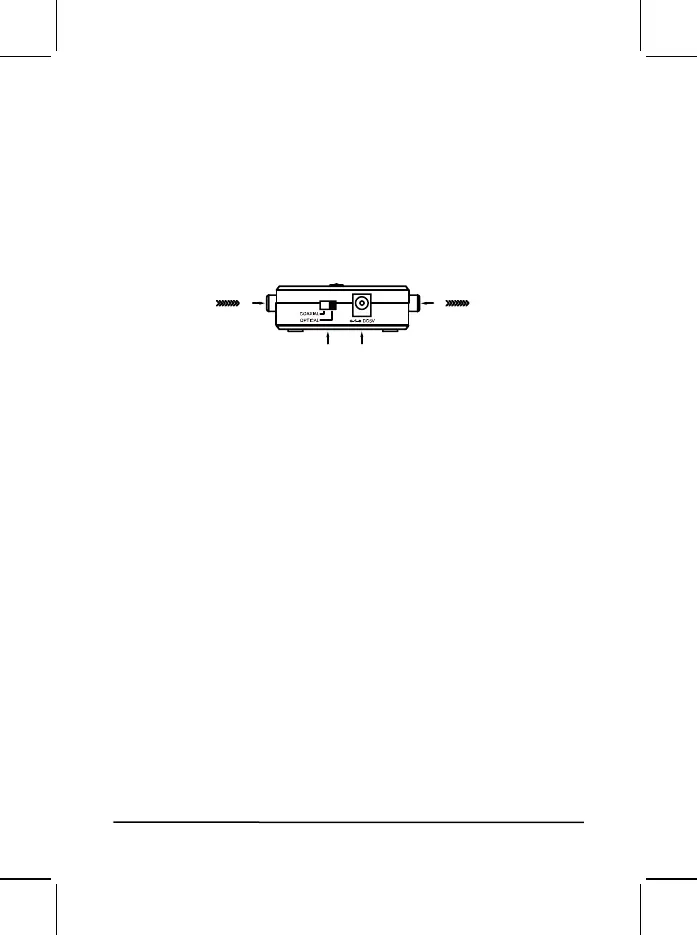
1. Connect the Audio Source to one of the digital audio inputs
[1] on the Connect DA21™ using the optical or coaxial audio
cable.
2. Connect the Audio Amplifier to the stereo audio outputs [2]
on the Connect DA21™ using the (supplied) RCA stereo
audio cable.
3. Connect the power adapter [3] and plug into the electrical
socket.
4. Use the switch [4] to select which digital audio input (Coaxial
or Optical) is connected to the Connect DA21™.
5. Switch your device on and check that the audio connection
works.
7 Usage
If the audio connection does not work (properly), consult the
instructions for the Audio Source and/or the Audio Amplifier for the
correct settings.
8 Frequently asked questions (FAQs)
Please go to www.marmitek.com if you have any questions.
reifilpmAoiduAecruoSoiduA [1]
[4] [3]
[2]



 To Next Page