6 MARQ Golfer (Gen2)
EN
course from the list.
4 If necessary, set your driver
distance.
5 Select to keep score.
6 Select a tee box.
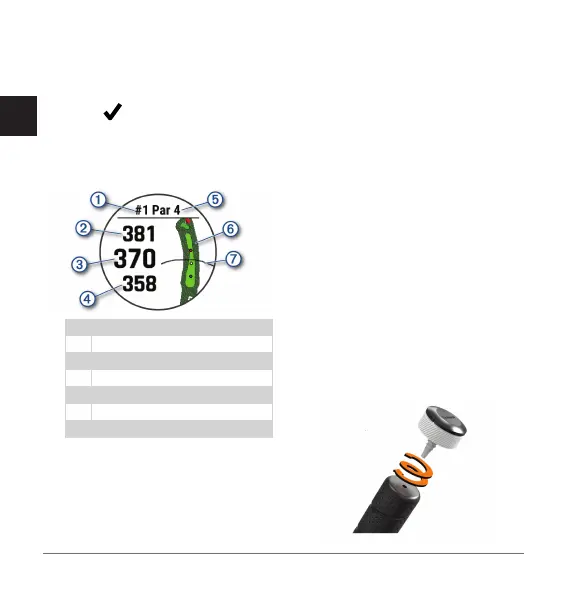
The hole information screen
appears.
Current hole number
Distance to the back of the green
Distance to the middle of the green
Distance to the front of the green
Par for the hole
Map of the green
Driver distance from the tee box
NOTE: Because pin locations
change, the watch calculates the
distance to the front, middle, and
back of the green, but not the actual
pin location.
7 Select an option:
• Tap the front, middle, or back
distances to the green to view the
PlaysLike distance.
• Tap the map to view more detail
or measure distance with touch
targeting.
• Press UP or DOWN to view the
location and distance to a layup or
to the front and back of a hazard.
• Press START to open the golf
menu.
When you move to the next hole, the
watch automatically transitions to
display the new hole information.
Attaching the Sensor to a Club
1 Screw the sensor into the hole at the
end of the grip.


 To Next Page