MARQ Golfer (Gen2) 9
EN
Golf app. The virtual caddie provides a
recommended club and aim direction
based on the hole, wind data, and your
past performance with each club.
Changing the Club
Recommendation
1 Press START.
2 Select Virtual Caddie.
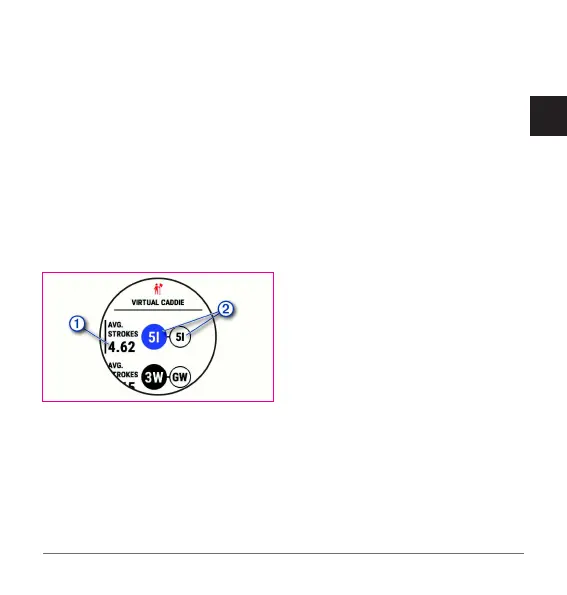
The device displays the calculated
average number of strokes
for
the recommended clubs
.
3 Select a different club
recommendation.
The map updates to show the new
shot direction target.
NOTE: The device automatically
recalculates the club recommendation
as you progress through the course.
You can select Recalculate to manually
update the club recommendation.
Garmin Golf App
The Garmin Golf app allows you
to upload scorecards from your
compatible Garmin device to view
detailed statistics and shot analyses.
Golfers can compete with each other
at different courses using the Garmin
Golf app. More than 42,000 courses
have leaderboards that anyone can
join. You can set up a tournament event
and invite players to compete. With a
Garmin Golf membership, you can view
green contour data on your phone and
compatible Garmin device.
The Garmin Golf app syncs your data
with your Garmin Connect account. You
can download the Garmin Golf app from
the app store on your phone (garmin.
com/golfapp).
Activities and Apps
Your watch can be used for indoor,


 To Next Page
 Loading...