TURNING ON REMINDERS
Reminders can be helpful to automatically notify you when general maintenance items needs to
be checked. Because usage patterns can vary widely from one owner to another, the reminders
are turned off by default. Below is a list of reminders that will become active if turned on.
• Check Sanitizer
• Change Cartridge
• Clean Filter
• Change Filter
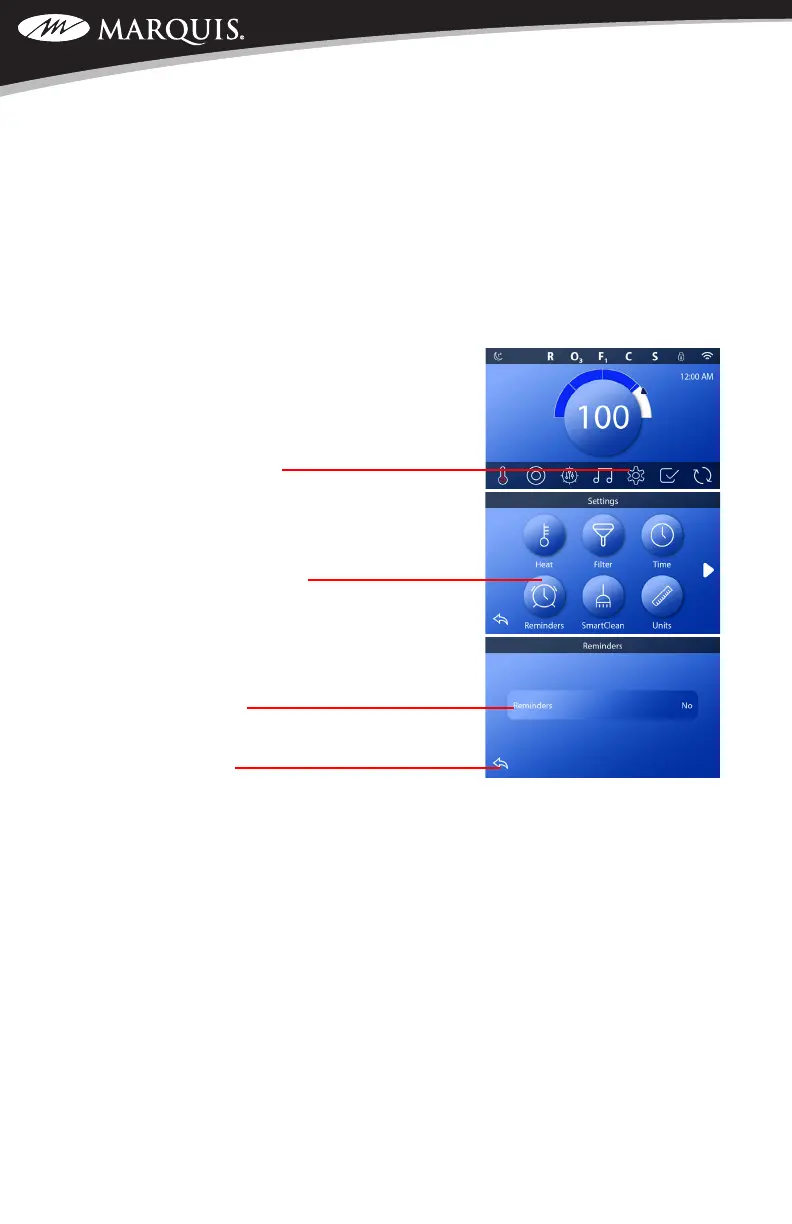
To access the screen to turn reminders on or off, please
follow these instructions.
1. On the home screen, touch the Settings icon located on
the bottom of the display.
2. Touch the Reminders button.
3. Touching the Reminders window allows you to toggle
between on and off.
4. To save and return to the home screen, press the back
button two times.
SWIM SPA CONTROLS: V174S & V174K



 To Next Page