SETTING THE LANGUAGE
The control panel is able to display the following languages
• English (Factory Default)
• Spanish
• German
• French
• Swedish
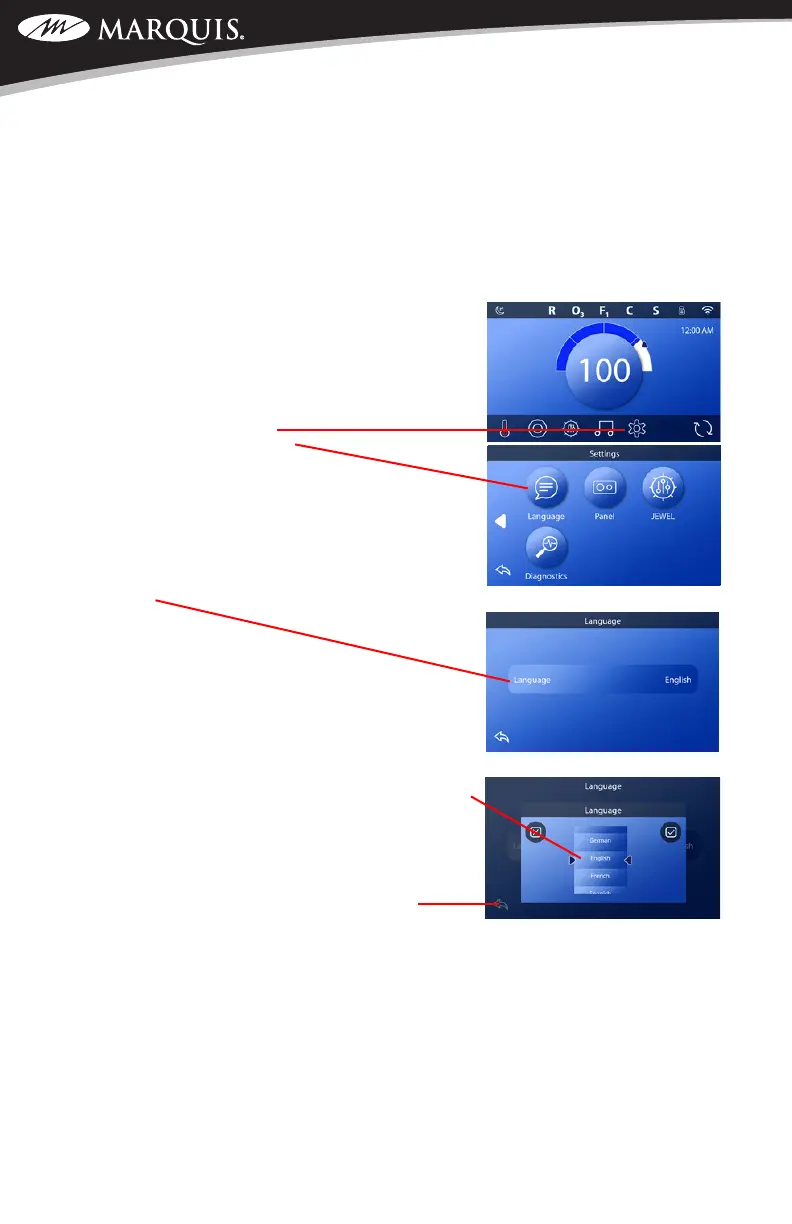
To access the screen to make any changes, please follow
these instructions.
1. On the home screen, touch the Settings icon located on
the bottom of the display
2. Touch the Language button
3. Touch inside the Language box to open the selection
screen
4. Use your nger to scroll up or down through the
various language choices. To make a selection, move
the chosen language to line up between the two black
arrows. Once there, touch the “check” box on the
upper right hand corner of the screen to select. You
may also touch the “X” to cancel the selection. Use
the back button to return to the home screen.
SWIM SPA CONTROLS: V174S & V174K



 To Next Page