BLUETOOTH AUDIO (OPTIONAL)
TM
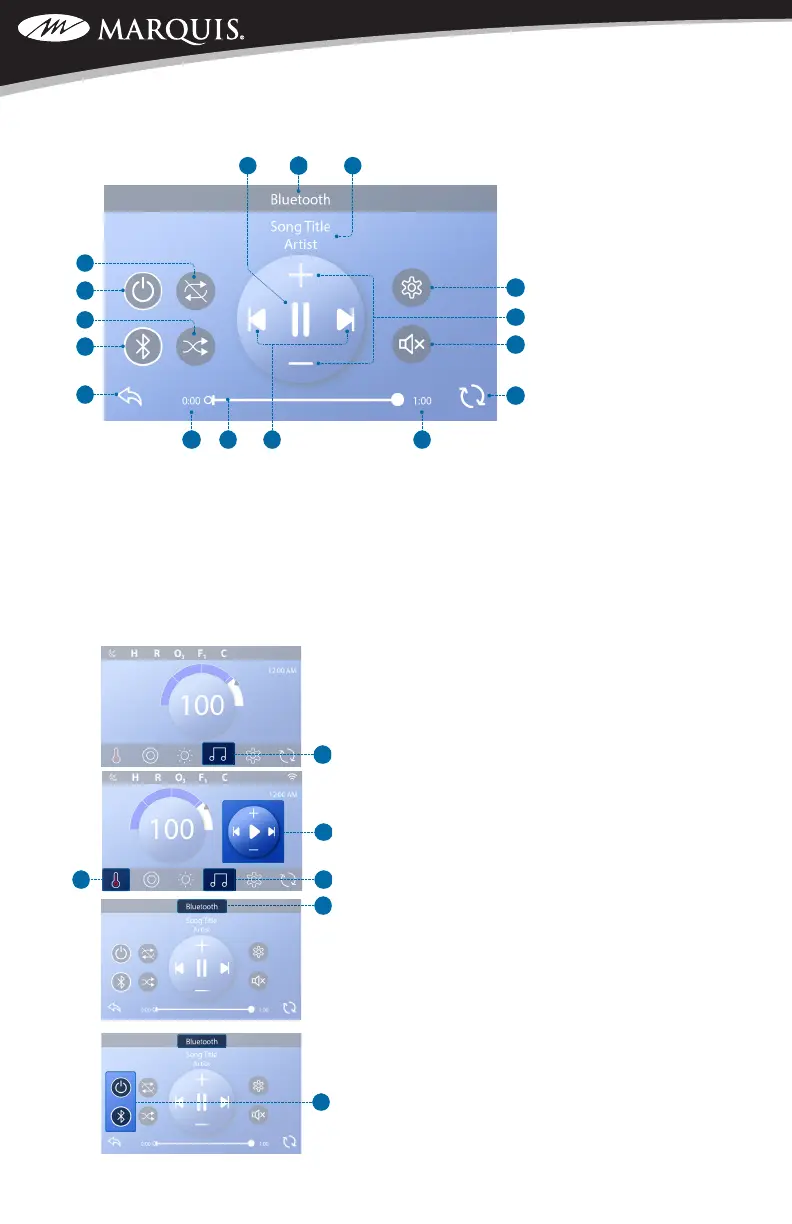
A - Play/Pause B- Bluetooth Screen
C - Song Title, Artist D - Settings
E- Volume Up/Down F - Mute Control
G- Invert Display H- Remaining Time
I - Track Next/Previous J- Progress Bar
K - Elapsed Time L - Back
M- Input Modes: Bluetooth, Line In N- Shufe Control
O - Power P- Repeat Control
NAVIGATE TO THE BLUETOOTH SCREEN
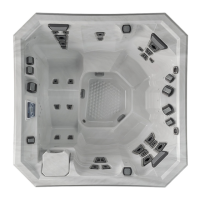
Follow these steps to navigate to the Bluetooth screen (D).
If connected to a music source:
1- Press the Music button (A) to view the Mini Player (B).
2- Press the Music button again (C) to enter the Bluetooth
screen (D).
If not connected to a music source:
1 - Press the Music button (A) to enter the Bluetooth screen
(D).
About the Mini Player:
The Mini Player (B) controls play, pause, track forward/
back, and volume up/down.
Hide the Mini Player by pressing the Heater Status button
(E) twice. The rst press displays the Set Temperature/Time
in the Mini Player. The second press hides the Mini Player.
NOTE: If these buttons (F) appear and both have white
circles as shown here, your music source is connected. If
they appear as shown except either one of them does not
have a white circle, your music source is not connected.
O
SWIM SPA CONTROLS: V174S & V174K



 To Next Page