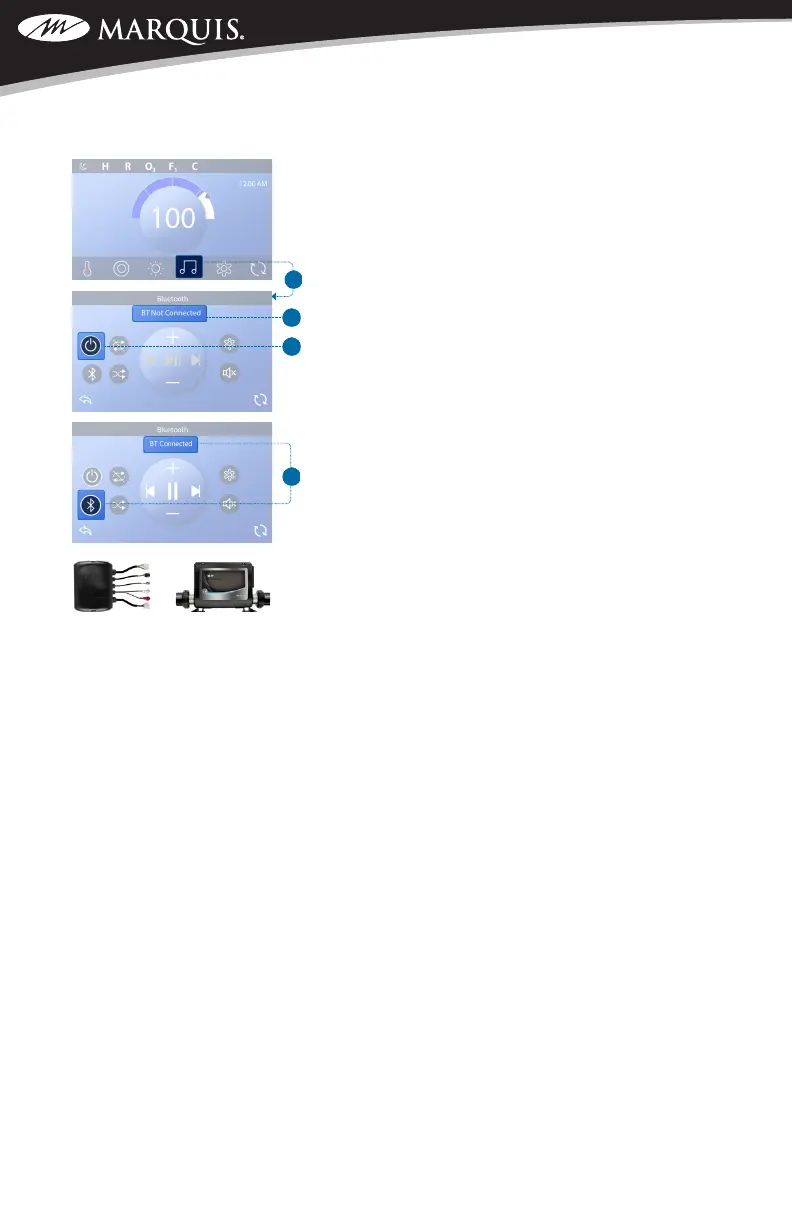
E. bbaTM3 Amplier D. Control System
PAIR SMART DEVICE
Follow these steps to pair your smart device with the
bbaTM3 amplier (E).
1. Power up the spa.
IMPORTANT: All paired devices are erased from the
bbaTM3 amplier when power to the spa is cycled.
While the bbaTM3 amplier forgets your smart device
when the spa power is cycled, your smart device might
not forget the bbaTM3 amplier. In this case, an error
message may appear if you try to reconnect. You may
need to have your smart device “forget” the bbaTM3
amplier, and only after that connect to the bbaTM3
amplier again to avoid such error messages.
2. Press the music button (A) to enter the Bluetooth
screen. The music button (A) may not appear if
control system (F) did not detect the bbaTM3
amplier (E).
3. Press the power button (C) to turn On the bbaTM3
amplier. This message will appear (B) when your
smart device is not connected/paired with the
bbaTM3 amplier. “BT” stands for Bluetooth.
4. On your smart device, turn On the Bluetooth
function.
5. On your smart device, click search for Bluetooth
device. Make sure the smart device is close
enough to the spa tub, so the smart device can
pair with the bbaTM3 amplier.
6. On your smart device, select “BBA Spa Music”
from the pairing list. If “BBA Spa Music” does not
appear, repeat steps 1 - 5.
7. Some smart devices will connect automatically,
but with others you will need to select “Connect.”
Once connected, a white ring appears around the
Bluetooth button and “BT Connected” appears
at the top of the screen (D). Play music on your
smart device. If the music plays from the speak-
ers in the spa, the connection is complete.
NOTE: bbaTM3 operates up to 100 feet in open air.
Ranges vary as they are dependent on installations and
environments.
C
SWIM SPA CONTROLS: V174S & V174K



 To Next Page