ADJUST AUDIO SETTINGS
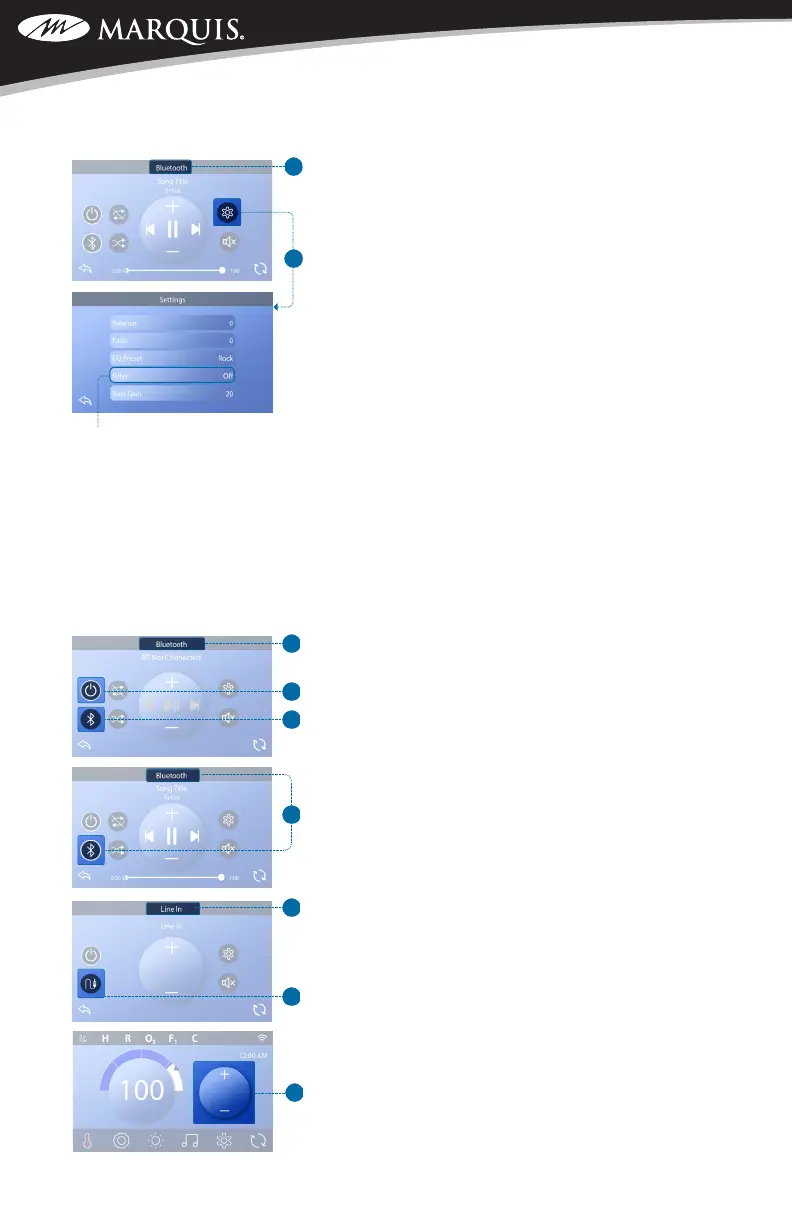
Follow these steps to adjust the audio settings.
1. Navigate to the Bluetooth screen (A); refer to page
4.
2. Press the Settings button (B) to enter the Settings
screen.
3. Make desired changes to the audio settings.
SELECT INPUT MODE
The following input modes are available: Bluetooth,
Line In. All control systems are equipped with Bluetooth
mode. However, control systems may or may not have
Line In, as this input mode is optional.
Follow these steps to select the input mode of the
bbaTM3 amplier.
1. Navigate to the Bluetooth screen (A); refer to page
4.
2. Conrm that the bbaTM3 amplier is turned On.
If it is On, a white ring appears around the Power
button (B).
3. Press the Input button (C). If the Bluetooth input
mode is selected, this appears (C or D). If the Line
In input mode is selected, this appears (E and F).
If you select the Line In input mode (F), you can con-
nect any headphone output to the Aux In connectors
(H), but you will likely need an adapter cable because
of the different connectors.
Only those settings which remain on the Line In screen
(E) are available when using Aux In (H).
The terms “Line In” (E) and “Aux In” (H) refer to the
same thing.
The Mini Player (G) on the Main screen looks like this
when Line In is the selected input mode. For more
information about the Mini Player, view page 4.
There are two types of lters: Low Pass and High
Pass. These lters apply to the rear speaker output
only. Select Low Pass for subwoofers or High Pass
for tweeters. Select OFF if ltering is not desired.
Regular speakers do not require ltering.
TM
C
SWIM SPA CONTROLS: V174S & V174K



 To Next Page