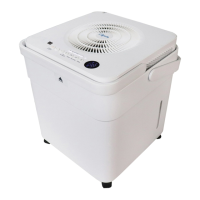
This document describes the Comfort-Aire Dehumidifiers, specifically models BHD-22A, BHD-35A, BHD-50A, BHDP-50A, and BHDP-60A, which include models with and without pumps. These dehumidifiers are designed for indoor residential applications to help prevent moisture damage and maintain a comfortable humidity level.
Function Description
The primary function of these dehumidifiers is to remove excess moisture from the air. They operate by drawing in humid air, passing it over evaporator coils where moisture condenses, and then releasing drier air back into the room. The collected water can be removed in three ways: manually using a bucket, continuously draining through a hose, or, for pump-equipped models, automatically pumping water to a suitable drainage facility.
The dehumidifier features a control panel that allows users to adjust settings such as humidity level, fan speed, and timer functions. It also includes indicators for various operational statuses like "Bucket Full," "Auto Defrost," and error codes. The unit is designed to operate within a specific environment, typically between 5°C (41°F) and 32°C (90°F) and 30% to 80% relative humidity.
Usage Features
- Humidity Control: Users can set the desired humidity level between 35% RH and 85% RH in 5% increments using the UP/DOWN buttons. For drier air, a lower percentage is selected, and for damper air, a higher percentage.
- Fan Speed Control (TURBO Pad): The fan speed can be set to either High or Normal. High speed is recommended for maximum moisture removal, while Normal speed is preferred for quieter operation once humidity is reduced.
- Continuous Dehumidifying (CONTINUE button): This feature allows the unit to operate continuously without a specific humidity target.
- Timer Function: The Timer button enables Auto Start and Auto Stop features. Users can set the auto start/stop time from 0.0 to 24 hours in 0.5-hour increments up to 10 hours, and then 1-hour increments up to 24 hours. The control panel will count down the remaining time.
- Power Button: Used to turn the dehumidifier on and off.
- Pump Operation (on some models): The PUMP button activates the pump function for automatic water removal. It's crucial to ensure the pump drain hose is correctly installed and the continuous drain hose is removed before activating this feature. This function is not recommended when outdoor temperatures are 0°C (32°F) or less.
- Comfort Dehumidifying (COMFORT button on some models): This mode starts or stops comfort dehumidifying operation. In this mode, the humidity level cannot be manually set.
- Ionizer Function (ION button on some models): Activates the ionizer to generate anions, which help deactivate airborne chemical vapors and dust particles.
- Dryer Operation (DRYER button on some models): Activates a specific dryer operation mode.
- Auto Defrost: When frost builds up on the evaporator coils, the compressor cycles off, and the fan continues to run until the frost disappears, protecting the unit and maintaining performance.
- Auto Shut Off: The unit automatically shuts off when the water bucket is full or incorrectly positioned. For some models, the fan motor may continue to run for 30 seconds after shut-off.
- Auto-Restart: In case of an unexpected power cut, the unit will automatically restart with its previous function settings once power is restored.
- 3-Minute Delay: After the unit stops, it cannot restart operation for the first 3 minutes. This protects the unit and operation automatically resumes after this delay.
- Water Removal Options:
- Bucket: Water collects in a removable bucket. When full, the "Full" indicator light illuminates, and the unit may beep and display "P2" or "Eb." The bucket should be carefully removed, emptied, and reinstalled.
- Continuous Draining: A water hose (not included, ID ≥ Φ5/16") with a female threaded end (ID:M=1" on some models) can be attached to the unit's back drain outlet for continuous gravity draining to a floor drain or suitable facility. The hose must be secure, level, or sloped downwards, and free of kinks.
- Pump Draining (on some models): For units with a pump, a supplied pump drain hose (Φod=1/4") can be connected to the pump drain hose outlet. The pump will automatically activate when the bucket is full, pumping water to a higher drainage point.
Maintenance Features
- Cleaning the Grille and Case: Use water and a mild detergent. Avoid bleach, abrasives, or splashing water directly onto the unit. The air intake and outlet grilles can be cleaned with a vacuum attachment or brush.
- Cleaning the Bucket: The water bucket should be cleaned every few weeks to prevent mold, mildew, and bacteria growth. Partially fill it with clean water and a mild detergent, swish it, then empty and rinse. Do not use a dishwasher. The bucket must be correctly seated for the dehumidifier to operate.
- Cleaning the Air Filter: The air filter should be removed and cleaned every two weeks under normal operating conditions. The "Filter" light (Clean filter light) will illuminate after 250 hours of operation as a reminder. To clean, pull the filter outwards, wash it with clean water, dry it, and then re-install it. Operating the dehumidifier without a filter can lead to dirt and lint clogging the unit and reducing performance. After cleaning, press the Filter button to reset the light.
- Long-Term Storage: When not using the unit for extended periods:
- Turn off the unit and wait one day before emptying the bucket.
- Clean the main unit, water bucket, and air filter.
- Wrap the power cord with the power cord buckle.
- Cover the unit with a plastic bag.
- Store the unit upright in a dry, well-ventilated place.
The unit also provides troubleshooting tips for common issues such as the unit not starting, not drying air effectively, making loud noises, or displaying error codes. These tips guide users to check power connections, bucket position, humidity settings, air filter cleanliness, and hose connections before contacting service.

 Need help?
 General

 To Next Page