EasyManua.ls Logo

marsden I-100 - User Manual

marsden I-100
12 pages
Print Icon
To Next Page IconTo Next Page
Loading...
USER MANUAL
I-100 Indicator
Please take time to read these
instructions before starting
to use this indicator
Version 1.0 06/17
Question and Answer IconNeed help?

Do you have a question about the marsden I-100 and is the answer not in the manual?

Overview

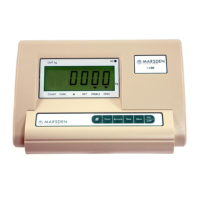
The Marsden I-100 Indicator is a versatile weighing device designed for various applications, offering basic and advanced functions for accurate measurement and counting. It operates on a DC6V/4AH rechargeable battery or can be powered directly from the mains lead. The indicator is ready for use once the display shows "0.000" after being switched on.

Function Description:

The I-100 Indicator serves as a central control unit for a weighing scale, providing a digital display and various function keys to perform different weighing and counting tasks. Its primary functions include:

  • Basic Weighing: Displaying the weight of items placed on the scale.
  • Zeroing: Resetting the display to "0.000" when nothing is on the scale, ensuring accurate measurements.
  • Tare Function: Deducting the weight of a container or pallet, allowing for the measurement of net weight only.
  • Counting Function: Enabling the user to count a quantity of items by placing a sample on the scale and then using the indicator to determine the total count.
  • Accumulation Function: Totaling up the weights of several loads, useful for batch weighing or inventory management.

Important Technical Specifications:

  • Model: I-100
  • Units of Measure: Kilograms (Kg)
  • Function Keys: COUNT, FUNC, ACCUM, TARE, ZERO, ON/OFF
  • Display: 6 bits LCD with 6 state indicating symbols
  • Power Supply: Mains/rechargeable battery
  • Battery: DC6V/4AH
  • Operating Temperature: 0~40°C, <90% RH
  • Transporting Temperature: -20~50°C
  • Sample Rate: 10 times/second
  • Load Cell Sensitivity: 1.5~3mV/V
  • Scale Interval Options: 1/2/5/10/20/50

Usage Features:

  • Switching On/Off: Press ON/OFF to power on. Hold ON/OFF for three seconds to power down.
  • Setting to Zero: Press ZERO once to reset the display to "0.000" if it shows a non-zero reading with nothing on the scale.
  • Tare Function:
    1. Place the item to be deducted (e.g., a pallet) on the scale.
    2. Press TARE. The scale will show a minus reading, and the indicator will then display "0.000".
    3. Weigh items as normal; the negative weight will be deducted from the total.
  • Counting Function:
    1. Place a sample quantity on the scale.
    2. Press FUNC and hold until 'COUNT' is displayed to switch to count mode.
    3. Press ACCUM. 'C00000' will display.
    4. Use the TARE key to move right and ZERO to increase the sample size.
    5. Press ACCUM to confirm the amount.
    6. Press FUNC to return to weighing mode.
  • Accumulation Function:
    1. Add the first item to the scale and press ACCUM.
    2. Remove the item from the scale.
    3. Add the next item to the scale and press ACCUM again.
    4. To check the accumulated weight, remove the load from the platform and press ACCUM to display the total weight.
    5. Press ACCUM again to return to normal weighing mode; the accumulate annunciator will switch off.
    6. To clear accumulated readings at any time (whilst in Accumulation Mode), press FUNC.

Error Messages and Solutions:

  • ERR 1 (AD value too small when calibrated): Switch off and restart. If the error persists, contact Marsden or your dealer.
  • ERR 2 (Zero point out of range when calibrated): Contact Marsden or your dealer.
  • ERR 3 (Zero point out of range when starting up): Check nothing is underneath the scale. If the message still shows, contact Marsden or your dealer.
  • ERR 4 (Inputted sample number is zero in counting mode): (No specific solution provided in the manual, implies user correction of sample number).
  • ERR 5 (Inputted weight is zero in calibration mode): Contact Marsden or your dealer.
  • ERR 6 (Unit weight less than 0.25e in counting mode): (No specific solution provided in the manual, implies user correction of sample weight).
  • bAt-lo (Low battery power): Charge the battery.

Maintenance Features:

  • Charging: Charge the battery prior to use. If the indicator is not used for a long time, an eight-hour charge is recommended every 2 months.
  • Cleaning:
    • Do not use corrosive liquids or large amounts of water.
    • Always disconnect the scale from the mains power supply before cleaning.
  • Routine Maintenance: The scale does not require routine maintenance. However, regular accuracy checks are recommended. Contact Marsden Service team on 01709 364296 for accuracy checks or if inaccuracies occur.

Safety Instructions:

  • Always comply with appropriate regulations when using electrical components under increased safety requirements.
  • Inappropriate installation/use will void the warranty.
  • Ensure the power supply unit voltage matches your mains supply.
  • The product is not waterproof; avoid humid, damp, or wet environments.
  • Observe permissible ambient temperatures (0~40°C).
  • Do not exceed maximum electromagnetic capability values.
  • Do not place the indicator in direct sunlight.
  • Use in a dust-free and vibration-free environment.
  • Cut off power before disconnecting to any external device.
  • Turn off power immediately if a problem occurs and contact Marsden or your dealer if damaged.

marsden I-100 Specifications

General IconGeneral
Brandmarsden
ModelI-100
CategoryMeasuring Instruments
LanguageEnglish