The Marsden PT-500/PT-600 is a pallet truck scale designed for weighing and counting items, offering a robust solution for industrial environments. It features a durable construction and an integrated indicator for displaying weight and other data.
Function Description
The primary function of the PT-500/PT-600 is to accurately weigh items placed on its forks. The PT-600 model also includes an integrated printer for generating reports. Key functions include:
- Weighing: Measures the weight of items in kilograms (kg) or pounds (lb).
- Counting: Allows users to count multiple items by placing a sample quantity on the scale.
- Accumulation: Adds up the weights of several separate items, providing a running total.
- Tare: Removes the weight of a pallet or container from the total reading, providing the net weight of the goods.
- Hold: Stabilizes the weight display for unstable loads, locking the reading on the screen.
- Zero: Resets the scale to a zero reading if it shows a value when nothing is on the forks.
- Target Weighing (Check Weighing): Enables setting target weights and high/low error limits, indicating whether a load is "less," "OK," or "over" the target.
- Printing (PT-600 only): Generates printed reports for single weights, accumulated weights, and count data.
Important Technical Specifications
- Model Numbers: Marsden PT-500/PT-600
- Capacity/Division: 2000kg x 500g
- Inner Resolution: 1 million
- Weight of Scale: Approximately 125kg
- Dimensions:
- Length: 1470mm
- Width: 545mm
- Width between forks: 220mm
- Fork to ground: 78mm
- Indicator: HL318L with 6-digit 32cm LED display and seven function keys.
- Protection Level: IP5X
- Battery: 6V4Ah
- Adaptor: Voltage - 100-240VAC, Current - 0.1A
- Operating Temperature: -10°C to 40°C
- Print Output (PT-600 only): Weight, count, net weight, gross weight, tare weight, accumulation.
Usage Features
The scale is operated via seven function keys on the indicator:
- Hold:
- Holds the weight reading on the indicator screen.
- Cancels a held weight reading.
- Returns to normal weighing from accumulation mode.
- Used in conjunction with other keys for setting functions (e.g., target weights, print settings).
- Total:
- Accumulation function: Adds up multiple separate weights.
- Displays the current total in accumulation mode (press and hold).
- Switches to counting mode (press and hold until 'SAMPLE' is displayed).
- Displays the current target weight in normal weighing mode (press and hold until 'target' is displayed).
- Lb/Kg:
- Units conversion function: Switches between weight displayed in kg and lb.
- Used for left/right input in counting mode.
- Gross:
- Tare function cancel key: Cancels a previously entered tare weight.
- Displays the full weight on the scale after taring.
- Used for setting target weights and error limits (up input).
- Tare:
- Tare function: Removes unwanted weight from the reading (e.g., a pallet).
- Used for up/down input in counting mode.
- Zero:
- Scale re-zero function: Returns the scale to a zero reading.
- Clears accumulation readings.
- Used for setting functions (e.g., target weights, print settings, down input).
- Print On/Off:
- On/Off button: Powers the scale up or down (press and hold for three seconds).
- Print function (PT-600 only): Prints weight or count data.
- Confirms sample size in counting mode.
- Confirms target weight, error limits, and print settings.
- Prints individual weights and a total in accumulation mode.
- Prints weight and state ('less', 'OK', 'over') when using target weighing.
Operation Modes:
- Switching On: Press and hold PRINT/ON/OFF for three seconds. The display will show '0.00'.
- Using Hold: Press HOLD to lock an unstable weight. Press again to cancel.
- Using Tare: Place pallet, press TARE, remove pallet. Add goods. Press GROSS to see full weight. Press TARE again to cancel.
- Switching Units: Press LB/KG to switch between kg and lb.
- Zeroing: Press ZERO if the indicator shows a reading with nothing on the scale.
- Accumulation: Add item, press TOTAL. Repeat for subsequent items. Hold TOTAL for two seconds to view current total. Press PRINT/ON/OFF to print. Press ZERO to clear. Press HOLD to return to normal weighing.
- Counting Mode: Place sample, press and hold TOTAL until 'SAMPLE'. Press PRINT/ON/OFF. Use LB/KG for left/right and TARE/ZERO for up/down to input sample size. Press PRINT/ON/OFF to confirm. Press HOLD to return to weighing mode.
- Setting Target Weights/Limits: Access via HOLD and ZERO key combinations, then use GROSS and ZERO to set values, and PRINT to confirm. The display will flash when within 1kg of target and stay steady when 1kg above.
- Printing (PT-600 only):
- Single Weight: Set print format '1' via HOLD, ZERO, PRINT/ON/OFF.
- Accumulated Weights: Set print format '0' (total only) or '1' (individual and total) via HOLD, ZERO, PRINT/ON/OFF.
- Count Data: Set print format '5' via HOLD, ZERO, PRINT/ON/OFF. Scale must be in counting mode.
Power Saving:
- Screen Time Out: Set the display to power down after a period (0-99 minutes) via HOLD, ZERO, PRINT key combinations.
- Auto Power-Off: Set the scale to power down completely after a period (0-99 minutes) via HOLD, ZERO, PRINT key combinations.
Maintenance Features
- Charging: The PT-500 and PT-600 use a 7v 100ma tip +ve adaptor. Allow eight hours for a full charge from flat.
- Replacing Printer Tally Roll (PT-600 only): Pull the lever down on the top right side of the printer to release the front cover. Remove the old roll and replace with a new one, ensuring it's lined up with the printer opening. Replacement rolls can be ordered from Marsden.
Error Messages: The manual provides a list of error messages and their corresponding solutions, such as:
- 【_EEE】 / 【 EEE 】: Unable to reset after start up (ensure nothing is on the scale).
- 【-----】: Possible scale overload (remove weight).
- 【L_ _ _ _】: Scale is below zero (press ZERO).
- 【r-no-】: Out of balance range (remove weight, try again).
- 【--no--】: Invalid operation.
- 【Err 03】: EEPROM error (switch scale on again; if persistent, contact dealer).
- 【Err 09】: AD initialization error (switch off and restart; if persistent, contact dealer).
Marsden's policy is one of continuous development, and product specifications may change without notice.

 Need help?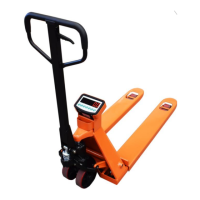

 To Next Page
 General