
 Need help?
Do you have a question about the Marshall Electronics V-R841DP-AFHD and is the answer not in the manual?
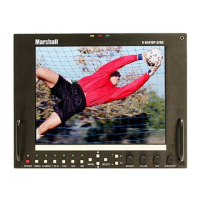
The Marshall Electronics V-R841DP-AFHD is an 8.4-inch portable high-definition LCD monitor designed for professional video applications. It features a completely digital TFT-MegaPixel™ active matrix LCD platform, making it suitable as a lightweight, high-resolution viewfinder or focus-assist monitor. The monitor can be used in various configurations, including rack-mounted with an optional 4RU adapter or in a desktop setup with an optional stand.
The V-R841DP-AFHD is engineered for precise color representation, offering emulation of SMPTE-C/EBU color space and adjustable color temperature settings. Its proprietary digital signal processing capabilities include 10-bit A/D conversion for all analog signals, 4x over-sampling, and 5-line super-adaptive 2D comb filtering for composite signals. De-interlacing is handled by the HyperProcess™ algorithm, which incorporates motion-adaptive interpolation.
The monitor boasts multi-format compatibility, supporting a wide range of video formats such as NTSC/PAL, 480i/p, 720p, and 1080i/p standards. It also accepts VGA and DVI inputs, adhering to VESA standards, allowing it to function as a computer monitor.
High-Resolution 8.4" Panel: The monitor features an all-digital TFT-MegaPixel™ active matrix LCD system with 2.4 million pixels. The LCD panel offers a brightness of 400 cd/m², a 400:1 contrast ratio, and a 170° all-around viewing angle, ensuring clear visibility in diverse environments and lighting conditions.
Multi-Format Compatibility: With a variety of analog and digital inputs, including Composite Video, S-Video, YPbPr, SDI, VGA, and DVI with HDCP, the V-R841DP-AFHD accommodates virtually all video formats. Accepted formats include NTSC/PAL, 480i/p, 576i/p, 720p, 1035i, and 1080i/p standards, as well as VESA PC formats through SXGA (1280 x 1024).
End-to-End Digital Signal Processing: Analog signals are digitized using an advanced 10-bit process with 4x over-sampling, 5-line super-adaptive 2D comb filtering, and exacting color space conversion. Video is scaled to fit on the screen in the highest possible resolution using a state-of-the-art LSI that incorporates precision gamma correction and the HyperProcess™ motion-adaptive interpolation for interlaced images.
ColorMatch™ Conversion with Color Temperature Adjustment: The monitor allows emulation of SMPTE-C/EBU color space, making it suitable as a broadcast CRT monitor replacement. Settings include D55, D65, and D95. Bias and Gain adjustments for each color enable precise color matching and white balance.
Advanced Features: The V-R841DP-AFHD includes various advanced features such as aspect ratio settings, underscan mode, blue-only mode, monochrome mode, H/V delay, and Pixel-to-Pixel™ mode. The Pixel-to-Pixel™ mode allows native display of any incoming image format.
Flexible Screen Markers: A variety of screen markers in both 4:3 and 16:9 modes are available for accurate monitoring of different aspect ratios used in broadcast environments.
User-Definable Function Buttons: Two user-assignable function buttons on the front panel provide quick access to numerous settings and features, including aspect ratio, screen markers, monochrome mode, color temperature, and delay mode.
On-Screen Menu Navigation: The monitor features an intuitive on-screen menu system for easy navigation and configuration. Users can access the main menu by pressing and holding the MENU button, then use the arrow buttons to step through menu items and SELECT to choose options. Settings can be adjusted, and the menu automatically times out after 8 seconds.
Internal SMPTE Color Bars: The monitor can display internally generated SMPTE split-field color bars for calibration purposes.
User-Definable Function Buttons: The FUNCTION 1 and FUNCTION 2 menu items allow users to define each function button on the front panel. Options include enabling and rotating delay modes, toggling between 4:3 and 16:9 aspect ratios, rotating marker backgrounds, enabling/disabling the center marker, rotating marker settings, enabling/disabling monochrome mode, rotating color temperature settings, and enabling/disabling Pixel-to-Pixel™ mode. By default, FUNCTION 1 is set to RATIO and FUNCTION 2 to PTP.
Status Display: This feature enables an on-screen display of input/format status in the upper-left corner of the screen.
Saving and Loading User Configuration Presets: Users can save current settings to one of six presets (USR1-USR6) or load a preset using the SAVE CONFIG and LOAD CONFIG menus. All monitor settings, including image adjustment knob settings, are saved. Factory default settings can also be loaded by selecting MFG, but factory defaults cannot be overwritten.
Color Temperature Presets: Users can choose from three color temperature presets: D55 (5500K), D65 (6500K), D93 (9300K), or a USER setting that allows for adjustable Color Bias and Gain.
Adjusting Color Bias and Gain: Submenus are available to adjust the bias and gain of the color response for Red, Green, and Blue. These adjustments help alter the white balance of the image. The Color Temperature preset automatically switches to USER when Color Bias or Gain settings are adjusted.
Monochrome Mode: This setting enables monochrome mode, displaying only the luminance of the image as a grayscale picture.
Blue-Only Mode: This mode displays only the blue color component of the image, switching off the red and green components. It is used for calibrating the monitor to SMPTE color bars. The calibration procedure involves warming up the monitor, displaying SMPTE split-field color bars, enabling Monochrome mode, adjusting Brightness and Contrast, disabling Monochrome mode, enabling Blue-Only mode, adjusting Color, and for Composite/S-Video NTSC only, adjusting Tint.
Pixel-to-Pixel™ Mode: This setting bypasses the monitor's internal scaling function, displaying incoming images in their native resolution and aspect ratio with a one-to-one mapping. For formats smaller than the native resolution (1024 x 768), the image is centered, using only the necessary LCD pixels. For formats exceeding 1024 x 768, only the center 1024 x 768 of the incoming image is displayed, cropping the remainder. This mode is not available with VGA or DVI inputs.
Aspect Ratio Settings: Users can switch between 4:3 and 16:9 aspect ratios. The monitor automatically scales incoming images to fit the screen's native resolution of 1024 x 768 RGB pixels. In 4:3 mode, images fill the entire 4:3 screen. In 16:9 mode, images fill the maximum 16:9 portion, with black bars filling the remainder. The aspect ratio setting is ignored when Pixel-to-Pixel™ mode is enabled.
Scanning Modes: This setting allows switching between normal and underscan modes. In normal scan mode, the active portion of the video signal is displayed with 0% overscan. In underscan mode, the area around the active video area is displayed, showing blanking intervals around the perimeter of the active image, useful for viewing the edges of the active video area.
Delay Modes: This setting enables one of three delay modes: H/V, H, or V. In H/V delay mode, both horizontal and vertical sync are delayed, showing both blanking periods. In V delay mode, vertical sync is delayed to display the vertical blanking period. In H delay mode, horizontal sync is delayed to display the horizontal blanking period. Delay modes are only available in normal scan mode.
Power Input: The monitor connects to a 4-Pin XLR power input connector, accepting 12VDC. Power can be supplied from the included power supply or from various DC sources providing at least 2 Amps at 12 Volts. Correct polarity for the DC input is crucial.
Tally Interface: Three tally LEDs (green, red, and yellow) are provided as general-purpose indicators. Each LED can be individually controlled via the HD-15 connector on the rear panel by connecting the corresponding pin to ground.
V-Mount Battery Adapter: The monitor accepts standard V-Mount 12V / 14.4V batteries for portable use.
Screen Cleaning: Periodically clean the screen surface using ammonia-free cleaning wipes (Marshall Part No. V-HWP-K) or a clean micro-fiber cloth with non-abrasive and ammonia-free cleaning agents. Avoid using paper towels, which can scratch the polycarbonate faceplate or leave streaks. Antistatic and fingerprint-resistant cleaning agents are recommended. Do not apply excessive pressure to the screen to prevent damage to the LCD.
Faceplate Dusting: Dust the unit with a soft, damp cloth or chamois. Dry or abrasive cloths can cause electrostatic charge, attracting dust particles. Neutralize static electricity effects by using recommended cleaning and polishing practices.
 General
| Screen Size | 8.4 inches |
|---|---|
| Resolution | 1920 x 1080 |
| Aspect Ratio | 16:9 |
| Brightness | 400 cd/m² |
| Contrast Ratio | 1000:1 |
| Input Voltage | 12V DC |
| Weight | 2.6 lb (1.2 kg) |
| Inputs | HDMI, Composite |
| Outputs | HDMI, Composite |
| Input Connectors | HDMI, VGA, BNC |
| Power Supply | 12V DC |

 To Next Page