App settings
Select the settings wheel at the top right to change settings or get information:
. Account management.
. Share equipment.
. WiFi network.
. Deep discharge setting.
. Discharge start threshold setting.
. App and device information.
<
Change Password
Account deletion
Sign out
Account management
***
Share Now
<
Share device
Device ID:
Device Name:
Mac:
Device Type ID:
Entitlement granted:
View Only Permissian
Transfer management privileges
Begin Configuration
<
WiFi configuration
1 Please make sure the phone is connected to wifi
2 Proximity to device protection and device Bluetooth
connection
Password
<
App V: 1.1.7
Device V: 0
settings
Share device
WiFi configuration
Depth of Discharge Dod (98)
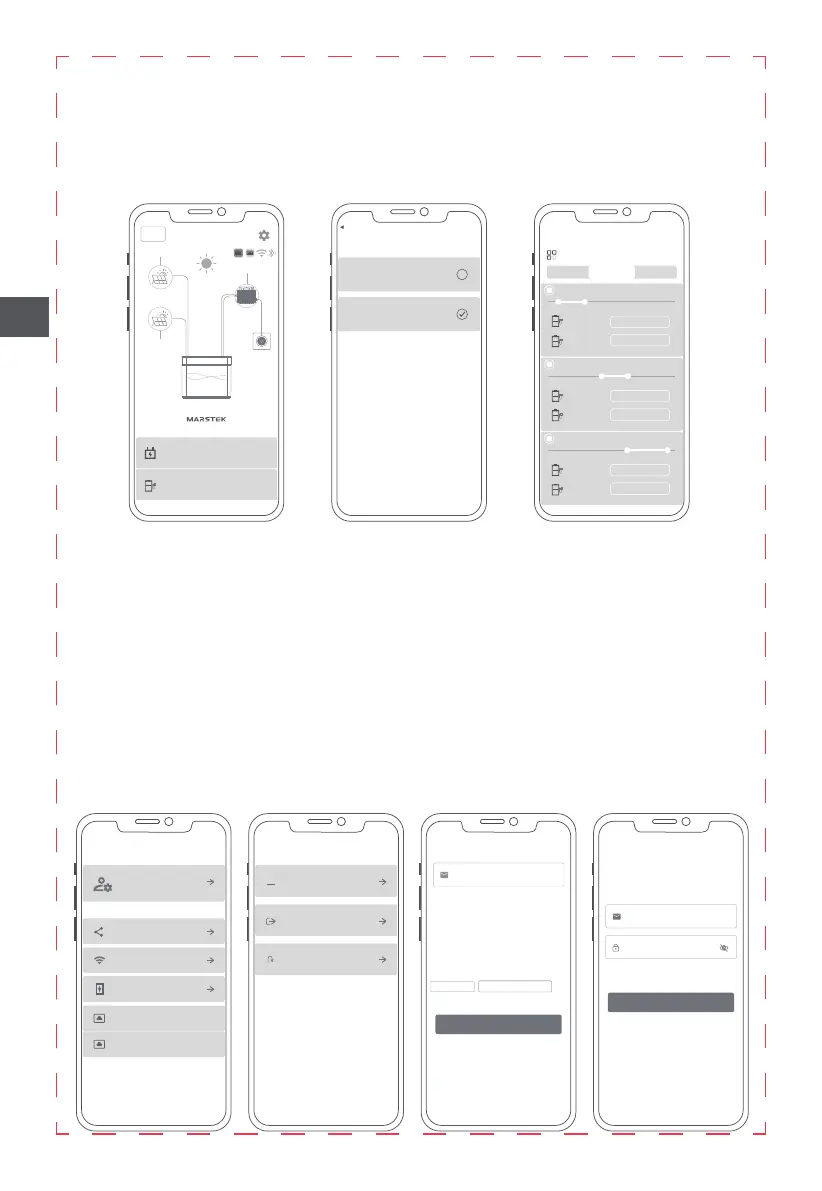
. Discharge settings: set the output mode of the product
(1)You can choose the output power of each line of the product through the APP.
(2)You can select the output time period of each line of the product through the APP.
(3)You can turn on the smart power control mode, in which the product will automatically collect the
household electricity, and control the product output of the household electricity needs, thereby
saving electricity.
<
Charging Settings
PV1 charging PV2 discharging
Fully charge and then discharge
Settings
<
Discharge settings
Discharge mode setting
Output 1
Discharging time 1: 01:31 ⸺ 07:06
00:00 06:00 12:00 18:00 24:00
Threshold Adaptive
Output 2
150W
100W
Output 1
Discharging time 2: 10:32 ⸺ 17:17
00:00 06:00 12:00 18:00 24:00
Output 2
220W
250W
Output 1
Discharging time 3: 13:42 ⸺ 23:37
00:00 06:00 12:00 18:00 24:00
Output 2
360W
150W
Time period
EN
7
B2500
B2500
<
50%
PV 2
PV 1
Micro Inverter
Grid
Plenty of Sunlight
Output 1:512W
Output 2:0W
1120W
Charging settings
PV1 charging PV2 discharging
<
Discharge settings
Time period


 To Next Page