
 Need help?
Do you have a question about the Martin Professional M1 and is the answer not in the manual?
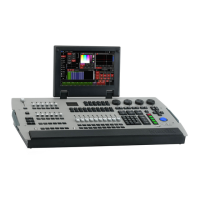
Defines the Martin M1 as a state-of-the-art all-in-one lighting desk.
Lists available optional accessories and upgrades for the Martin M1 console.
Details the physical dimensions and weight of the Martin M1 console.
Outlines the protocols, universes, channels, and programming features.
Describes the main playback, sub playback, other controls, and interface components.
Details playback assignment, banks, pages, fading, and override functionalities.
Covers the console's hardware components like touchscreen, SSD, and software aspects.
Lists all physical connections and electrical power requirements.
Specifies included items and part numbers for ordering console and accessories.
Highlights the 16:9 touchscreen, grandmaster, and main go section.
Describes the main and extended playback sections with faders and buttons.
Details the programming section with keypad, command keys, and LCDs.
Details all input/output ports including USB, DMX, MIDI, Network, and Video.
Focuses on the numerical keypad, command keys, and RGB LCD buttons.
Explains the function keys and their assignment for parameter access.
Describes the 10x60mm faders and 20 customizable keys in the main playback.
Details the scrollwheels used for changing playback banks.
Covers the 12x40mm faders with flash buttons and 12 single flash buttons.
Explains scrollwheels for bank changes and spacing for labeling.
Details the grandmaster with customizable button.
Describes the dedicated Main GO section for show control.
Explains the 12 freely assignable function keys for console functions.
Details how playbacks can be assigned to function keys for direct access.
 General
| Brand | Martin Professional |
|---|---|
| Model | M1 |
| Category | Control Unit |
| Language | English |

 To Next Page