Need help?
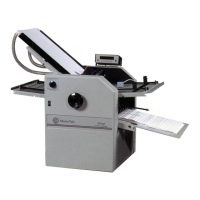
Do you have a question about the Martin Yale 2051 and is the answer not in the manual?
Lists all items included in the shipping container for the 2051 folder.
Instructions for placing and inspecting the folder for damage upon arrival.
Details on connecting the power cord and identifying voltage requirements for the folder.
Both fold tables are the same, and can be installed into either the first (upper, right) or second (lower, left) fold table positions.
Instructions for attaching the feed table extensions to the unit.
Procedures for turning on the folder and the initial boot-up sequence.
Instructions for loading paper into the feed table and its capacity.
How to adjust paper guides for proper paper alignment in the feed table.
Procedure for selecting the paper size before running the folder.
Steps to select the desired fold type for the operation.
How to use the TEST button to check folder settings with test sheets.
Adjusting the fold skew by changing paper guide angles.
Initiating the folding process using the RUN button.
Methods for stopping the folder, including normal and emergency stops.
Using buttons for fine adjustment of various folder functions.
Manually adjusting fold table positions using buttons or keypad input.
Manually adjusting the position of the stack wheels.
Adjusting the operating speed of the folder.
Adjusting the contrast of the LCD display.
Setting the total number of sheets to fold and batch quantities.
Programming the specific number of pages to be folded.
Enabling batch mode to fold and deliver sheets in batches with gaps.
Troubleshooting clean stacking issues with paper.
Specifying custom paper lengths to configure fold tables and stack wheels.
Manually setting fold tables when in manual mode.
Storing up to 10 custom fold programs with various settings.
Procedure for saving a custom fold program to memory.
Loading a previously stored custom fold program.
Entering diagnostics mode and navigating the main diagnostics screen.
Basic setup of the folder, including language and unit settings.
Changing the display language of the folder.
Selecting between Inches and Centimeters for measurements.
Enabling/disabling saving of folder speed in custom programs.
Enabling/disabling saving of fold quantity in custom programs.
Enabling/disabling saving of batch quantity in custom programs.
Viewing the current state of all sensor inputs.
Verifying the function of the keypad by testing button inputs.
Running the folder, moving fold tables, and firing the feed clutch.
Troubleshooting fold table drives and stack wheel drive.
Moving fold tables and viewing encoder counts.
Testing fold table drives by repeatedly moving them.
Displaying Clutch Count and Age Count for folder usage reference.
Defining operating parameters like fold table home and offsets.
Teaching the home positions for both fold tables.
Setting the home offset position for Fold Table #1.
Setting the home offset position for Fold Table #2.
Setting the distance Fold Table #2 moves for a half fold.
Teaching the home position for the stack wheels.
Setting a value to offset fold errors caused by paper weight.
Cycling the LED in a race track manner.
Troubleshooting causes for the folder failing to feed paper.
Diagnosing exit sensor failure when it incorrectly indicates paper presence.
Diagnosing exit sensor failure when it incorrectly indicates no paper.
Addressing issues where the main motor runs unexpectedly.
Resolving issues with the position encoder for Fold Table #1.
Troubleshooting reversed motor wires for Fold Table #1.
Resolving issues with the position encoder for Fold Table #2.
Troubleshooting reversed motor wires for Fold Table #2.
Addressing clutch engagement issues with the feed wheel.
Diagnosing RPM sensor failure related to roller rotation.
Resolving feed errors caused by retarder or paper holding issues.
Diagnosing why the folder fails to start when the RUN button is activated.
Troubleshooting steps for a blank LCD display on the folder.
Identifying the cause of loud popping or clicking noises during operation.
Addressing discrepancies between fold table pointers and the LCD display.
Resolving issues where the fold location on the paper is incorrect.
Troubleshooting stack wheels that are not moving as expected.
Diagnosing clicking noise from stack wheels.
Troubleshooting lack of sound from stack wheels.
Resolving paper jams between stack wheels and rollers.
Troubleshooting specific LCD display issues.
Addressing general paper feeding problems.
Troubleshooting intermittent paper feeding issues.
Resolving issues with the folder feeding multiple sheets at once.
Diagnosing and correcting non-square folds.
Troubleshooting folds misaligned in the same direction.
Resolving folds that are misaligned in multiple directions.
Troubleshooting electrical issues using diagnostics and checking connections.
Checking electrical connections for sensors.
Checking electrical connections for switches.
Checking electrical connections for motors.
Troubleshooting mechanical issues with folder components.
Ensuring mechanical components in the fold table are not slipping.
Steps for qualified technicians to inspect stack wheel components.
Testing and inspecting the feed clutch assembly for proper function.
Inspecting the fold table components for proper movement and alignment.
Checking the feed wheel for damage and cleanliness.
Inspecting the condition of the retarder (sheet separator).
List of tools recommended for maintenance and repair.
List of consumables required for tool kit.
Table showing paper stop locations for various fold types and sizes.
Diagram showing the assembly of the folder components.
Detailed list of all part numbers and descriptions for the folder.
Exploded view and part list for the feed bridge assembly.
Exploded view and part list for the exit conveyor assembly.
Exploded view and part list for the motor cover assembly.
Exploded view and part list for the feed table assembly.
Exploded view and part list for the conveyor stack wheels.
Exploded view and part list for the fold table assembly.
Diagram showing the 110 volt wiring connections.
Diagram showing the 220/230 volt wiring connections.
 General
| Fold Capacity | Up to 5 sheets at a time |
|---|---|
| Throat Width | 8.5" |
| Power Requirements | 115V, 60Hz |
| Fold Types | Letter, Half, Z-fold, Double Parallel |
| Fold Speed | 8, 600 sheets per hour |

 To Next Page