EasyManua.ls Logo

Marvo KG953 - User Manual

Marvo KG953
48 pages
Print Icon
To Next Page IconTo Next Page
Loading...
KG953
User Manual • Uživatelský manuál •
Užívateľský manuál • Használati utasítás •
Benutzerhandbuch • Manuel d'utilisation
Question and Answer IconNeed help?

Do you have a question about the Marvo KG953 and is the answer not in the manual?

Overview

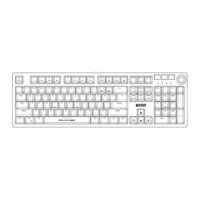
This document describes the Marvo KG953 keyboard, a tri-mode wireless mechanical keyboard designed for versatile use.

Function Description

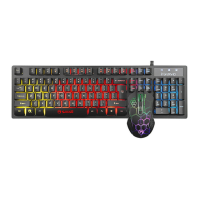
The Marvo KG953 is a tri-mode wireless mechanical keyboard that supports three connection modes simultaneously: 2.4GHz wireless, Bluetooth (V3.0 and V5.0), and wired (USB 2.0). It features a unique backlight with mixed colors to create a rainbow effect, enhancing the visual experience. The keyboard also boasts full anti-ghosting with N-key rollover support, ensuring that all commands are registered accurately, regardless of how many keys are pressed simultaneously. This makes it suitable for gaming and fast typing where precision is crucial.

Important Technical Specifications

  • Keys: 87
  • Wireless Specifications: 2.4G/V3.0/V5.0
  • Operating Distance: 10 m
  • Switch Type: Mechanical
  • Switch Rating: ≥ 50 million presses
  • Key Route: 4.0 ± 0.5 mm
  • Backlight: Rainbow
  • Battery Specifications: 3.7V – 1900 mAh
  • Interface: USB 2.0
  • Cable Length: 1.6 m
  • Weight: 985 g
  • OS Support: Mac/Windows/Android/iOS

System Requirements: A PC system compatible with an available USB port is required. The operating system should be Windows 7 or newer. It is also compatible with wireless devices.

Usage Features

The keyboard offers a range of functions accessible via key combinations, primarily using the "FN" key.

Office Functions:

  • FN + F1: My computer
  • FN + F2: IE browser
  • FN + F3: Email
  • FN + F4: Calculator
  • FN + F5: Media Player
  • FN + F6: Volume -
  • FN + F7: Volume +
  • FN + F8: Mute
  • FN + F9: Previous track
  • FN + F10: Play/pause
  • FN + F11: Next track
  • FN + F12: Stop

Combination Key Functions:

  • FN + WIN_L: Windows Lock (disables the Windows key)
  • FN + Q: Wired mode
  • FN + W: 2.4GHz wireless mode
  • FN + E: Wireless mode 1 (Bluetooth)
  • FN + R: Wireless mode 2 (Bluetooth)
  • FN + T: Wireless mode 3 (Bluetooth)
  • FN + ESC: Press and hold for 3 seconds to restore factory settings.

Backlight Control Functions:

  • FN + Right ALT: Change backlight mode
  • FN + ↑/↓: Change brightness
  • FN + →/←: Change lighting speed

Wireless Pairing: To select a Bluetooth device location, press FN + E, R, or T. The indicator for the selected key will flash, entering pairing mode. After successful pairing, the normal light mode will resume. A short press of FN + E, R, or T will reconnect to the device. For 2.4G devices, press FN + Q for wired connection mode, then FN + W to select the 2.4G device location. The W key indicator will flash, entering code mode. Upon successful coding, the normal light mode will resume.

Power Saving Function: In Bluetooth and 2.4G modes, the keyboard has two power-saving states:

  1. After one minute of inactivity, the keyboard lights turn off (first power-saving mode).
  2. After 30 minutes of inactivity, the keyboard enters hibernation mode.

Charging: Direct charging is done via the USB cable, regardless of whether the power switch is on or off. A blinking blue light indicates low power. A solid blue light means it is charging, and the blue light turns off when fully charged.

Maintenance Features

Safety Notes:

  • Keep the equipment dry and away from precipitation, humidity, liquids, and condensation.
  • Do not use the product with wet hands.
  • Avoid using or storing the equipment in dusty or dirty areas.
  • Do not store the equipment under high or low-temperature conditions, as this may cause damage.
  • Do not drop, knock, or shake the equipment to prevent breakage.

Installation:

  1. Connect the keyboard to an available USB port on your computer.
  2. For first-time use, allow approximately 15 seconds for the generic driver to install.
  3. The keyboard does not require a specialized driver for proper operation.

Troubleshooting: If incorrect operation occurs, follow these steps:

  1. Check the integrity of the connectors.
  2. Verify that the connection to the computer is correct.
  3. Ensure your computer settings are correct.
  4. Disconnect and reconnect the equipment; restart the computer. If the problem persists, contact your local seller.

Warranty Conditions: A new product purchased through the Alza.cz sales network is guaranteed for 2 years. For repairs or other services during the warranty period, contact the product seller directly and provide the original proof of purchase with the date.

The warranty does not cover:

  • Using the product for purposes other than its intended use, or failing to follow maintenance, operation, and service instructions.
  • Damage caused by natural disaster, unauthorized intervention, or mechanical damage due to the buyer's fault (e.g., during transport, cleaning with inappropriate means).
  • Natural wear and aging of consumables or components (e.g., batteries).
  • Exposure to adverse external influences (e.g., sunlight, electromagnetic fields, fluid intrusion, object intrusion, mains overvoltage, electrostatic discharge, faulty power supply, chemical processes).
  • Modifications, alterations, or adaptations to the design, or use of non-original components to change or extend product functions.

EU Declaration of Conformity: The product complies with the essential requirements of Directives 2014/30/EU and 2011/65/EU, including amendments 2015/863/EU.

WEEE (Waste Electrical and Electronic Equipment): This product must not be disposed of as normal household waste. It should be returned to the place of purchase or a public collection point for recyclable waste. Proper disposal helps prevent negative environmental and health consequences. Improper disposal may result in fines.

Marvo KG953 Specifications

General IconGeneral
BrandMarvo
ModelKG953
CategoryKeyboard
LanguageEnglish

Related product manuals