MASSA PRODUCTS CORPORATION
Product Manual- April 24, 2012 4 M3 Wireless Ultrasonic Level Sensor
2.0 Gateway Basic Settings
2.3 Gateway’s XBee Settings (continued from previous page)
2.4 Gateway’s Python Files
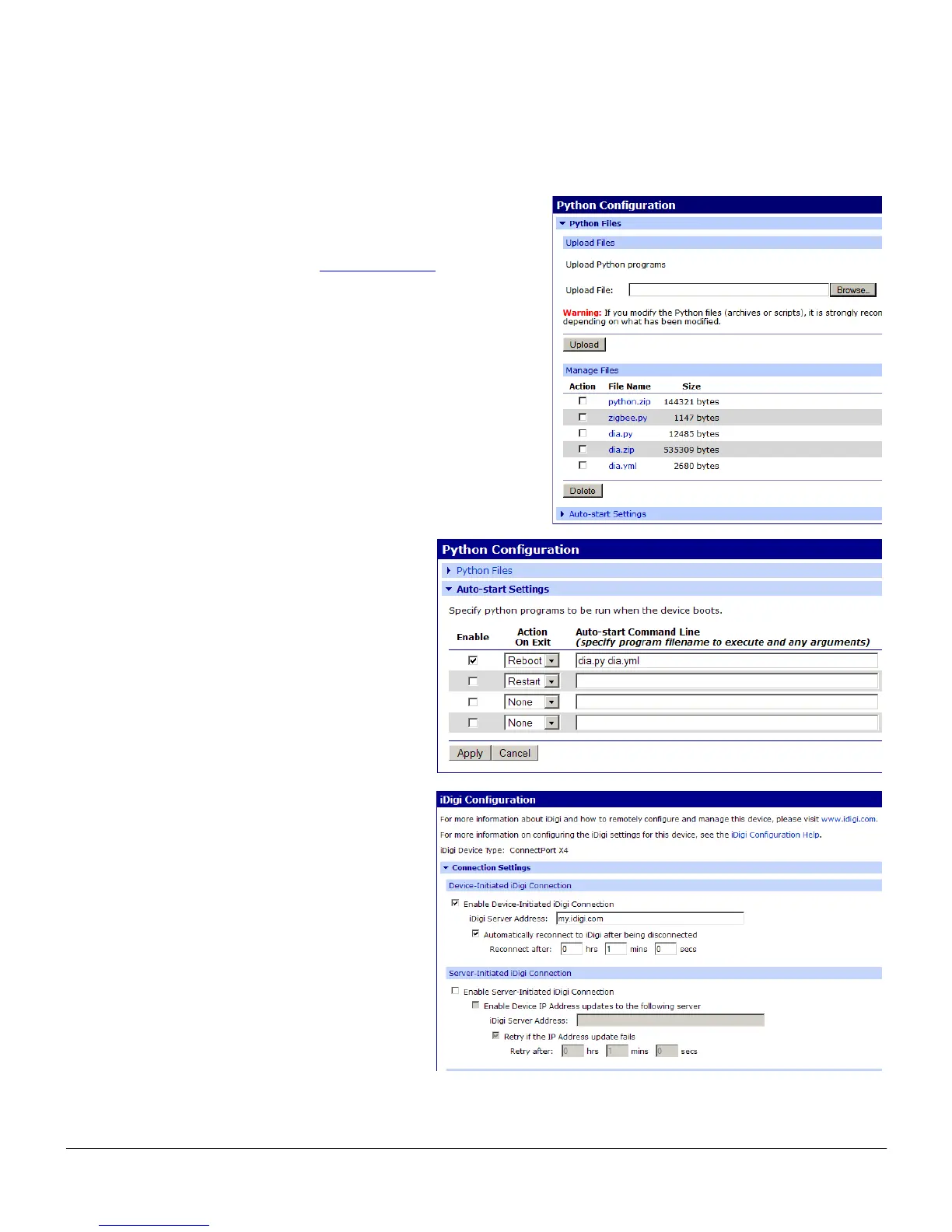
The files indicated here are required to set up and operate the M3
Sensors. They can be obtained from www.massa.com
. The dia.yml
file will need to be edited to configure the M3 Sensors to operate with
your gateway. See Section 3.0 for more information.
The operating files require include:
a) python.zip
b) zigbee.py
c) dia.py
d) dia.zip
e) dia.yml (This is used to control the operating mode when
gateway boots. See section 3.1 for more information)
To have the gateway start executing the DIA (device
integration application) when it powers up or
reboots, check the Enable box in the Auto-start
Settings UI. See section 3 for creating additional
auto-start command lines as an option.
Here is the setting for sending the M3 automated
message to the iDigi Cloud server. Contact Digi
International for support.


 To Next Page