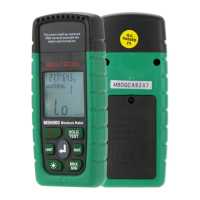
MS6900
Multi Function Moisture Meter
USER'S MANUAL
To Avoid Possible Electr ic Shock Or
Personal Injury:
• Use th e Meter only a s speci fied in t his man ual or th e
prot ectio n pro vided b y the Met er migh t be impa ired.
Do not p lace the Met er near e xplos ive gas o r vapor.
Read t he Users Man ual bef ore use a nd foll ow all
safe ty inst ructions .
•
•
Limited Warranty And Limitation Of Liability
This M S6900 prod uct fro m Maste ch will b e free fr om
defe cts in mater ial and w orkma nship f or one ye ar from
the da te of purcha se. This wa rrant y does no t cover
fuse s, disposa ble bat terie s, or dam age fro m accident ,
negl ect, misus e, alte ratio n, cont amina tion, or
abno rmal condi tions o f opera tion or h andli ng.
Rese llers are no t autho rized t o exten d any oth er
warr anty on Mast ech's b ehalf . To obt ain ser vice du ring
the wa rranty per iod, co ntact y our nea rest Ma stech
auth orized ser vice ce nter to o btain r eturn a uthoriza tion
info rmation, t hen sen d the pro duct to t hat Ser vice
Cent er with a desc ripti on of the p roble m.
Out of Box
Chec k the Meter an d acces sorie s thoro ughly b efore
usin g the Meter. Co ntact y our loc al dist ribut or if the
Mete r or any compo nents a re dama ged or ma lfunc tion.
01 02
Accessories
•
•
One Us ers Manual
Two AAA Bat tery
Safety Information
WARNI NG
TO REDUC E THE RISK OF FIRE, ELE CTRIC AL
SHOC K, PROD UCT D AMAGE O R PERSO NAL
INJU RY, PLEA SE FOLLOW TH E SAFET Y
INST RUCTI ONS DESCRI BED IN TH E USER
MANU AL. READ THE U SER MAN UALS BE FORE
USIN G THE MET ER.
WARNI NG
DO NOT P LACE TH E METER IN AN Y
ENVI RONMENT OF HIGH PRE SSURE , HIGH
TEMP ERATURE, DUST, EX PLOSI VE GAS OR
VAPOR. TO ENS URE SAFE OPE RATION AN D
LIFE O F THE MET ER, FOLLOW THESE
INST RUCTIONS
Safety Symbols
Impo rtant safe ty mess age
Conf orms to rele vant Eu ropea n
Unio n directiv es
03 04
Warning Symbols
Risk o f danger. Imp ortan t infor matio n.
See Us ers Manual
Stat ement iden tifie s condi tions a nd
acti ons that fai l to foll ow the
inst ructions c ould re sult fa lse
read ing, damag e the Met er or the
equi pment unde r test.
Caut ion
War ning
Hint
Sugg estions or h ints.
Using The Me ter
WARNI NG
TO AVOID ELE CTRICAL SHOC K AND IN JURY,
COVE R THE MET ER WITH PROT ECTIV E
COVE R WHEN NOT IN USE.
Caut ion
1: Ope rate th e Met er betw een -10 ~50 (14~ 122°F).
2: Avoid sh aking, dro pping o r takin g any kin d of impacts
when u sing or tran sport ing the M eter.
3: To avoid po ssible ele ctric s hock or p erson al injury,
repa irs or se rvi cing no t cover ed in thi s manua l
shou ld be perfor med onl y by qual ified p erson nel.
4: Che ck the termi nals ev ery tim e befor e opera te the
Mete r. Do not op era te the Me ter if th e termi nals ar e
dama ged or one or mo re func tions a re not wo rking
prop erly.
5: Avoid ex ploring th e Meter t o direc t sunli ght to en sur e
and ex tend th e lif e of the Me ter.
°C
6: Do no t place the Me ter in st rong ma gneti c field , it may
caus e false r ead ings.
7: Use o nly the batt eries i ndica ted in th e Tech nical Spec .
8: Avoid ex ploring th e batte ry to hum idity. Rep lace the
batt eries a s soo n as the lo w batte ry indi cator a ppears.
Hint
1: Sen sitivity o f the Met er towa rd temp eratu re and
humi dity will be l ower ov er time . Pleas e calib rate
the Me ter per iod icall y for bes t perfo rmanc e
2: Ple ase keep the o rigin al pack ing for f uture s hipping
purp ose (ex. Cal ibrat ion)
1 . Introduction
1.1 Produc t Des cription
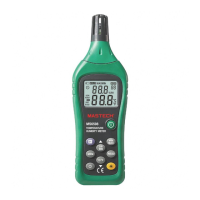
MS69 00 is a materi al mois ture, t emper ature , humidity
all- in-one mul ti func tions M eter. The Me ter is id eal f or
meas uring mois ture of w ood and c oncre te buil dings.
1.2 MS6900 M ult i Function Moisture
Meter Feat ure s:
• Provid e te mperature , hu midity and mo isture measur ing.
Measure se ven kinds of ma te rials throu gh manual mode.
Maximum an d Minimum Moi st ure reading s.
Displa y Ho ld.
LCD Disp la y, mois tu re bar displa y.
Units swit ch.
Backligh t display.
Auto off (when not in u se f or 10 minutes )
Sturdy con struction , ea sy to carry.
•
•
•
•
•
•
•
•
05
1.3 Components
1.3.1 Figures and Components
Terminals Protective Cover.
LCD Display
On/Off Button:
Press once to turn the
Meter on, press for 1 sec
to turn it off.
Temperature/Moisture Switch:
Switch between Temp:
°C/°F and
Moisture: %/WB/TD;
Backlight Button
Display Test/Hold Button
Switch between testing materials
Maximum/Minimum Display Button
Enter Button.
1
2
4
3
5
6
9
7
The Meter exit switching
mode if “Enter” button
is not pressed in 8 seconds.
8
1
2
3
4
5
9
8
7
6
MS 6 9 0 0 Diag r a m
Unit
Test/Hold
Meterial
MAX
MIN
MS6900
Tember Moisture Meter
Unit
Test/Hold
Meterial
MAX
MIN
MS6900
Tember Moisture Meter


 To Next Page
 Need help?
 General