Need help?
Do you have a question about the MASTER KITCHEN MKMW 3825-PR XS and is the answer not in the manual?
This document provides the instruction manual for the Master Kitchen Built-in Microwave Oven, model MKMW 3825-PR XS. It covers safety precautions, technical specifications, installation guidelines, operation instructions, and troubleshooting.
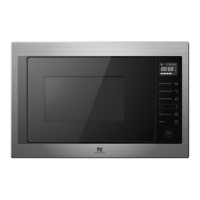
The Master Kitchen MKMW 3825-PR XS is a built-in microwave oven designed for domestic use. It offers various cooking functions including microwave cooking, grill, and combination cooking. The appliance is intended for heating food and is not suitable for industrial or laboratory applications. It features a turntable for even cooking and a control panel for setting cooking parameters. The oven also includes a child lock function for safety and a kitchen timer.
Upon electrification, the LED displays "0:00". The clock can be set by pressing the clock button twice, adjusting hours (0-23) and minutes (0-59) using the adjustment buttons, and confirming with the clock button. If the clock is not set, the oven will not function.
To use microwave cooking, press the microwave button. The display will show "P100" (100% power). Pressing the microwave button repeatedly or using the adjustment buttons allows selection of power levels: P100 (100%), P80 (80%), P50 (50%), P30 (30%), or P10 (10%). After confirming the power level, set the cooking time (from 0:05 to 95:00) using the adjustment buttons and start cooking.
Press the microwave button once to display "P100", then press it repeatedly or use the adjustment buttons to select grill (G), Combi 1 (C-1: 55% microwave, 45% grill), or Combi 2 (C-2: 36% microwave, 64% grill) modes. Confirm the mode, set the cooking time (0:05 to 95:00), and start cooking. In grill mode, the oven will beep twice at half the cooking time, prompting the user to turn the food for better grilling.
In standby mode, pressing the quick start button initiates 30 seconds of cooking at 100% power. Each subsequent press adds 30 seconds, up to a maximum of 95 minutes. This also applies during microwave, grill, combi cooking, or time defrost modes.
Press the defrost by weight button once to display "dEF1". Use the adjustment buttons to select the food weight (100g to 2000g) and start defrosting.
Press the defrost by time button twice to display "dEF2". Use the adjustment buttons to select the defrost time and start defrosting.
Press the auto menu button clockwise to select from predefined menus (A-1 to A-8) for pizza, meat, vegetable, pasta, potato, fish, beverage, and popcorn. Confirm the menu, select the default weight using the adjustment buttons, and start cooking.
Press the kitchen timer button once to display "00:00". Set the desired time (up to 95 minutes) using the adjustment buttons and confirm. The buzzer will ring five times when the time is reached. This timer is separate from the 24-hour clock system.
Up to two cooking sections can be set. If defrosting is included, it must be the first section. The process involves setting the parameters for the first section (e.g., defrost by time), then setting the parameters for the second section (e.g., microwave cooking). The oven will beep between sections and five times at the end of cooking.
During microwave, grill, or combination cooking, pressing the power button will display the current power level for 3 seconds. Pressing the clock button during cooking will display the remaining time for 3 seconds.
To activate, press the pause/cancel button for 3 seconds in standby mode. A long beep indicates activation, and the clock or "0:00" will display. To deactivate, press the pause/cancel button for 3 seconds again.
Press the door open button. If it doesn't work, use the provided sucker to open the door.
 General
| Brand | MASTER KITCHEN |
|---|---|
| Model | MKMW 3825-PR XS |
| Category | Microwave Oven |
| Language | English |

 To Next Page