11 12
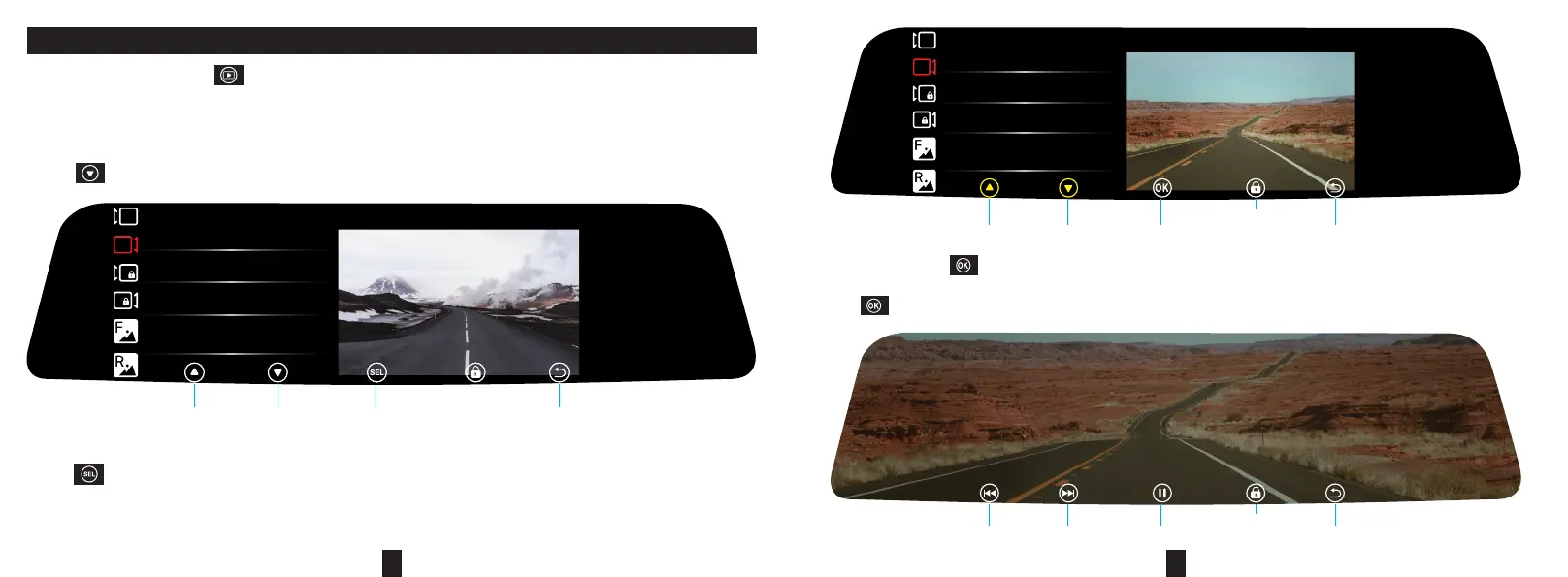
Stop recording, tap the icon “ ” in the main interface to proceed to the playback interface. There are 6 sub-menus.
They are: 1. Front-view normal video; 2. Rear-view normal video; 3. Front-view locked video; 4. Rear-view locked
video; 5. Front-view picture; 6. Rear-view picture.
Press “ ” to switch to “Rear View Normal Video”, as shown in the gure below:
Press “ ” to select, as shown in the gure below:
PLAYBACK
FILE191205-131524-000365R
FILE191205-132138-000366R
FILE191205-151022-000367R
FILE191205-152247-000368R
15:30
THU
2019.12.05
F
R
F
R
[1/18] [00:03:00]
Return
Previous
Next
Select
FILE191205-131524-000365R
FILE191205-132138-000366R
FILE191205-151022-000367R
FILE191205-152247-000368R
15:30
THU
2019.12.05
F
R
F
R
[1/18] [00:03:00]
ReturnPrevious Next Conrm
Lock the
selected video
ReturnPrevious video
Next video
Play
Lock the
current video
2/18
00:00:03 /00:00:28
FILE191205-132138-000366R.MOV
PS: Press and hold “ ” to delete the current video.
Press “ ” to select and enter the playback interface, as shown below:


 To Next Page