EasyManua.ls Logo

Master MAC-30D - User Manual

Master MAC-30D
24 pages
Print Icon
To Next Page IconTo Next Page
Loading...
This product meets the requirements of OSHA 1910.212(a)(5), the standard which regulates electric
fan blade safety.
Please note the serial number of your fan, and write it on the back of this User’s Manual for future reference. Your serial
number is located on upper rear section of mount bar.
READ AND SAVE THESE INSTRUCTIONS
Model Numbers:
MAC-30D / MAC-36D
IMPORTANT: Read and understand all of the instructions in this manual before assembling,
starting, or servicing the fan. Improper use of this fan can cause serious injury. Keep this manual for
future reference.
For general ventilating use only. Do not use to exhaust hazardous or explosive
materials and vapors. Never use the fan in spaces which contain products such as
gasoline, solvents, paint thinners, dust particles, volatile or airborne combustibles, or any unknown
chemicals.
CAUTION
'
(
7
6
,
/
&0
86&
1 Industrial Blvd #101, Sauk Rapids, MN 56379 USA • Toll Free (800) 779-3267
Fax: 320-251-2922 • Web: www.masterindustrialproducts.com • Email: info@pinnacleclimate.com
© 2018 Pinnacle Climate Technologies, Inc. MAFA-412
Users Manual &
Operating Instructions
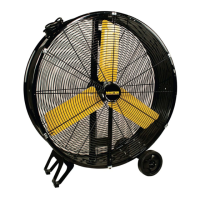
HIGH CAPACITY
BARREL FAN
This product can expose you to chemicals, including lead, which
are known to the State of California to cause cancer and birth
defects or other reproductive harm. For more information go to
www.P65Warnings.ca.gov.

WARNING

Questions and Answers

  • E
    Erin BartlettJul 28, 2025
    What to do if my Master MAC-30D Fan does not operate?
    • S
      sandra28Jul 28, 2025
      If your Master Fan isn't working, first check the power cord for any damage. Make sure the unit is properly plugged in and turned on. If the power cord is fine, the power switch might be faulty. It is recommended to have the power switch replaced by a qualified professional according to code. To prolong the life of the power switch, operate the fan in LOW for 5-10 seconds before switching to HIGH.
  • D
    dorothy53Aug 6, 2025
    How to fix reduced airflow in my Master Fan?
    • J
      Jeffrey ReeseAug 6, 2025
      If you're experiencing reduced airflow from your Master Fan, the issue might be loose pulleys or a loose fan blade. Try tightening the motor pulley Hex Screw to resolve this.
  • C
    ckimAug 16, 2025
    Why is my Master MAC-30D making so much noise?
    • A
      Antonio SchwartzAug 17, 2025
      Excessive noise from your Master Fan, such as vibration, slapping, or squealing, can be due to a couple of reasons. First, check if the fan is placed on level ground. If not, turn it off and move it to a smooth, level surface. Also, ensure that the motor bolts are secure by tightening both the Motor Safeguard bolts and the four motor bolts.

Summary

Safety Information

General Safety Precautions

Essential safety rules for fan operation and handling, including warnings against misuse and child safety.

Electrical and Usage Safety

Guidelines on electrical safety, proper wiring, extension cord use, and operational restrictions.

Assembly and Installation

Attaching the Wheels

Step-by-step instructions for attaching the wheels to the fan unit.

Operation

Starting and Stopping the Fan

Instructions for initiating fan operation and safely turning it off, including speed control details.

Maintenance and Storage

Maintenance and Storage Procedures

Guidance on inspecting the fan before use and proper procedures for unplugging and storing.

Troubleshooting Guide

Common Fan Problems and Solutions

A guide to diagnose and resolve common issues like fan not operating or reduced air flow.

Exploded View

Exploded View for MAC-30 D

Diagram illustrating the assembly components of the MAC-30D model fan.

Exploded View for MAC-36 D

Diagram illustrating the assembly components of the MAC-36D model fan.

1 Year Limited Warranty

Warranty Terms and Conditions

Details on the product's limited warranty, coverage, exclusions, and duration.

Warranty Claim Information

Instructions for making a warranty claim, including required information like model and serial numbers.

Master MAC-30D Specifications

General IconGeneral
ModelMAC-30D
CategoryFan
Number of Blades3
Power Consumption60W
Power60 W
Voltage220-240V
Frequency50 Hz
Speed Settings3

Related product manuals