Operating Instructions
Automatic Operation
The fan and water pump are controlled automatically to achieve the desired comfort level.
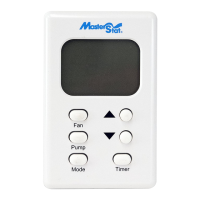
Automaticoperationisactivatedbypressingthe‘Mode’buttonuntil‘Auto’isdisplayedontheLCD.The‘Mode’buttonchangesthe
controlbetweenOff,AutoandManual.
TheSettemperature(thetargettemperatureforthecontrol)maybealteredbyrepeatedlypressingorholdingthe‘Up’and‘Down’but-
tons.TheLCDwilldisplay‘Set’ratherthen‘Room’temperatureforashorttimeafterpressingthe‘Up’or‘Down’button.
Onstarting,ifthepadsinthecooleraretoodry,thefanmaybedelayedfromstartinguntilthepadshaveabsorbedsomewater.Thisis
calledPre-Wetandlastsfor2minutes,indicatedby‘Pre-Wet”ashingontheLCD.ThePre-Wetcanbebypassedbyenteringmanual
modebyeitherpressingthe‘Fan’,‘Pump’or‘Mode’buttonandthenpressingthe‘Mode’buttonuntil‘Auto’isdisplayed.
Duringautomaticoperation,thecontrolperformsawaterpurgecycleevery8or12hoursofpumpoperation.Thisintervalcanbe
toggledbetween8or12hoursbysimultaneouslyholdingthe‘Pump’and‘Fan’buttonsfor5seconds.Theselectedintervalisdisplayed
forashorttime.PresstheUporDownarrowbuttonstochangebetween8or12hours.Thisactionalsostartsamanualpurgecycle.A
purgepumporpurgevalve,whichisnotsuppliedwiththethermostatcontrolorevaporativecooler,isrequiredforthisoperation.
Manual Operation
The fan speed and pump are set by the user.
Toactivatethemanualmodefromthe‘Off’state,pressthe‘Mode’buttonuntil‘Manualisdisplayed.Ifthecontrolisinthe‘Auto’
mode,youcanchangetomanualmodebypressingeitherthe‘Mode’,‘Fan’or‘Pump’buttons.Eachpressofthe‘Fan’buttonchanges
thefantoHigh,LoworOff.EachPressofthe‘Pump’buttonchangesthepumpstatuseitherOnorOff.
TheLCDwilldisplay‘Manual’ontheleftandthefanandpumpsettingsontheright.Thefanspeedwillbedisplayedas‘FanHi’or
‘FanLo’.Ifneitheraredisplayedthefanisoff.Withthefanandpumpbothrunning‘Cool’willbedisplayed.Ifonlythefanisrunning
‘Vent’willbedisplayed.Ifonlythepumpisrunning‘Pre-Wet’willbedisplayed.
Time Delay Operation
Delayed start or stop in ‘Auto’ or ‘Manual’ mode
The‘Timer’buttonisusedtosetadelayperiodbetween1and12hoursin1hourincrements.
Ifthecoolerisoperating(in‘Auto’or‘Manual’modes)whenthe‘Timer’buttonispressed,thedelayperioddetermineswhenthecooler
switchesoff.
Ifthecoolerisoffwhenthe‘Timer’buttonispressed,thedelayperioddetermineswhenthecoolerstartsin‘Auto’mode.TheSet
Temperaturewillbethelastsettingwhenrunningin‘Auto’mode.
‘TimerDelay’andtheremainingtimearedisplayedontheLCDwhilethetimerfeatureisactivated.
YoucancanceltheTimerfunctionatanytimebypressingthe‘Timer’button.The‘TimerDelay’indicatorwillnolongerdisplayonthe
LCD.
In the event of a power outage
Ifpowerisinterruptedwhilethecoolerisrunningineither‘Auto’or‘Manual’modethecoolerwillremainoffwhenpowerisrestored.
Thecoolermustbestartedmanuallybypressingthe‘Mode’buttononthewallcontrol.Thethermostatwillrememberthelast‘Set’
temperatureentered.


 To Next Page
 Loading...