EasyManua.ls Logo

Matelec Hydrowhiz FPC-63X20 - User Manual

Default Icon
14 pages
Print Icon
To Next Page IconTo Next Page
Loading...
1
P: 1800 281 282 | F: 1300 281 282 | E: info@matelecaustralia.com.au | W: www.matelecaustralia.com.au
QUICK START GUIDE
Introduction
The HydroWHIZ Controller has been designed with ease of use at the core of the system design. Building on the wealth of the pump
control features in the Advanced controller, the HydroWHIZ brings these features into a new age with a color touch screen interface
and a streamlined setup process. In a world where information is power the HydroWHIZ has extensive time and date stamped
alarms, logged data, trend graphs and diagnostic pages to provide the user with all the information required for optimisation and
preventative maintenance. Featuring the flexibility of level, pressure and temperature system modes with a wide range of functions
and protections, the HydroWHIZ VSD controller is ideal for a wide range of applications including water transfer, stormwater and
sewage pump out, constant pressure, hot water circulation and chiller supply, to name a few.
For more information on the operation of the HydroWHIZ VSD controller see the HydroWHIZ VSD Operation Manual.
V1.7
HydroWHIZ Pump Controllers
VSD
Safety
This control panel has been designed and built for applications that are Commercial and/or Industrial in nature, operation, function
and location. If the control panel is to be used in Domestic/Residential applications, where specific Wiring Rules in respect of ‘electrical
supply’ protection may apply, it is the responsibility of the installing electrician to ensure compliance with relevant standards.
Prior to installation, ensure power supply is isolated.
Power supply must be circuit breaker protected (qualified electrician to determine appropriate amp rating).
It is highly recommended that RCDs are NOT used to protect the supply to this panel. The VSDs in this panel have EMC filtering
which can cause nuisance tripping of RCDs. It is recommended to use alternative protection for the incoming cables. If RCDs
are required, type B RCDs must be used, taking into consideration the VSD earth leakage current to avoid nuisance tripping.
Electrical connection to the panel must be carried out in accordance with the following pages.
Additions or modifications to the control panel are not permitted and will void warranty.
The controller is not intended for use by children or infirm persons without supervision.
Repairs to the controller must only be carried out by a suitably qualified electrician.
This manual makes use of the following symbols to indicate warnings that must be paid specific attention to:
Damage to equipment or personal harm may occur if this instruction is not followed
Electrical risk (electrocution hazard) may occur if this instruction is not followed
Single Phase - FPC-63X21 (1-6 Pumps)
Three Phase - FPC-63X20 (1-6 Pumps)
Question and Answer IconNeed help?

Do you have a question about the Matelec Hydrowhiz FPC-63X20 and is the answer not in the manual?

Summary

QUICK START GUIDE

Safety Information

Crucial safety precautions and warnings for installation and operation of the control panel.

Step 5 - System Setup

System Setup Configuration

Main setup for system and pump control, defining default settings for system types.

Analog Input Setup

Configuring analog inputs for transducers for Level, Pressure, and Temperature control.

Function Setup

Setting up system functions for Level, Pressure, and Temperature control modes.

VSD Speed Control Setup

Configuring VSD for proportional or PID speed control based on system type.

System Protection Settings

Configuring optional additional system protections like anti-seize and fault detection.

Step 6 A - VSD Commissioning (Lenze Drives)

Setting Lenze Pump Parameters

Entering essential motor data (speed, frequency, voltage, current, power) for Lenze VSDs.

Step 6 B - VSD Commissioning (ABB Drives)

Setting ABB Pump Parameters

Configuring ABB VSD parameters like nominal voltage, current, frequency, and speed.

Step 7 - Put System in Auto

Overview

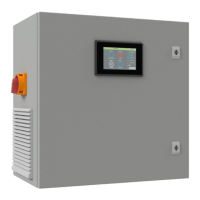
The HydroWHIZ is a multipump controller designed for a wide range of commercial and industrial applications, including water transfer, stormwater and sewage pump out, constant pressure systems, hot water circulation, and chiller supply. It is available in VSD (Variable Speed Drive) models for both single-phase (FPC-63X21) and three-phase (FPC-63X20) systems, supporting 1 to 6 pumps.

Function Description

At its core, the HydroWHIZ controller manages multiple pumps to maintain desired levels, pressures, or temperatures within a system. It achieves this through an intuitive color touch screen interface and a streamlined setup process, making it user-friendly despite its advanced capabilities. The controller integrates a wealth of pump control features, building upon previous advanced controller designs.

Key operational modes include:

  • Level Control: Manages pumps based on liquid levels, suitable for applications like tank filling or emptying.
  • Pressure Control: Maintains a constant pressure within a system, ideal for water supply or boosting applications.
  • Temperature Control: Regulates pumps to achieve and maintain a target temperature, useful in HVAC or hot water systems.

The controller's VSD capabilities allow for precise pump speed control, which contributes to energy efficiency and smoother system operation. Instead of simply turning pumps on and off, the VSD adjusts pump speed to match demand, reducing wear and tear and optimizing performance.

Usage Features

The HydroWHIZ is designed with ease of use as a primary consideration. The color touch screen HMI (Human Machine Interface) provides a clear and interactive platform for monitoring and configuring the system.

  • Main Screen: This is the default display, offering an immediate overview of the system's status, including individual pump status (e.g., running, standby, fault, disabled), system mode (Auto, Off, Manual), and current readings like pressure or frequency.
  • Menu Screen: Accessible from the main screen, the menu provides navigation to various other screens such as Alarms, Logged Data, Trend Plot, Setup, All Parameters, Date & Time, and Diagnostics.
  • Setup Process: The setup process is guided, starting with a login screen (default PIN 2020) to prevent unauthorized changes. The setup screens are organized logically, allowing users to configure system type (Level, Pressure, Temperature), control output type (DOL, Soft Start, VSD), number of pumps, pump limit, and duty change period.
  • Analog Input Configuration: For systems utilizing transducers, the analog input can be configured for level, pressure, or temperature control. This involves setting parameters such as max sensor range, setpoint, wakeup step, standby start step, and low/high thresholds. These settings determine when pumps activate or deactivate based on analog readings and trigger protections.
  • Function Settings: The controller offers various functional settings, including:
    • Jacking pump: A specific pump function.
    • Low/High level/pressure/temperature protection: Triggers alarms or actions when readings exceed defined thresholds.
    • Sleep delay: Configures the delay before the system enters a low-power sleep mode when demand is low.
    • Tank top up/Mains bypass valve enable: Controls valves for specific system operations.
    • Sleep mode: Defines how the system behaves during periods of low demand.
  • VSD Specific Settings: When operating in VSD mode, users can configure parameters like:
    • VSD full speed level/temperature: The analog level or temperature at which all pumps run at full speed.
    • VSD speed at stop level/setpoint: The speed at which pumps run at the setpoint or stop level.
    • Manual speed: The speed for VSD-controlled pumps in manual mode.
    • PID Proportional and Integral: These parameters are crucial for fine-tuning the VSD's response to maintain a stable setpoint, especially in pressure control applications. Adjusting these values affects how quickly and smoothly the system reacts to changes in demand.
    • VSD No demand speed: A critical setting that defines the pump speed (in Hz) at which one pump can achieve the setpoint against a dead head (shut discharge valve), influencing sleep and destaging functions.
    • Pipe fill: A feature that allows the system to slowly increase pressure when waking from sleep, preventing water hammer.
    • Sleep assist: Modes like "Speed minimise" or "Boost" help the system manage low demand periods or quickly respond to sudden demand increases.
  • System Protections: The HydroWHIZ includes several optional system protections:
    • Pump anti-seize protection: Periodically runs pumps for a short duration to prevent seizing, especially when the system is in sleep, disabled, or inhibit mode.
    • Max run fault protection: Detects if a pump runs at maximum speed for an extended period, indicating a potential issue, and can inhibit the pump or system.
    • Pump cycle protection: Prevents rapid cycling of pumps, which can occur if the system frequently wakes up and goes to sleep within a short timeframe.
    • No flow protection: Detects if pumps are running without flow for a specified duration, indicating a dry run or blockage, and can inhibit the pump or system.
  • SCADA Setup: The controller supports remote monitoring and control via Modbus RS485 connection. Users can configure SCADA parameters such as baud rate, parity, slave address, and watchdog settings for reliable communication and system supervision.

Maintenance Features

The HydroWHIZ is designed to provide comprehensive information for system optimization and preventative maintenance.

  • Alarms: The controller logs extensive time and date stamped alarms, providing a detailed history of system events and potential issues. This allows operators to quickly identify and address problems.
  • Logged Data: Historical operational data is recorded, which can be reviewed to understand system performance over time.
  • Trend Graphs: Visual trend graphs help in analyzing system behavior, identifying patterns, and optimizing settings for efficiency and longevity.
  • Diagnostic Pages: Dedicated diagnostic pages offer in-depth information about the controller's status and connected components, aiding in troubleshooting.
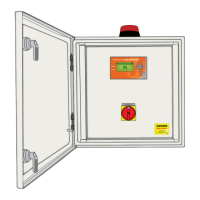
  • Fan Thermostat: The cabinet fan's thermostat can be adjusted to a suitable temperature (recommended 25-30°C) for the ambient environment, ensuring proper cooling of internal components and extending the life of the electronics.
  • Modular Design: The VSDs within the panel are designed for accessibility, allowing for individual commissioning and maintenance. Once one VSD is configured, the screen can be removed and connected to other VSDs in the panel for efficient setup.
  • Warning System: The controller provides warnings, such as when changing parameters might lead to unexpected behavior or when the system needs to be switched to OFF for configuration, guiding users through safe operation.

The HydroWHIZ controller is a robust and intelligent solution for managing multipump systems, offering advanced control, extensive monitoring, and user-friendly features to ensure efficient and reliable operation.

Matelec Hydrowhiz FPC-63X20 Specifications

General IconGeneral
BrandMatelec
ModelHydrowhiz FPC-63X20
CategoryController
LanguageEnglish

Related product manuals