MC110 - Quick Start Guide - page 2
maticagroup.com
8
You are now ready to
start printing!
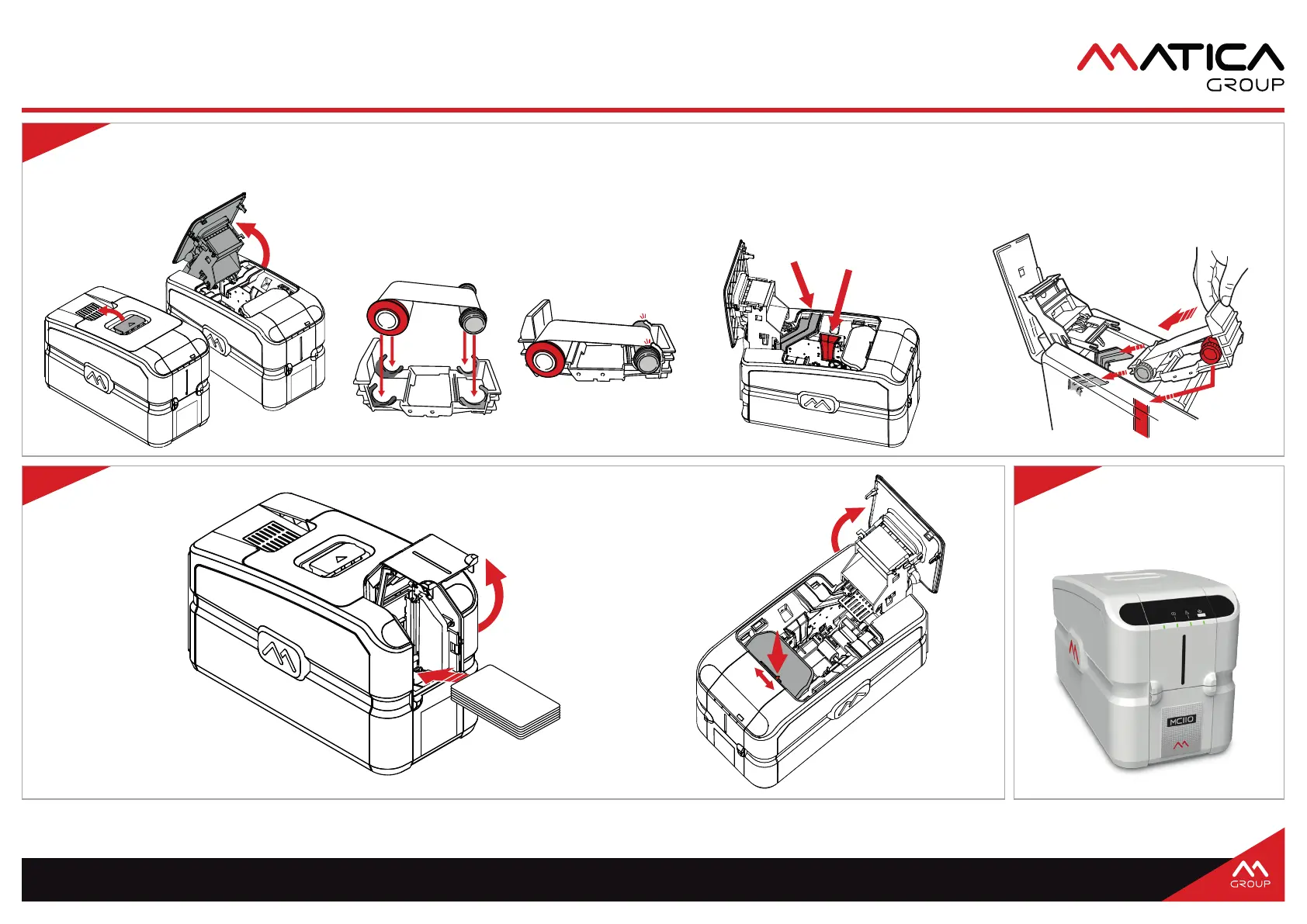
6
Open printer
• Push the top cover
lever away from you
and lift the top cover.
Inserting ribbon into printer
• Place the reels into the appropriate
channel and slide the ribbon
cartridge into place.
• Close the top cover.
Printer ribbon guides
• Observe the ribbon guides to insert the ribbon cartridge.
• The channel for the red reel is red.
• The channel for the grey reel is dark grey.
Install the ribbon into the cartridge system
• Remove cartidge system from printer.
• Place red reel into FRONT SIDE of cartridge
and push securely into clips.
• Place grey reel into the other end of the
cartridge and push securely into clips.
7
Loading cards
• Open front card
door and insert
cards according to
the card orientation
sticker inside.
Card thickness adjustment
• Open the top cover, adjust the
card thickness lever to the
appropriate card thickness
and close the top cover.
Installing the ribbon cartridge into printer



 To Previous Page