Installation de l’imprimante | Druckerinstallation | Installazione della stampante | Instalación de la impresora | Con gurar a impressora | Het instellen van uw printer
Setting Up Your Printer
Matica Technologies AG | All Rights Reserved
maticacorp.com
MC310_QIS_2021_07_ENG
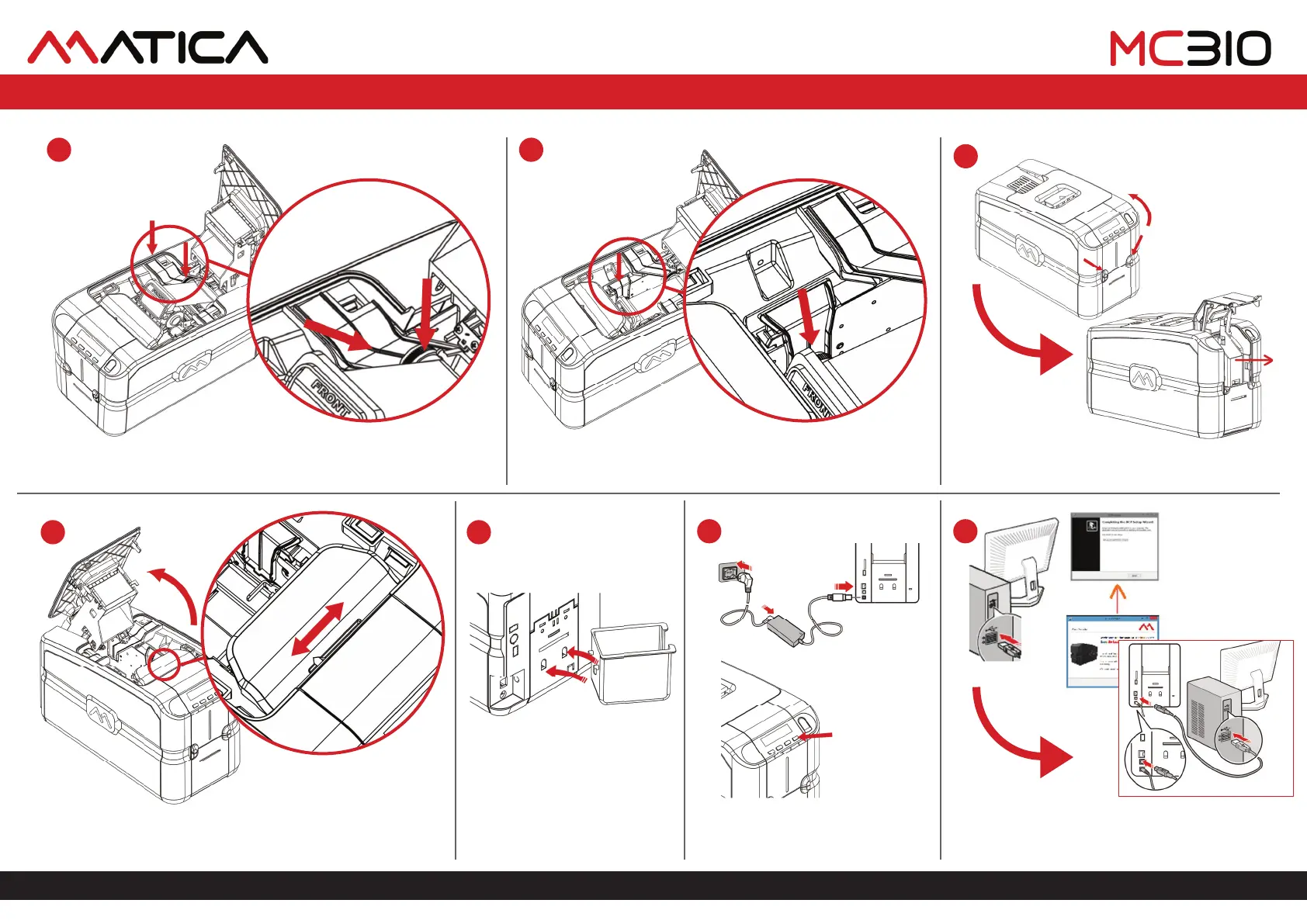
Place the ribbon cartridge. Align the grey take-up core with the grey guides
and slide the cartridge inside the printer.
8
11
Ensure ribbon cartridge is placed correctly and close the top cover.
9
Open the front card feeder door and remove the
protective piece of carton.
10
12
Place the reject card tray to the rear
end of the printer.
13
Connect the AC power supply and
power ON the printer.
14
Connect the memory stick to a computer and install the
driver. Connect the printer to the computer using the USB
cable when instructed during driver installation.
Open the top cover and adjust the card thickness lever to the
appropriate card thickness and close the top cover.



 To Previous Page