38 Matrox GXM – User Guide (Mac version)
2
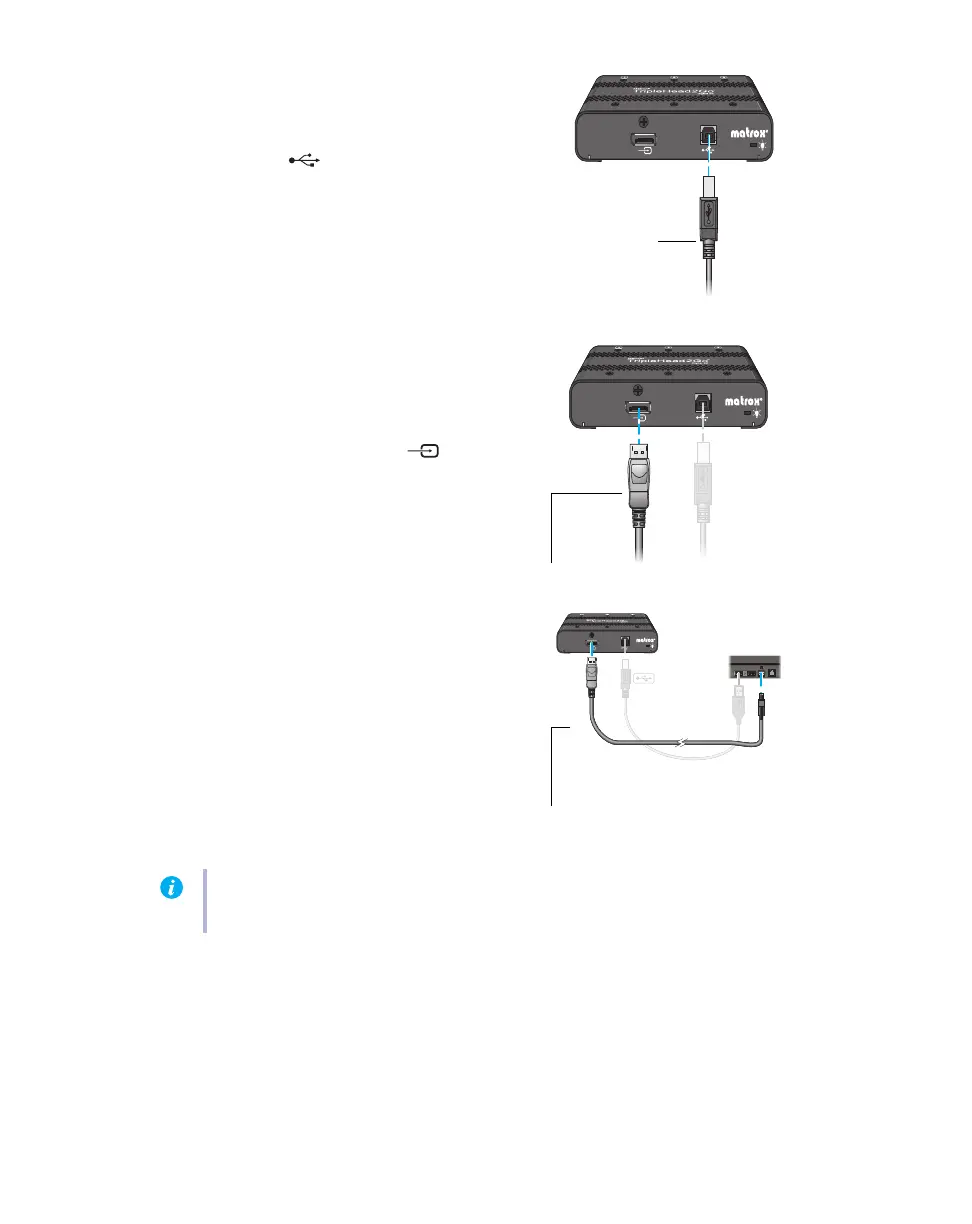
Connect the USB cable
Plug one end of the USB cable provided with
your Matrox product into the USB
connector ( ) on your Matrox product.
Plug the other end of the USB cable into a
powered USB port on your computer. For
more information on powered USB ports,
see your system manual.
3
Attach the Matrox input cable
Attach one end of the Matrox mini
DisplayPort to DisplayPort cable provided
with your Matrox product to the
DisplayPort input connector ( ) on your
Matrox product.
Attach the other end to the mini DisplayPort
graphics connector on your computer.
Matrox input cable
(DisplayPort to DisplayPort)
Matrox input cable
(Mini DisplayPort to DisplayPort)
Note:
To avoid problems related to image quality, make sure the DisplayPort connection to
your graphics hardware is firmly in place.


 To Next Page