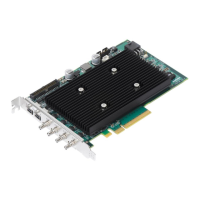
The Matrox Meteor-II /1394 is an IEEE 1394-to-PCI adapter board designed for simplified, high-performance digital video capture using a computer. It is available for the PCI form factor.
Function Description:
The Matrox Meteor-II /1394 board acts as an interface between IEEE 1394 devices (such as digital cameras) and a computer's PCI bus. It enables the capture of digital video data from these devices. The board is capable of acting as a bus manager (cycle master), an isochronous resource manager, and a node controller ("root") within the 1394 network. The cycle master triggers data signals at 125-microsecond intervals. The isochronous resource manager is responsible for reserving, distributing, and managing both isochronous and asynchronous data streams across the available bandwidth. The root controller can manage up to 62 peripheral devices connected to the network. The 1394 bus transfers real-time (isochronous) data streams through a four-layered architecture, with the Physical Layer and Link Layer implemented in hardware on the board.
Important Technical Specifications:
- Interface: IEEE 1394-to-PCI adapter board.
- Form Factor: PCI.
- Input Ports: Three IEEE 1394 input ports (6-pin connectors) for attaching 1394 devices, complying with the IEEE 1394 tree topology.
- Data Bus Rates: Supports serial data bus rates of 100, 200, or 400 Mbits per second, shared across the three ports.
- Power Supply: Can supply power from the computer to the camera through the IEEE 1394 interface. An auxiliary power supply input (standard 4-pin male connector) routes 12V power from the computer's power supply to the board. The total current drawn by all connected cameras is limited to 1.10 A.
- PCI Bus Interface: 32-bit PCI bus interface, capable of a peak transfer rate of 132 Mbytes/sec.
- Physical Layer (PHY): Part of the bi-directional interface between the link layer and the IEEE 1394 serial bus. It converts and reformats commands and digital data for transmission, monitors line conditions for connection status, initialization, arbitration, and handles packet reception and transmission. Supports data transmission rates up to 400 Mbits per second.
- Link Layer (Link): The second component in the bi-directional interface between the physical layer and the PCI bus. It is a PCI-to-1394 Host controller, compliant with PCI and 1394 OHCI specifications. Supports both asynchronous and isochronous data transfer between nodes. Controls transfer speed between itself and the PHY, and supports data transfers of 100, 200, or 400 Mbits per second. Capable of transferring a cacheline of data at 132 Mbytes per second over the PCI bus. Includes deep FIFOs to overcome high or long PCI latency.
- Galvanic Isolation Barrier (Optional): Isolates the Matrox Meteor-II /1394's ground from that of the 1394 network, preventing ground loops and protecting components from potential differences or power surges.
- Operating Voltage and Current: 5 V ±5%, 250 mA; 12 V ±10%, 50 mA.
- Power Consumption: 1.85 watts (board only, excluding attached 1394 devices).
- Operating Temperature: 0°C - 55°C.
- Storage Temperature: -40°C - 75°C.
- Max Altitude for Operation: 3000 meters.
- Max Altitude for Transport: 12000 meters.
- Operating Humidity: 20 - 80% relative humidity (non-condensing).
- Supported Video Formats: MIL-Lite can be used to grab from monochrome or color digital IEEE 1394 DCAM-compliant cameras. YUV 4:2:2 data is grabbed in UYVY format.
- Compatibility: Does not support the Matrox Meteor-II MJPEG module.
Usage Features:
- Simplified Digital Video Capture: Designed to simplify the process of capturing high-performance digital video.
- Multiple Device Connectivity: Features three IEEE 1394 input ports, allowing multiple 1394 devices to be attached, provided the configuration adheres to the IEEE 1394 tree topology.
- Software Support: Operates with Matrox Imaging software products such as Matrox Imaging Library (MIL), MIL-Lite, ActiveMIL, ActiveMIL-Lite, and Matrox Inspector. MIL-Lite includes commands for image acquisition, transfer, display control, and archiving. ActiveMIL provides ActiveX controls for rapid application development. Matrox Inspector is an interactive Windows application for image capture, processing, analysis, and archiving. Matrox Intellicam, an interactive Windows program for fast camera interfacing and access to acquisition features, is included with MIL/ActiveMIL and MIL-Lite/ActiveMIL-Lite.
- System Requirements: Requires a computer with a PCI bus and an Intel Pentium processor (or equivalent) or better. Recommended chipsets for full functionality include Intel 440BX, 810, 815E, 820, 840, or 850 for better data transfer rates. An empty 32-bit PCI expansion slot (bus-master capable) is necessary. A CD drive and hard disk/network drive are needed for software installation.
- Powering Devices: The board can supply power to connected 1394 devices (e.g., cameras) via the IEEE 1394 interface, using an auxiliary power supply input from the computer.
- Installation Process: Involves physically installing the board into an empty 32-bit PCI slot in the computer, securing it, and then installing the Matrox Imaging software.
- Driver Installation: For Windows NT, the board must be installed before the software. For Windows 2000, the Plug-and-Play system might detect a new PCI card; users should cancel driver assignment at this stage as the driver will be installed with MIL or its derivatives.
Maintenance Features:
- Troubleshooting Guide: Appendix A provides solutions for common installation and grabbing problems, including issues with power cords, driver installation, BIOS conflicts, IRQ conflicts, and DMA memory allocation.
- Static Electricity Precautions: Emphasizes the importance of draining static electricity before handling components to prevent damage to sensitive electronic circuits.
- Customer Support: Users are advised to contact their local Matrox representative, Matrox Sales Office, or Matrox Imaging Customer Support Group for problems not addressed in the manual. Information required for support includes a problem description, computer specifications, board serial number, and revision number.
- Product Return Procedure: Outlines steps for returning a defective board, including contacting customer support for an RMA, maintaining the original configuration, and packing the board in its original box with a completed Product Assistance Request form.

 Need help?

 To Next Page
 General