2
Throttle Trigger
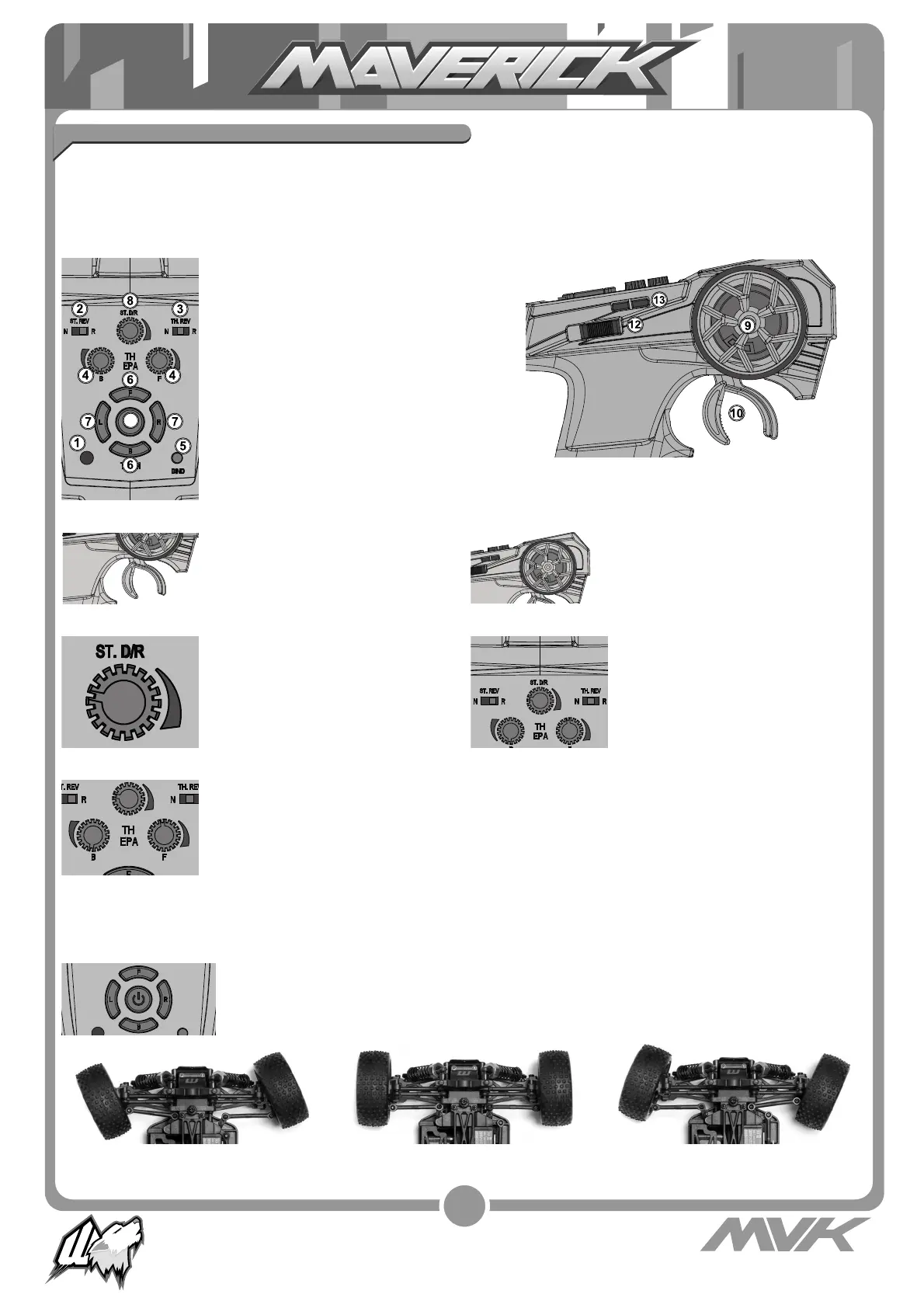
1. Power LED
2. Steering Reverse Switch
3. Throttle Reverse Switch
4. Throttle End Point Dial (low/high points)
5. Bind Button
6. Throttle Trim
7. Steering Trim
8. Steering Dual Rate (D/R) Switch
9. Steering Control
10. Throttle Trigger
11. Power Switch
12. Channel 3 Control
13. Channel 4 Control
• Pull the trigger to go forwards and
speed up
• Push the trigger forward to brake
• Push again for reverse
Turn the steering wheel to the left
or right to make the vehicle turn left
or right
The Steering (ST.REV) and Throttle
(TH.REV) reverse switches are
set to “N” (Normal) as standard.
To switch the direction of travel of
either the steering or throttle move
the switch to the “R” (Reverse).
The dual rate settings adjust the
maximum degree of movement from
the servo.
Turn the dial anti-clockwise to
reduce or clockwise to increase the
allowable degree of movement.
Transmitter
Your Transmitter is an advanced controller designed for the beginner to be easy to use and tune. You will need to
follow the steps below to ensure you prepare the controller correctly for use and understand the adjustment
possibilities available.
The function switches on the transmitter
Steering Wheel
Steering Dual Rate (D/R) Reverse Switches
Trim Setup
If the steering is not straight with the transmitter on, make sure the trim dial is set to the central position and adjust
the Servo horn on the car if needed. Then make fi ne adjustments with the steering trim whilst driving the vehicle.
The trim buttons have an audible beep when pressed. The central position is denoted with a double beep sound.
Throttle Trim
Throttle neutral adjustments can be made
by pressing the throttle trim “F” for more
throttle or “B” for more brake.
Steering Trim
Steering neutral adjustments can be made by
pressing the steering trim “L” left or “R” right
buttons.
If the wheels point left, press “R”. If wheels point right, press “L”.If they point straight no adjustment
required.
Throttle End Point Adjustment (EPA)
The throttle EPA allows you to adjust the maximum degree of movement of the throttle channel.
“F” sets the EPA for the throttle direction, “B” sets the EPA for the brake direction. Turn the dial
anti-clockwise to reduce or clockwise to increase the allowable degree of movement.
When using this transmitter with an electric powered vehicle, set the end points to the
maximum setting.
11






 To Next Page