10 11
Installing the Maverick XL Door Hardware
Step 1: Cut the remaining (2) tabs out of the door that are holding it closed
+ These are in place to secure door during shipping
Step 2: Slide door seal onto the door on the top, bottom, and handle side
+ You can trim the seal at each corner and the remaining seal piece to fit
between the door hinges
+ You may need to push or tap the seal on.
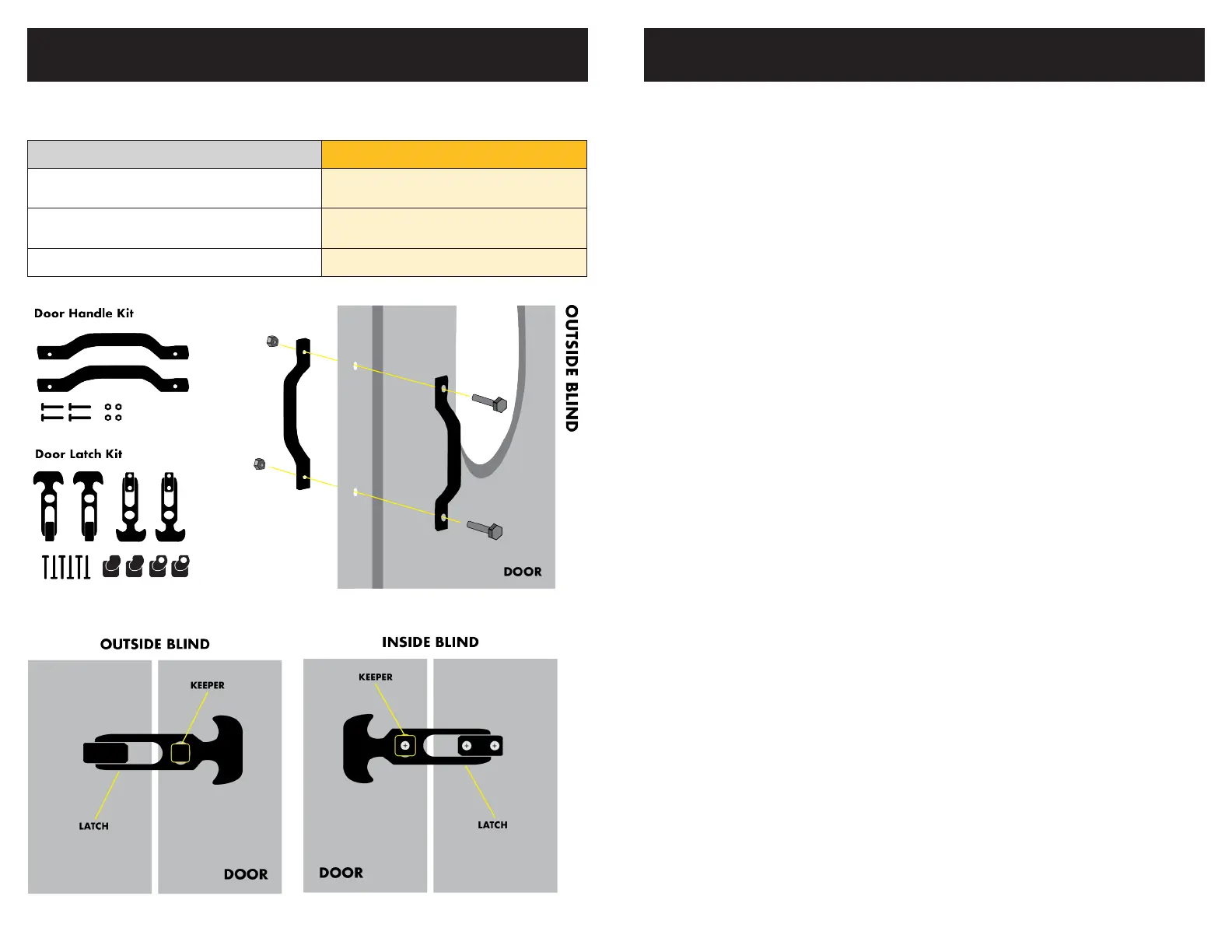
Step 3: Place door handles back-to-back using the middle set of pre-drilled holes
on the door using (2) bolts and (2) nuts
Step 4: Install door latch keepers using pre-drilled holes on the door
+ Keepers with through holes go on the inside of the blind
+ Install screw through the hole farthest from the seam of the door
(the other hole is for the locating tab on the keeper)
+ Screws install from the inside of the blind and thread into the keeper
on the outside of the blind
Step 5: Using the pre-drilled holes, install latches by attaching the bracket to the
wall of the blind
+ Latches with through holes go on the inside of the blind
+ Screws install from the inside of the blind and thread into the keeper
on the outside of the blind
Part XL
Door Latch Kit
(2 latches inside, 2 latches outside)
2 Sets
Door Handle Kit
(1 handle inside, 1 handle outside)
1
Door Seal 1
INSTALLING DOOR HARDWARE INSTALLING DOOR HARDWARE
XL Specic Instructions


 To Next Page
 Loading...