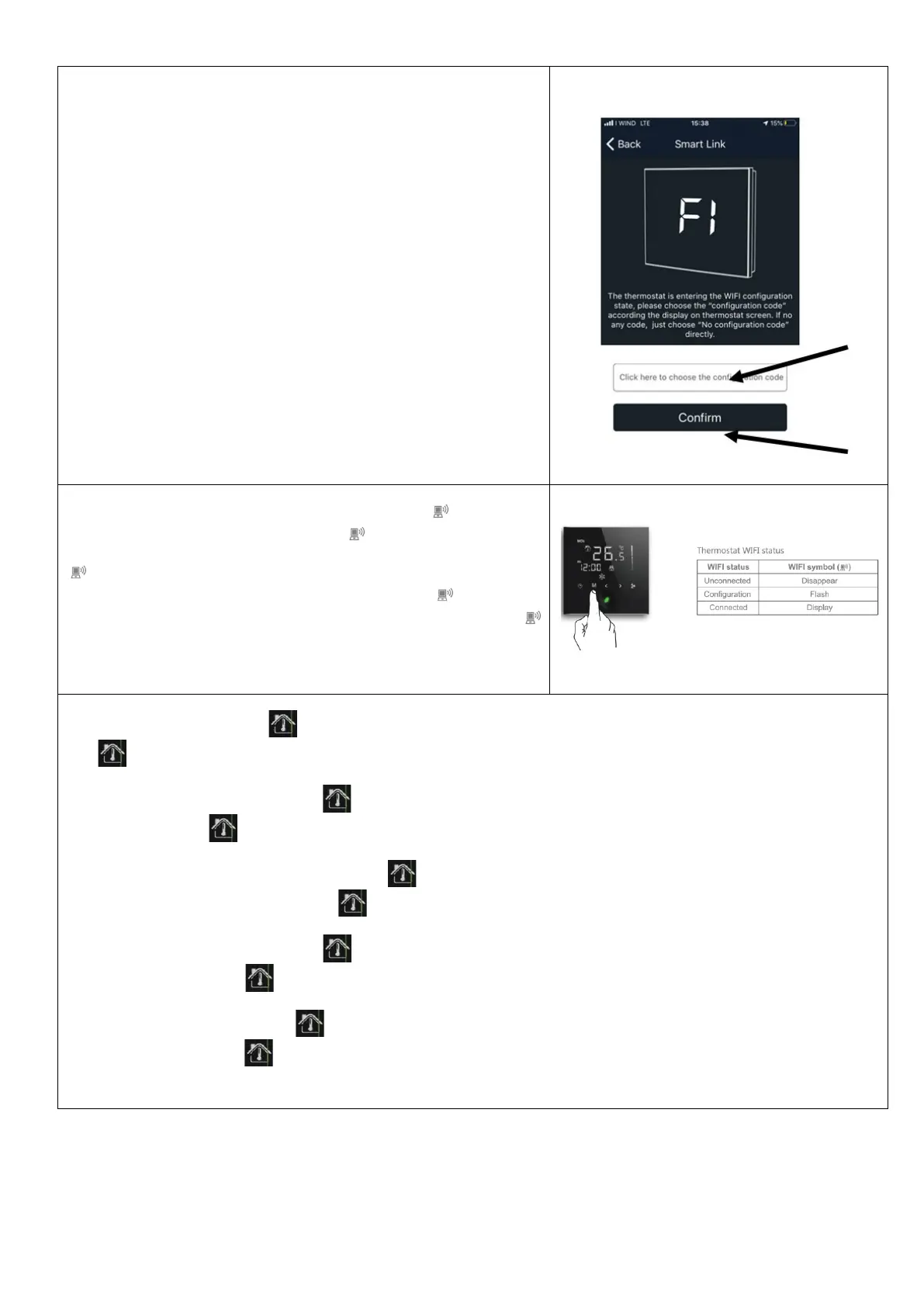
Quando compare la
schermata con indicazione F1, assicurarsi che sotto sia
indicato F1 e premere “Confirm”.
When
it appears F1 indication, please to ensure that also in the field below is
indicated always F1 and press “Confirm”.
Wenn es eine F1-Anzeige gibt, stellen Sie bitte sicher, dass auch im Feld darunter
immer F1 angezeigt wird und drücken Sie auf “Confirm”.
Quand il apparaît l'indication F1, veuillez vous assurer que le champ ci-
indique toujours F1 et appuyez sur "onfirm".
Cuando aparece la
indicación F1, asegúrese de que también en el campo
siguiente se indique siempre F1 y presione "Confirm".
Premere il pulsante "M" per 5 secondi sul termostato e l'icona lampeggerà.
Press “M” button for 5s on thermostat and icon will flash.
Drücken Sie die Taste "M" für 5 Sekunden auf dem Thermostat und das Symbol
wird blinken.
Appuyez sur le bouton "M" pour 5s sur le thermostat et l'icône va clignoter.
Presione el botón "M" durante 5 segundos en el termostato y el icono
parpadeará.
Nel termostato l’icona con la casa lampeggerà e comparirà la scritta F1…..la connessione alla WIFI sarà possibile quando l’icona della
casa rimarrà fissa.
in the thermostat, the icon with the house
starts blinking and F1 indication appears...... the WIFI connection it will be ensured when
the icon with the house will be fixed (no blinking)
Im Thermostat beginnt das Symbol mit dem Haus zu blinken und die F1-Anzeige erscheint. Über die WLAN-Verbindung wird
sichergestellt, dass das Symbol mit dem Haus repariert wird (kein Blinken).
Dans le thermostat, l'icône avec la maison
commence à clignoter et l'indication F1 apparaît ...... la connexion WIFI elle sera assurée
lorsque l'icône avec la maison sera fixe (pas de clignotement).
En el termostato, el ícono con la casa comienza a parpadear y aparece la indicación F1 ...... la conexión WIFI se garantizará cuando
se repare el ícono con la casa (sin parpadear).



 To Next Page