010
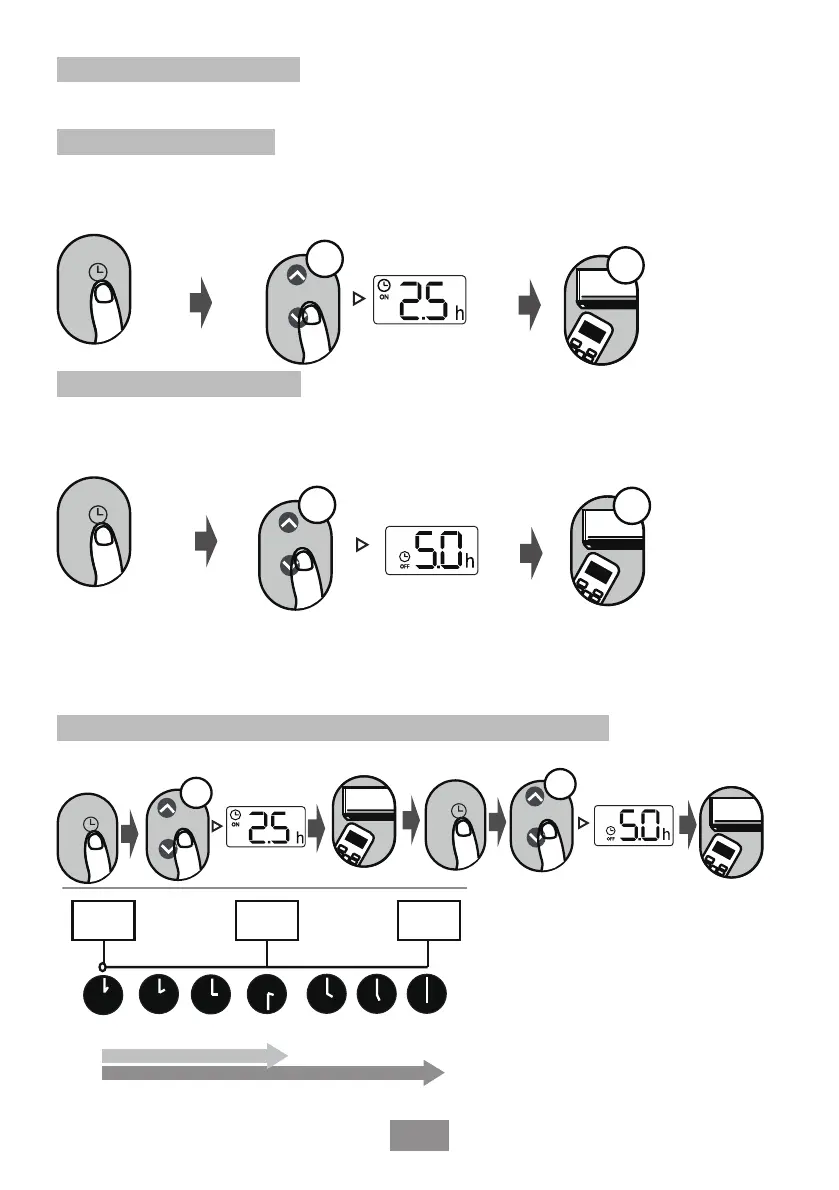
Impostazione del TIMER
TIMER ATTIVO/DISATTIVO - Imposta l'intervallo di tempo entro il quale l'unità si accenderà/
spegnerà automaticamente.
Attiva il Timer
Premere il pulsante
TIMER per avviare la
sequenza temporale.
Premere i pulsanti su e giù di
Temp. per più volte, al fine di
impostare l'ora desiderata in cui si
accende l'unità.
Puntare il telecomando all'unità
e attendere 1 secondo, il
TIMER verrà attivato.
O
N/O
FF
M
ODE
F
AN
SHORT
CUT
T
IME
R ON
TIM
ER
O
F
F
TEM
P
S
L
E
EP
1sec
x5
TIMER
Impostazione TIMER OFF
Premere il pulsante
TIMER per avviare la
sequenza temporale OFF.
Premere i pulsanti su e giù di
Temp. per più volte, al fine di
impostare l'ora desiderata in cui si
spegne l'unità.
Puntare il telecomando all'unità
e attendere 1 secondo, il
TIMER OFF verrà attivato.
O
N/O
FF
M
ODE
F
AN
SHORT
CUT
T
IME
R ON
T
IM
ER
O
F
F
T
EM
P
S
L
E
EP
1sec
x10
TIMER
NOTA:
1. Quando si imposta TIMER ATTIVO o TIMER DISATTIVO, il tempo aumenta di 30 minuti ad ogni
click, fino a 10 ore. Da 10 ore fino a 24, ad ogni click aumenta di 1 ora (ad esempio, premere 5 volte
per ottenere 2,5 ore e premere 10 volte per ottenere 5 ore). Il timer tornerà a 0.0 dopo 24 ore.
2. Annulla entrambe le funzioni impostando il timer su 0.0 h.
Impostazione del TIMER ATTIVO/DISATTIVO (esempio)
Si nota che le ore impostate per entrambe le funzioni si riferiscono alle ore successive all'ora corrente.
ON/OF
F
MODE
F
AN
SHORT
CU
T
T
I
M
E
R
ON
TIM
ER OF
F
TEMP
SL
E
E
P
ON/OFF
M
ODE
F
A
N
SHOR
T
CU
T
TIM
ER O
N
TIM
ER
OF
F
TEMP
SL
E
EP
xn
xn
xn
TIMER
TIMER
2:00PM3:00PM
4PM5PM
6PM
3:30PM
Inizia il
timer
L’unità si
accende
ACCESO
L’unità si
accende
SPENTO
Ora corrente
1 PM
Entro 2,5 ore
Entro 5 ore
Per esempio: Il timer corrente è
1:00 PM, secondo come viene
impostato il timer come sopra
indicato, l'unità si accenderà
entro 2,5 ore (15:30) e si
spegnerà alle 18:00.


 To Next Page
 Loading...