2-4-4. USB Interface Specification
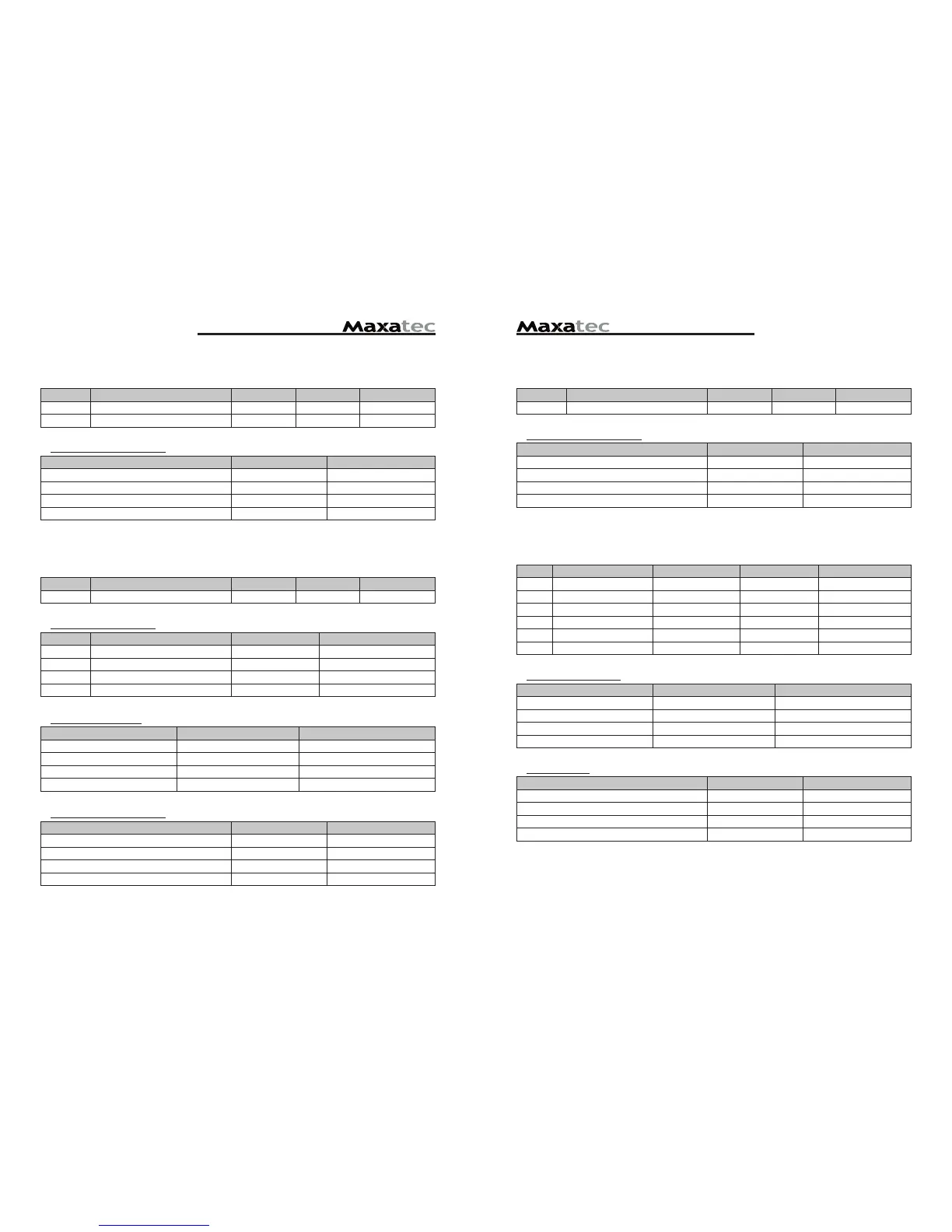
DIP Switch Set 1 Function
SW FUNCTION ON OFF DEFAULT
2 Hexadecimal HEXDUMP NORMAL OFF
Print Density (DIP-SW2)
Print Density SW-1 SW-2
Low Power ON ON
Normal OFF ON
Normal ON OFF
Dark OFF OFF
-------------------------------------------------old USB--------------------------------------------------------
DIP Switch Set 1 Functions
SW FUNCTION ON OFF DEFAULT
1 Data Receive Ignored Print “?” OFF
2 Hexadecimal HEXDUMP NORMAL OFF
3 Hand Shaking XON/XOFF DTR/DSR OFF
4 Data Length 7bits 8bits OFF
5 Parity Check ENABLED DISABLED OFF
6 Parity Check EVEN ODD OFF
Baud rate selection
Transmission speed SW-7 SW-8
4800 bps ON ON
9600 bps OFF ON
19200 bps ON OFF
38400 bps OFF OFF
Print Density
Print Density SW-9 SW-10
Low Power ON ON
Normal OFF ON
Normal ON OFF
Dark OFF OFF
--------------------------------------------------------------------------------------------------
2-4-2. Parallel Interface Specification
DIP Switch Set 1 Function
SW FUNCTION ON OFF DEFAULT
2 Hexadecimal HEXDUMP NORMAL OFF
5 Bi-Parallel mode DISABLED ENABLED OFF
Print Density (DIP-SW2)
Print Density SW-1 SW-2
Low Power ON ON
Normal OFF ON
Normal ON OFF
Dark OFF OFF
2-4-3. USB COMBO Interface Specification
DIP Switch Set 1 Function
SW FUNCTION ON OFF DEFAULT
2 Hexadecimal HEXDUMP NORMAL OFF
COMBO Serial Option
SW FUNCTION ON OFF
3 HANDSHAKING XON/XOFF DTR/DSR
4 DATA LENGHT 7BITS 8BITS
5 PARITYCHECK ENABLED DISABLED
6 PARITYCHECK EVEN 0DD
Baudrate selection
Transmission speed SW-7 SW-8
4800 bps ON ON
9600 bps OFF ON
19200 bps ON OFF
38400 bps OFF OFF
Print Density (DIP-SW2)
Print Density SW-1 SW-2
Low Power ON ON
Normal OFF ON
Normal ON OFF
Dark OFF OFF


 To Next Page