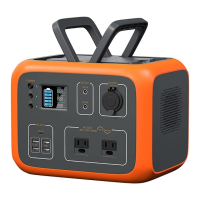
Need help?
Do you have a question about the MAXOAK Bluetti EB120 and is the answer not in the manual?
Identifies and describes all external components and ports of the portable power station.
Explains the information presented on the LCD screen, including input, output, and battery status indicators.
Essential safety warnings for handling, environment, and maintenance before product use.
Recommendations for proper storage and maintenance to ensure product longevity and performance.
Lists all included items and guidance for verifying package integrity and contents upon arrival.
Key considerations for environment and product status before operating the power station.
Step-by-step guide to turn the power station on and off using the master power button.
Instructions on how to activate and deactivate AC and DC output functions.
Procedure for activating the PV charge function for solar energy input.
Connect solar panels to charge the unit; display shows charging status.
Use AC adapter to charge; unit stops automatically when fully charged.
Impact of cold weather on battery capacity and low-temperature protection features.
Answers to common questions about charging status and device compatibility with output ports.
Details when the cooling fan activates and how system adjusts temperature.
Guide to entering setting mode and selecting the AC output frequency.
Lists common error codes, their problems, and recommended solutions for troubleshooting the device.
Information and details required for contacting customer service for unresolved issues.
Details inverter output voltage, frequency, power, power factor, and overload protection.
Specifications for the 12V cigarette lighter socket, including voltage and current ratings.
Details the maximum output current for the 5V USB ports.
Specifications for Type-C PD port, including voltage, current, and protocols.
Details AC adapter, PV input power, voltage range, current, and MPPT efficiency.
Information on rated voltage, capacity, battery cell type, and packing for different models.
Details IP rating, operating environment (humidity, temperature), dimensions, and net weight.
States that the product comes with a 12-month warranty from the date of purchase.
Provides contact details for inquiries or comments regarding the product.
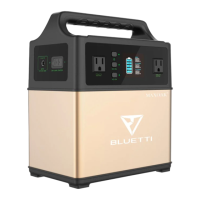
This document describes a portable power station, branded BLUETTI by MAXOAK, with models EB120, EB150, EB180, and EB240. It serves as an off-grid power storage system, designed to provide portable power for various electronic devices and small appliances.
The portable power station integrates several key components to deliver versatile power solutions. At its core, it features a Battery Management System (BMS) that oversees the battery's operation, ensuring safety and efficiency. Power input can be sourced from DC power, solar panels, or an AC charger. A charge controller manages the charging process, optimizing it for the chosen input source.
For AC output, the device incorporates a pure-sine-wave inverter, which converts the battery's DC power into clean, stable AC power suitable for sensitive electronics. An AC output controller manages this process. DC output is also available, including a 12V/9A cigarette lighter socket and Type-C/USB output ports. These outputs are designed to power a range of devices such as mobile phones, tablets, and small appliances.
The device features a master power button for overall control, along with separate AC and DC power buttons to activate specific outputs. A display screen provides real-time information, including charging power, DC ON/OFF status, AC ON/OFF status, and battery status. LED indicator lamps offer additional visual cues regarding the device's operational state. An AC charger/PV input port allows for flexible charging from either a wall outlet or solar panels, while a 12V cigarette lighter socket and AC100-120V outlet (US standard socket) provide diverse output options.
To operate the power station, users first press and hold the master power button for approximately 2 seconds to turn it on. The LED indicator light and display screen will illuminate. Similarly, holding the master power button for 2 seconds will turn the device off.
For AC/DC output, ensure the product is turned on. Then, press and hold the respective AC or DC power button to activate the output. The corresponding LED indicator light will turn on, and the display screen will show "AC ON/DC ON." To turn off the output, press and hold the AC or DC power button again.
The device supports charging via solar power or an AC adapter. When connecting a solar charging cable or AC adapter to the input port, the display screen will light up and show the charging power. It's important to note that the product will not automatically turn on when being charged; if it was previously off, it will remain off until manually turned on. The built-in advanced control circuit automatically stops charging once the battery is fully charged.
In cold weather, the device has protective measures. While it can discharge in sub-zero temperatures (below 0°C), charging is not recommended below 0°C as it can damage the battery. The device will automatically shut off and stop charging if the temperature is below 0°C and will reboot and resume charging when the temperature rises above 10°C. For discharging, it will turn off at -20°C and reboot/turn on output when the temperature rises above -10°C.
An intelligent cooling control system activates the cooling fan automatically under specific conditions: when the inverter load exceeds 400W, the 12V cigarette lighter socket load exceeds 80W, or the charging power of attached appliances exceeds 100W. The system also adjusts PV input or AC output power based on the outer case temperature to maintain a touchable temperature.
Users can check the charging status via the battery icon, which displays 5 segments. A flashing icon indicates charging, and all 5 segments filled signify a full charge. The device's maximum continuous output power (e.g., 1000W for AC output) dictates the types of electronic devices it can power.
The device also allows for frequency setting. With the product powered on, DC output on, and AC output off, pressing and holding both the DC and AC buttons simultaneously enters setting mode. The AC power button can then be used to choose the inverter AC output frequency. Holding both buttons again exits the setting mode, and the machine should be restarted.
Proper storage and maintenance are crucial for extending the product's life and ensuring reliable performance. The device should be stored in a dry, well-ventilated area with a mild temperature (0°C to 40°C) and relative humidity between 10% and 90%. It should be placed in a safe area, protected from impacts or shaking, and kept away from corrosive and combustible materials.
If the product is not in use, it will automatically turn off after 60 seconds of inactivity. If the AC/DC output is on but inactive, the backlight will turn off, requiring any button press to reactivate it.
If the battery voltage becomes too low, the product will turn off automatically, and the battery needs to be charged within 2-3 months. For long-term storage, it is recommended to fully charge the product before storing it and then charge it at least once every month in a dry environment. A full charge before storage and every 3 months is advised.
The product should be wiped clean with a dry cloth. In case of fire, only dry powder fire extinguishers should be used; water extinguishers are not suitable due to the risk of electric shock. Users are explicitly warned not to alter or disassemble the product. If maintenance is required, contact the local designated system installation and maintenance personnel or the seller.
The manual also provides a troubleshooting guide for various error codes (E001-E017), offering solutions such as stopping charging, restarting the machine, checking for overloads, or disconnecting charging cables. If problems persist, users are instructed to contact customer service with detailed information about the product (serial number, model, screen information, problem description, occurrence history, circumstances) and, if applicable, the solar panel used (manufacturer, model, output voltage/power, MPPT voltage/current, number of panels, connection method). This comprehensive approach ensures that users can effectively diagnose and resolve common issues or seek expert assistance when needed.
 General
| Battery Capacity | 1200Wh |
|---|---|
| Battery Type | Lithium-ion |
| AC Outlet Voltage | 110V |
| AC Outlet Frequency | 60Hz |
| AC Outlets | 2 |
| AC Output (Surge/Peak) | 1200W |
| USB Ports | 4 |
| USB Output | 5V/3A |
| DC Output | 12V/10A |
| Car Input | 12V/10A |
| Warranty | 24 months |
| AC Charging Time | 7-8 hours |
| Operating Temperature | -4°F to 104°F |

 To Next Page