Produci Parameters
Battery:
Capacity:
Charger
inpul:
lnput:
Outpui:
Charging time:
Cycle life:
Working teoperature:
Storage temperature:
Product sizei
Li-Polymer battery
5000omAh/r8swh
AC't00v-230v
DC 16.8V/2.5A
USB'l&2:5V/2.1A
USB3&4:5V/1.0A
DC'l:'12.0V/2.5A
DC2:20.0V/3.0A
6-8
houJs
:1000 times
ot',lsec
-10t-40r
206.9x136x33mm
8.1*5.3*1.7inch
Product
Overview
Producl Standard: G831241 -2O1 4
Product Accessory
Laptop
power
bank:
AC charger:
USB cable:
oc Adaptor:
Laptop charge connector:
Multifunclion bag:
Manual:
A
safety Guidelines
.
Please check lhe OC output vollage of
your
laptop fi rst, make
sure the charging vollage is consistent with the output voltage
o,
power
bank. Oo not mix
up
DC
'l2V
and DC 20V output voltage,
othe.wise
wrongly
operation
may
cause damage of
your
device,
.
Please
charge
power
bank wilh our attached origlnal adapter.
.
Prohibit using in bathroom6 or damp
places
or other
places
6a3y access to water.
.
Keep the
product
out of children's reach.
.
Don'l make
reverse
connection ofthe oulput and lnput
port.
.
Oon't
put
this
product
lnio flre.
.
Don't use this
product
in high temperaturo onvironment
(above
60t).
.
Pl.asodon'tbump/beat/shaketheproducl, oth€rwiselhe
internal circuit may
g€l
damaged.
.
Don't charge or use thls
product
in inllammabl€ 6nvironment.
.
Only
prolessional
technlclans or designated
malntenance
agencies are allowed to disassemble or repairihis
product.
.
Unauthorized disassembllng orrepairmayleadto damage
and danger.
.
Please make sure
lhe charging
voltage
of the digital
devices
match the outputvoltago
port
ofpowerbank when chargefor
digital devices such a3
cellphone/laptop/DV
xl
xl
xl
xt
x14
x1
x1
r-\
Charging
power
bank
LJ
AC Charger
Plug th€ DC outpu(
port
of AC adapter charger lnto the input
port
of
power
bank, and atlach the other side to wall outlet.
PayAtlention:
The K2
power
bank can not be recharged by aolar
panel
or car chargen
r-\
Product Feature
L-/
1.
Support charging and discharging al
the
same
time.
2.
Press ON-buttonr fast turn on, LED indlcates the remaining
power.
3.
Press OFF-button:
stay
2s for
power
off.
4. Auto turn
off:
power
bank lurns
off automatically in 30s if no load.
Laptop Power
Bank
Afler-sale
service commltm6nts'1 2 month warranty
ffimffi
o
O
Charging
port
O
Capacityindicato6
O
On-off/ function button
O
Output
pot:
20.0V/3A
O
Output
port:
12.0V/2.5A
O
Ourput
pod:
USB'I 5Vl2.1A
usB2 5V/2.1A
O
Outplt
porti
USB3
5V/1A
usB4 5Vl1A
A
We
Suggest
Fully Charge Our Power Bank Every Six l\,4onths
MtrMME@
5.LED llghts in dlscharging slalus
0-25%:
LEOI llghting
257.-50%: LEDI, LED2 lishting
50%-75%: LEOl,
LED2, LED3 llghtlng
7s%-100'/ot LEO1, LED2, LED3, LED4 lighting
Low voltago alarmi LED I flashlng
6. LED llghts ln charging
status
0-25%:
LEDI
flashing
25oh-50rlot
l-eD'l
lighiing, LED2 fla!hing
500/6-75%: LEDI, LED2 lightlng, LED3 fashing
75%-99%: LEOI, LED2, LED3 llghting, LED4flashing
100%fully chargedi LED'1, LED2, LED3, LED4 lighting
All LED indlcators light off when charglng cabl'e is disconnectod.
r-)
Other Multi-functional Applications
L-/
Charging tor mobile
phonerlaptop/olhe.
dlgital eleckonic
produd3.
l. Power
bank supports
all 5V
USB
Powored digital electronic
products.
You can use
your
own USB cables for charglng.
2.
Slightly
pre6s
the on-off bulton
afler
connecling well, Power
bank
starts
charglng.
Power bank wlll
pow6r
olf aulomatically ln 3Os It
charging cable is disconnect€d,
Er"#
Charging
for laptop
1. Never mix up DCI2V and OC20V output.
2. We configure 14 different laptop connectors for
power
bank,
pleas6
choose an appropriate one for charging
your
lapiop.
3. Please check the
DC outpui Voltagg
of
your
laptop carefully lo
choose the appropriate output
port
before charging
your
laptop.
4. Slighlly
pr€ss
lhe
on-off button after connecting well, Power bank
starts charging. Power bank will
power
oIf automatically in 303 It
charging cable
is disconnected.

 Need help?
 General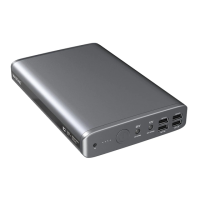

 To Next Page