After Sales Support
UK/N.IRELAND HELPLINE N
O
:
REP.IRELAND HELPLINE N
O
:
WEBSITE:
EMAIL:
01270 508538
1800 995 036
www.quesh.co.uk
enquiries@quesh.co.uk
8
Using the Speaker
Volume Controls
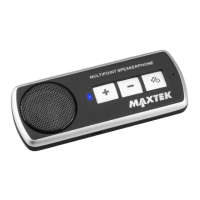
Use the ‘+’ or ‘-’ buttons to increase or decrease the volume level
with a quick press.
Answering or Ending a Call
Press the ‘On/Off’ button to answer or end an incoming call.
Rejecting an Incoming Call
Press ‘On/Off’ button twice quickly to reject an incoming call.
Call Last Number
Double press the ‘On/Off’ button to call the last number on the
current connected mobile phone.
Transferring a Call
You can change between the Speaker and the mobile phone to
interact with a call by pressing the ‘Mode’ button.
Making a Call
If your mobile phone supports voice activated dialing you can use
this feature to make out going calls. If your phone does not support
voice activated dialling then you will have to select a number to dial.


 To Next Page