After Sales Support
UK/N.IRELAND HELPLINE N
O
:
REP.IRELAND HELPLINE N
O
:
WEBSITE:
EMAIL:
01270 508538
1800 995 036
www.quesh.co.uk
enquiries@quesh.co.uk
6
To pair the keyboard rstly turn the keyboard on with the on/off
switch and put your tablet into bluetooth mode.
Press the ‘CONNECT’ button on the keyboard and search for and
select ‘MAXTEK KB’ on the device list on the tablet. A dialogue box
will appear asking you to type in a security number on the
keyboard. Enter the security number on the keyboard and press
enter.
Please Note:
The keyboard is in an American layout, you may need to change
the regional keyboard settings.
Pairing
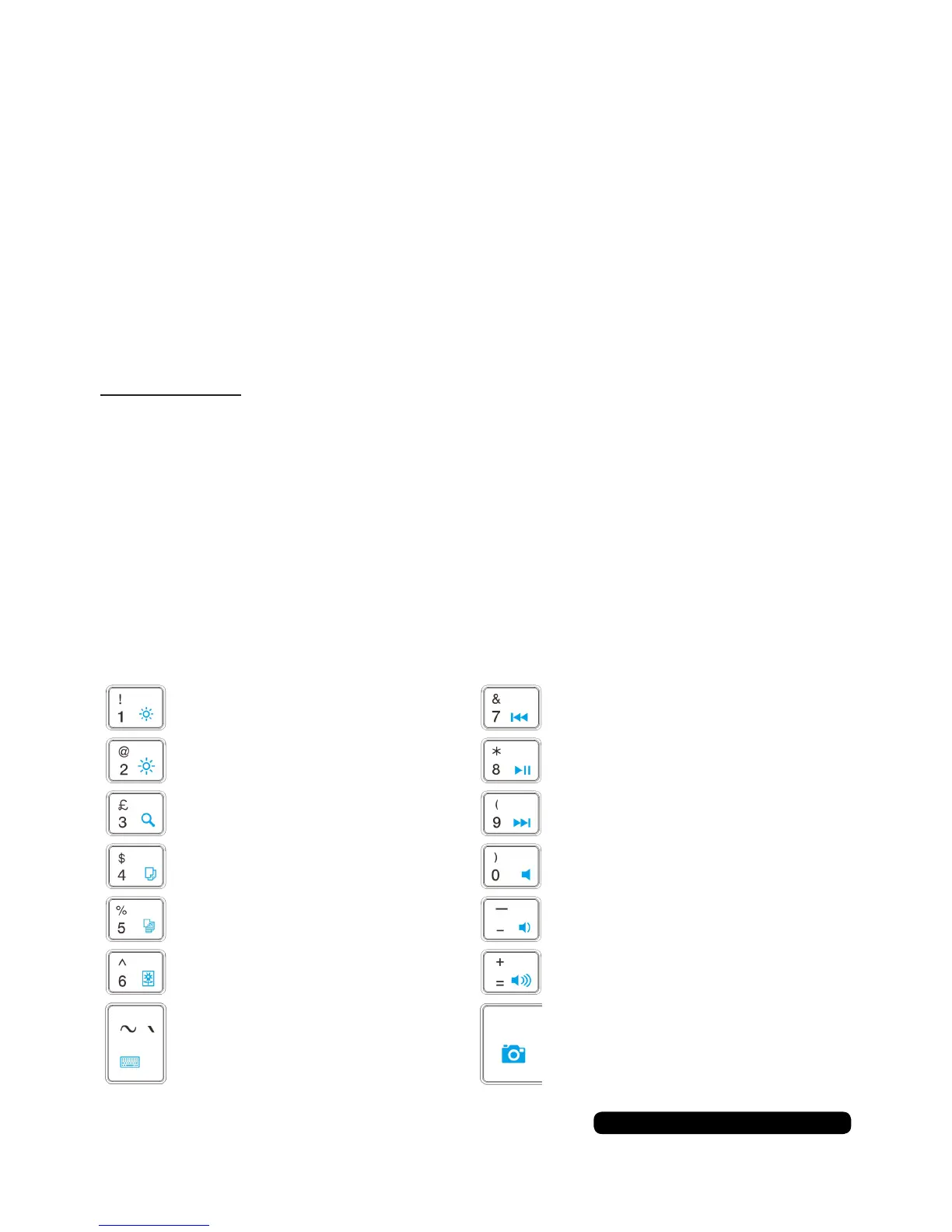
Icons
- Brightness
+ Brightness
Search
Copy
Paste
On Screen Keyboard
Image App
Skip Back
Play / Pause
Skip Forward
Mute
On Screen Keyboard
- Volume
+ Volume
Press and hold the ‘Fn’ then press the required key to use the icons
in blue.



 To Next Page