EasyManua.ls Logo

Maxwell MW-3751 W - User Manual

Maxwell MW-3751 W
66 pages
Go to English
Print Icon
To Next Page IconTo Next Page
Loading...
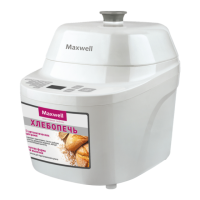
Хлебопечь
MW-3751 W
mw-3751.indd 1 18.05.2012 17:58:43

Questions and Answers

  • J
    Jose NormanAug 2, 2025
    Why is the bread structure not homogeneous in my Maxwell MW-3751 W Bread Maker?
    • A
      Ashley PetersAug 2, 2025
      If the bread structure is not homogeneous or the Maxwell Bread Maker bread went wrong, it could be due to several reasons. You might have selected the wrong mode; in that case, view the available baking programs and select another program by pressing the «MENU» button repeatedly. It could also be due to accidental pressing of the «START/STOP» button or a long power cutoff during operation; if so, load all necessary ingredients again and start the baking process from the very beginning. Avoid frequently opening the lid during operation, and only open it when the program requests supplementary ingredients. Finally, the paddle may be blocked. If so, take the form out and check if the drive is rotating. In case of any defect contact the authorized service center.
  • T
    Tracy SmithAug 6, 2025
    What to do if symbols «EEE» appear on Maxwell MW-3751 W Bread Maker display?
    • D
      Douglas VargasAug 7, 2025
      If you see symbols «EEE» on the display of your Maxwell Bread Maker, it means there is a temperature sensor failure. Switch the unit off and contact the authorized service center.
  • S
    Scott HolmesAug 10, 2025
    Why is there smoke coming from my Maxwell MW-3751 W?
    • K
      karenknoxAug 10, 2025
      If you notice smoke coming from the ventilation openings of your Maxwell Bread Maker, it's likely that ingredients have fallen onto the heating element. To resolve this, switch the unit off by unplugging the power cord plug from the socket. Take the form out and let the unit cool down. Then, wipe the walls of the process chamber and the heating element with a wet cloth.
  • R
    Rita BrownAug 15, 2025
    Why did my Maxwell MW-3751 W Bread Maker bread drop and the bottom is damp?
    • T
      Tiffany KempAug 15, 2025
      If the baked bread dropped and the bottom part of the bread is damp in your Maxwell Bread Maker, it means that the bread has stayed in the bread maker for too long after baking. When making bread according to this recipe switch the unit off immediately after the bread is ready.
  • K
    kmurphyAug 19, 2025
    How to prevent bread from sticking to the Maxwell Bread Maker?
    • C
      Colton MillerSep 12, 2025
      If the bread has stuck to the walls of the baking form in your Maxwell Bread Maker and the bottom part of the bread has stuck to the kneading paddle, grease the paddle with oil before assembly.
  • S
    Selena GreenAug 23, 2025
    What to do if Maxwell Bread Maker shows «???» on the display?
    • R
      Robert VaughanAug 25, 2025
      If symbols «???» appear on the display of your Maxwell Bread Maker, it means the unit has not cooled down after the previous baking cycle. Unplug the unit, take the form out, and let the unit cool down at room temperature.
  • C
    Charles SavageAug 28, 2025
    What does «LLL» mean on my Maxwell MW-3751 W display?
    • V
      Veronica ClineAug 28, 2025
      If you see symbols «LLL» on the display of your Maxwell Bread Maker, it indicates a low temperature in the process chamber. Switch the unit off, open the lid and wait for 10-20 minutes.

Summary

Product Description

Component Identification

Identifies the main parts and components of the bread maker unit.

Control Panel Functions

Details the functions and buttons of the bread maker's control panel.

Safety Precautions

General Safety Guidelines

Essential safety measures to follow for the safe operation of the bread maker.

Baking Programs

Program Descriptions

Details on the various bread baking programs available for the unit.

Control Panel Operation

Button Functions

Explanation of key buttons like Crust Color, Menu, Start/Stop, and Loaf Weight.

Advanced Functions and Setup

Delay Timer Operation

Instructions for setting a delayed start time for the baking process.

Initial Unit Setup

Steps required before the first use of the bread maker.

Using the Bread Maker

Assembly and Preparation

How to prepare the unit and baking form before adding ingredients.

Starting a Baking Cycle

Step-by-step guide to load ingredients and start the baking process.

Ingredient Recommendations

Flour Types and Properties

Information on different flour types and their impact on bread baking.

Sugar, Yeast, and Salt Usage

Guidelines for using sugar, yeast, and salt for optimal bread results.

Ingredient Dosage and Measurement

Ingredient Measurement Guidelines

Precise methods for measuring ingredients using provided tools.

Ingredients Loading and Recipes

Ingredient Loading Order

Recommended sequence for adding ingredients into the baking form.

Basic and French Bread Recipes

Recipes for basic mode and French bread settings.

Specific Bread Recipes

Whole-Wheat, Fast, Sweet, Extra Fast, Sandwich

Recipes for various bread types including whole-wheat and fast baking.

Specialty Recipes

Gluten-Free, Jam, and Cake Recipes

Recipes for gluten-free bread, jam, and cake settings.

Cleaning, Storage, and Troubleshooting

Cleaning and Maintenance

Instructions for cleaning and maintaining the bread maker unit.

Storage Guidelines

Recommendations for storing the bread maker when not in use.

Troubleshooting Common Issues

Solutions for common problems encountered during bread maker operation.

Product Information and Support

Delivery Set Contents

List of all items included in the bread maker package.

Technical Specifications

Details on power supply, consumption, and operating life.

Warranty Information

Details regarding the guarantee conditions for the appliance.

Maxwell MW-3751 W Specifications

General IconGeneral
BrandMaxwell
ModelMW-3751 W
CategoryBread Maker
LanguageEnglish