20
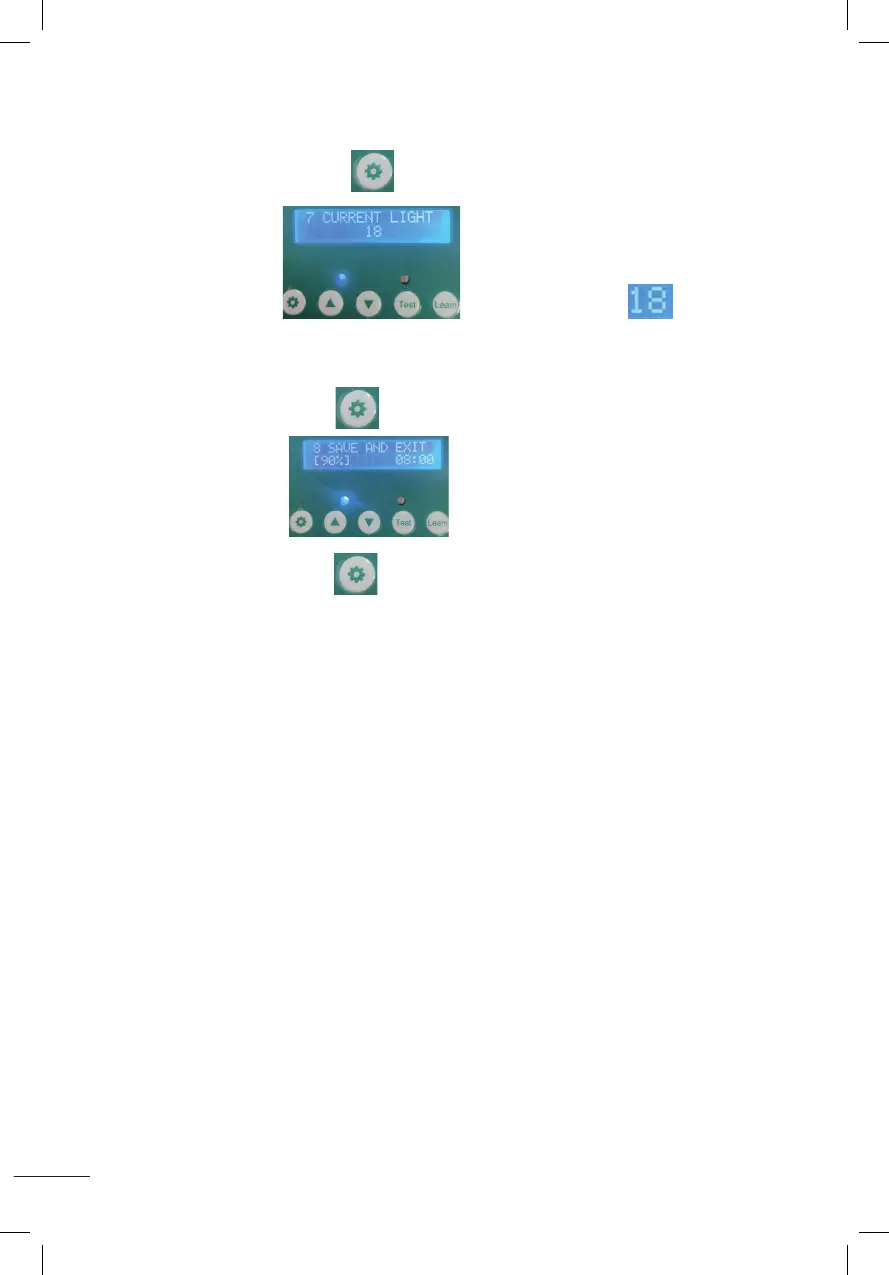
7. AUTOMATISCHE DETECTIE VAN HUIDIGE LUMENS
Drücken Sie die Einstelltaste 1 Sekunde lang und lassen Sie sie dann los,
wie im Bild gezeigt Die aktuellen Lumen entsprechen
der Abbildung.
8. SPEICHERN SIE DIE EINSTELLUNGEN UND KEHREN SIE ZUM STARTBILDSCHIRM ZURÜCK
Halten Sie die Einstelltaste 1 Sekunde lang gedrückt und lassen Sie sie dann los,
wie im Bild gezeigt
Halten Sie die Einstelltaste 1 Sekunde lang gedrückt und lassen Sie sie dann los.
Die eingestellten Parameter werden gespeichert und Sie kehren zum Startbildschirm
zurück.
7.Automatic sensing of current Lumens
Press the setting button for 1 second then release,it will display as shown
and the current Lumens is 18 as shown in the figure .
8.Save the settings and return to the desktop
Press the setting button for 1 second then release,it will display as shown
press the setting button again for 1 second then release,it will save the set parameters and return.
7.Automatic sensing of current Lumens
Press the setting button for 1 second then release,it will display as shown
and the current Lumens is 18 as shown in the figure .
8.Save the settings and return to the desktop
Press the setting button for 1 second then release,it will display as shown
press the setting button again for 1 second then release,it will save the set parameters and return.
7.Automatic sensing of current Lumens
Press the setting button for 1 second then release,it will display as shown
and the current Lumens is 18 as shown in the figure .
8.Save the settings and return to the desktop
Press the setting button for 1 second then release,it will display as shown
press the setting button again for 1 second then release,it will save the set parameters and return.
7.Automatic sensing of current Lumens
Press the setting button for 1 second then release,it will display as shown
and the current Lumens is 18 as shown in the figure .
8.Save the settings and return to the desktop
Press the setting button for 1 second then release,it will display as shown
press the setting button again for 1 second then release,it will save the set parameters and return.
7.Automatic sensing of current Lumens
Press the setting button for 1 second then release,it will display as shown
and the current Lumens is 18 as shown in the figure .
8.Save the settings and return to the desktop
Press the setting button for 1 second then release,it will display as shown
press the setting button again for 1 second then release,it will save the set parameters and return.
7.Automatic sensing of current Lumens
Press the setting button for 1 second then release,it will display as shown
and the current Lumens is 18 as shown in the figure .
8.Save the settings and return to the desktop
Press the setting button for 1 second then release,it will display as shown
press the setting button again for 1 second then release,it will save the set parameters and return.


 To Next Page
 Loading...