19
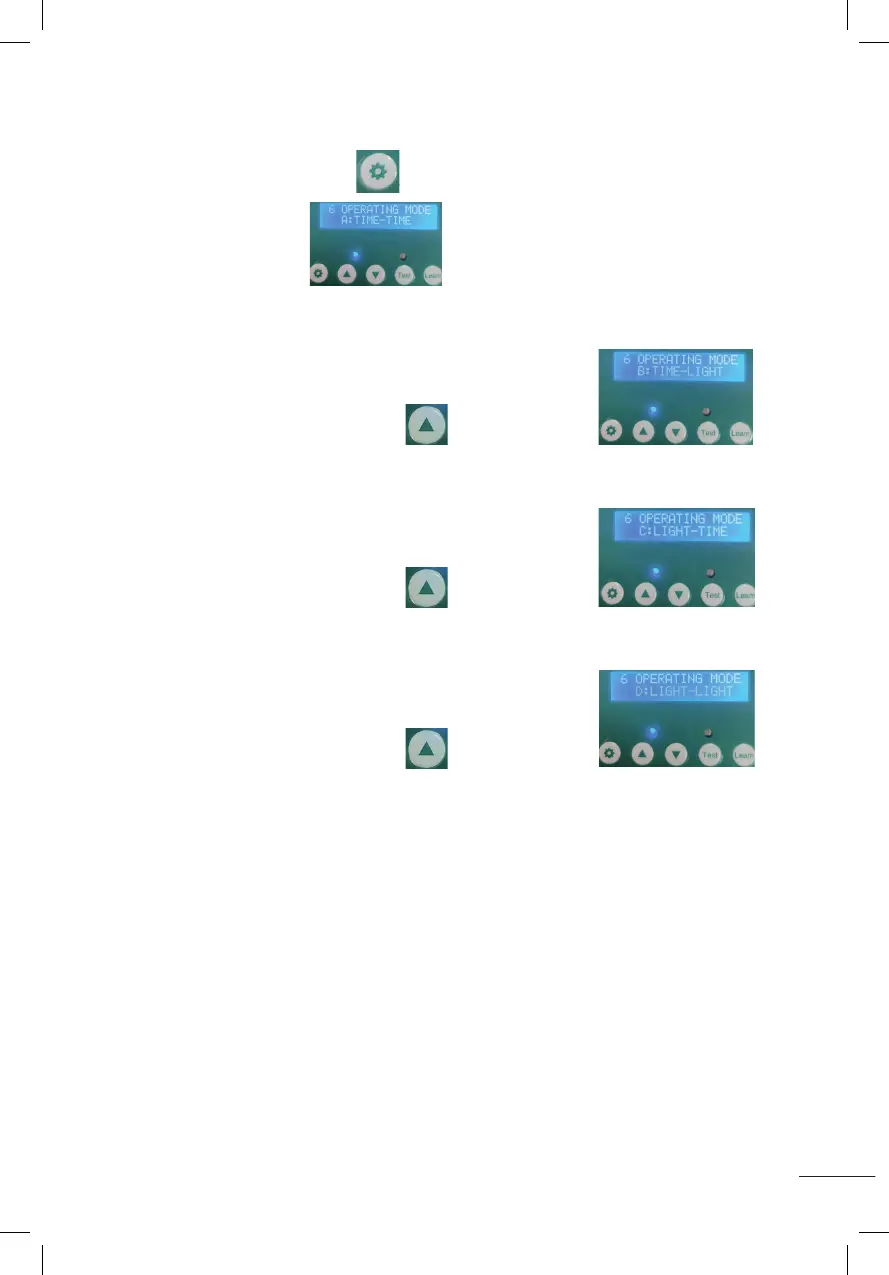
6. EINSTELLMODI (A-B-C-D) FÜR ZEIT UND LICHTSENSOR.
A. Halten Sie die Einstelltaste 1 Sekunde lang gedrückt und lassen Sie sie dann los,
wie im Bild gezeigt
MODE A: TIME-TIME: Tür öffnet nach eingestellter Zeit – Tür schließt nach
eingestellter Zeit.
B. Drücken Sie die Erhöhungstaste, wie im Bild gezeigt
MODE B: TIME-LIGHT: Tür öffnet nach eingestellter Zeit – Tür schließt nach
eingestelltem Lumen.
C. Drücken Sie die Erhöhungstaste, wie im Bild gezeigt
MODE C: LIGHT-TIME: Tür nach eingestellter Lichtstärke geöffnet - Tür nach
eingestellter Zeit geschlossen.
D. Drücken Sie die Erhöhungstaste, wie im Bild gezeigt
MODE D: LIGHT-LIGHT: Tür nach eingestelltem Lumen offen - Tür nach eingestelltem
Lumen geschlossen.
5.Set Lumens while door closing(00~23)(time range of door closing::12~23)
Press the setting button for 1 second then release, displaying as shown
(CLOSE LIGHT SET 12), it will start to flash as shown in the figure ,press the increase button or the
decrease button to adjust the Lumens.(Number 0 means minimum Lumens, weakest light. Number
23 means maximum Lumens, strongest light)
6.Setting Timing and Light Sensor Mixing Modes (A-B-C-D)
A:Press the setting button for 1 second and release,it will display as shown
A:TIME-TIME: Indicates time on - time off.
B: Press the increase button ,it will display as shown
B:TIME-LIGHT:Indicates time on-light off.
C:Press the increase button ,it will display as shown
C:LIGHT-TIME:Indicates light on-time off.
D: Press the increase button ,it will display as shown
D:LIGHT-LIGHT:Indicates light on-light off.
5.Set Lumens while door closing(00~23)(time range of door closing::12~23)
Press the setting button for 1 second then release, displaying as shown
(CLOSE LIGHT SET 12), it will start to flash as shown in the figure ,press the increase button or the
decrease button to adjust the Lumens.(Number 0 means minimum Lumens, weakest light. Number
23 means maximum Lumens, strongest light)
6.Setting Timing and Light Sensor Mixing Modes (A-B-C-D)
A:Press the setting button for 1 second and release,it will display as shown
A:TIME-TIME: Indicates time on - time off.
B: Press the increase button ,it will display as shown
B:TIME-LIGHT:Indicates time on-light off.
C:Press the increase button ,it will display as shown
C:LIGHT-TIME:Indicates light on-time off.
D: Press the increase button ,it will display as shown
D:LIGHT-LIGHT:Indicates light on-light off.
5.Set Lumens while door closing(00~23)(time range of door closing::12~23)
Press the setting button for 1 second then release, displaying as shown
(CLOSE LIGHT SET 12), it will start to flash as shown in the figure ,press the increase button or the
decrease button to adjust the Lumens.(Number 0 means minimum Lumens, weakest light. Number
23 means maximum Lumens, strongest light)
6.Setting Timing and Light Sensor Mixing Modes (A-B-C-D)
A:Press the setting button for 1 second and release,it will display as shown
A:TIME-TIME: Indicates time on - time off.
B: Press the increase button ,it will display as shown
B:TIME-LIGHT:Indicates time on-light off.
C:Press the increase button ,it will display as shown
C:LIGHT-TIME:Indicates light on-time off.
D: Press the increase button ,it will display as shown
D:LIGHT-LIGHT:Indicates light on-light off.
5.Set Lumens while door closing(00~23)(time range of door closing::12~23)
Press the setting button for 1 second then release, displaying as shown
(CLOSE LIGHT SET 12), it will start to flash as shown in the figure ,press the increase button or the
decrease button to adjust the Lumens.(Number 0 means minimum Lumens, weakest light. Number
23 means maximum Lumens, strongest light)
6.Setting Timing and Light Sensor Mixing Modes (A-B-C-D)
A:Press the setting button for 1 second and release,it will display as shown
A:TIME-TIME: Indicates time on - time off.
B: Press the increase button ,it will display as shown
B:TIME-LIGHT:Indicates time on-light off.
C:Press the increase button ,it will display as shown
C:LIGHT-TIME:Indicates light on-time off.
D: Press the increase button ,it will display as shown
D:LIGHT-LIGHT:Indicates light on-light off.
5.Set Lumens while door closing(00~23)(time range of door closing::12~23)
Press the setting button for 1 second then release, displaying as shown
(CLOSE LIGHT SET 12), it will start to flash as shown in the figure ,press the increase button or the
decrease button to adjust the Lumens.(Number 0 means minimum Lumens, weakest light. Number
23 means maximum Lumens, strongest light)
6.Setting Timing and Light Sensor Mixing Modes (A-B-C-D)
A:Press the setting button for 1 second and release,it will display as shown
A:TIME-TIME: Indicates time on - time off.
B: Press the increase button ,it will display as shown
B:TIME-LIGHT:Indicates time on-light off.
C:Press the increase button ,it will display as shown
C:LIGHT-TIME:Indicates light on-time off.
D: Press the increase button ,it will display as shown
D:LIGHT-LIGHT:Indicates light on-light off.
5.Set Lumens while door closing(00~23)(time range of door closing::12~23)
Press the setting button for 1 second then release, displaying as shown
(CLOSE LIGHT SET 12), it will start to flash as shown in the figure ,press the increase button or the
decrease button to adjust the Lumens.(Number 0 means minimum Lumens, weakest light. Number
23 means maximum Lumens, strongest light)
6.Setting Timing and Light Sensor Mixing Modes (A-B-C-D)
A:Press the setting button for 1 second and release,it will display as shown
A:TIME-TIME: Indicates time on - time off.
B: Press the increase button ,it will display as shown
B:TIME-LIGHT:Indicates time on-light off.
C:Press the increase button ,it will display as shown
C:LIGHT-TIME:Indicates light on-time off.
D: Press the increase button ,it will display as shown
D:LIGHT-LIGHT:Indicates light on-light off.
5.Set Lumens while door closing(00~23)(time range of door closing::12~23)
Press the setting button for 1 second then release, displaying as shown
(CLOSE LIGHT SET 12), it will start to flash as shown in the figure ,press the increase button or the
decrease button to adjust the Lumens.(Number 0 means minimum Lumens, weakest light. Number
23 means maximum Lumens, strongest light)
6.Setting Timing and Light Sensor Mixing Modes (A-B-C-D)
A:Press the setting button for 1 second and release,it will display as shown
A:TIME-TIME: Indicates time on - time off.
B: Press the increase button ,it will display as shown
B:TIME-LIGHT:Indicates time on-light off.
C:Press the increase button ,it will display as shown
C:LIGHT-TIME:Indicates light on-time off.
D: Press the increase button ,it will display as shown
D:LIGHT-LIGHT:Indicates light on-light off.
5.Set Lumens while door closing(00~23)(time range of door closing::12~23)
Press the setting button for 1 second then release, displaying as shown
(CLOSE LIGHT SET 12), it will start to flash as shown in the figure ,press the increase button or the
decrease button to adjust the Lumens.(Number 0 means minimum Lumens, weakest light. Number
23 means maximum Lumens, strongest light)
6.Setting Timing and Light Sensor Mixing Modes (A-B-C-D)
A:Press the setting button for 1 second and release,it will display as shown
A:TIME-TIME: Indicates time on - time off.
B: Press the increase button ,it will display as shown
B:TIME-LIGHT:Indicates time on-light off.
C:Press the increase button ,it will display as shown
C:LIGHT-TIME:Indicates light on-time off.
D: Press the increase button ,it will display as shown
D:LIGHT-LIGHT:Indicates light on-light off.


 To Next Page
 Loading...