18
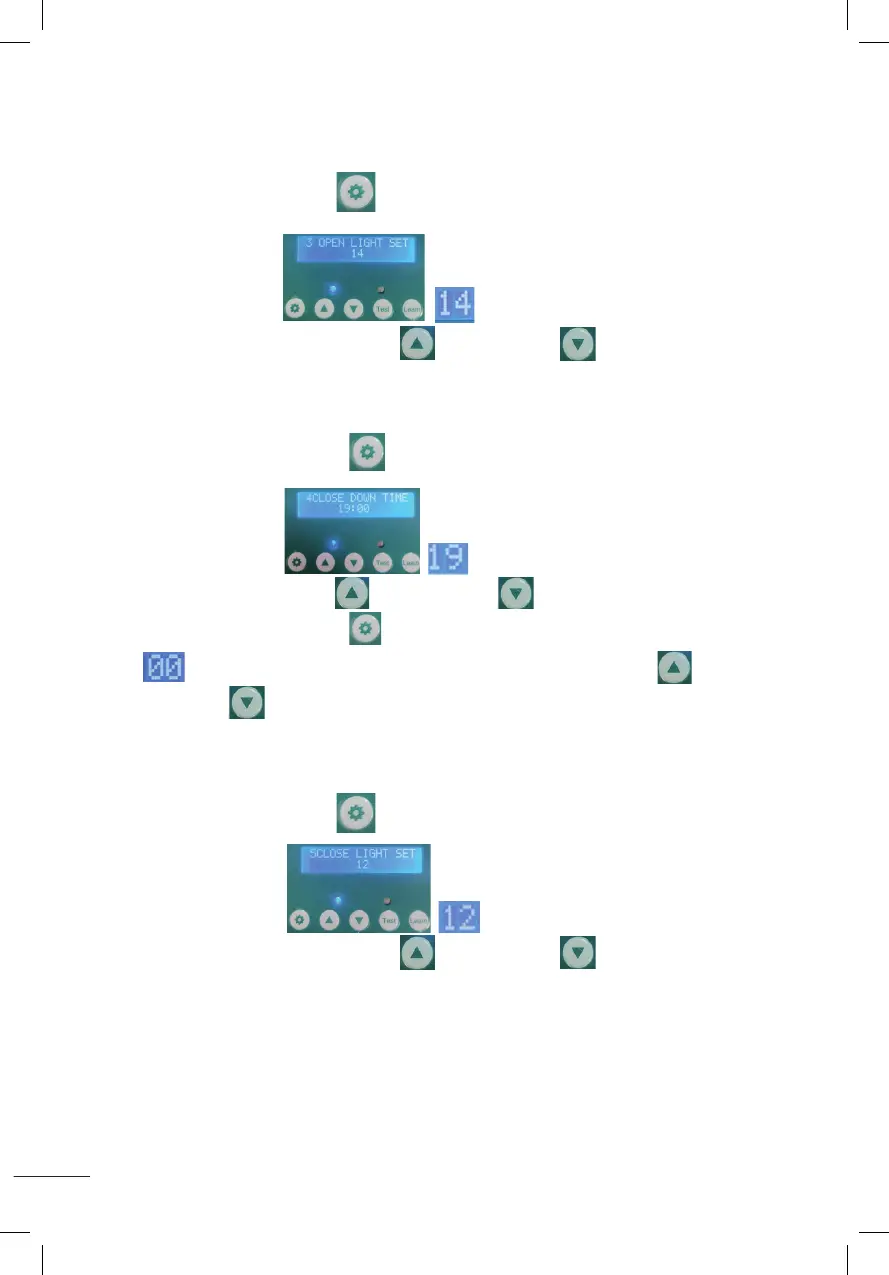
3. ANPASSEN DES LUMENS BEIM ÖFFNEN DER TÜR (00~23)
(TÜRÖFFNUNGSZEITBEREICH: 00~11)
Halten Sie die Einstelltaste 1 Sekunde lang gedrückt und lassen Sie sie dann los,
wie im Bild gezeigt beginnt zu blinken, wie im Bild gezeigt.
Drücken Sie die Taste zum Erhöhen oder Verringern , um die Lumenzahl
anzupassen (Zahl 0 bedeutet minimale Lumenzahl, schwächstes Licht).
Nummer 23 bedeutet maximale Lumen, stärkstes Licht)
4. STELLEN SIE DIE ZEIT EIN, ZU DER DIE TÜR GESCHLOSSEN WERDEN SOLL (12~23)
Drücken Sie die Einstelltaste 1 Sekunde lang und lassen Sie sie dann los,
wie im Bild gezeigt beginnt zu blinken, wie im Bild gezeigt.
Drücken Sie die Erhöhen- oder Verringern- Taste, um die Stunde einzustellen.
Drücken Sie die Einstelltaste 1 Sekunde lang und lassen Sie sie los.
beginnt zu blinken, wie im Bild gezeigt. Drücken Sie die Erhöhen- oder
Verringern- Taste, um die Minuten einzustellen.
5. ANPASSEN DES LUMENS BEIM SCHLIESSEN DER TÜR (00~23)
(TÜRSCHLIESSZEITBEREICH: 12~23)
Halten Sie die Einstelltaste 1 Sekunde lang gedrückt und lassen Sie sie dann los,
wie im Bild gezeigt beginnt zu blinken, wie im Bild gezeigt.
Drücken Sie die Taste zum Erhöhen oder Verringern , um die Lumenzahl
anzupassen (Zahl 0 bedeutet minimale Lumenzahl, schwächstes Licht).
Nummer 23 bedeutet maximale Lumen, stärkstes Licht)
2. Set the time to open the door(00~11)
Press the setting button for 1 second and release, displaying as shown
(OPEN UP TIME),it will start to flash as shown in the figure ,press the increase button or the
decrease button to adjust the hour .
Press the setting button for 1 second and release,it will start to flash as shown in the figure ,
press the increase button or the decrease button to adjust the minutes .
3.Set Lumens while door opening (00~23) (time range of door opening: 00~11)
Press the setting button for 1 second then release, displaying as shown
(OPEN LIGHT SET 14),it will start to flash as shown in the figure ,press the increase button or
the decrease button to adjust the Lumens.(Number 0 means minimum Lumens, weakest light.
Number 23 means maximum Lumens, strongest light)
4.Set the time to close the door(12~23)
Press the setting button for 1 second then release, displaying as shown
(CLOSE DOWM TIME),it will start to flash as shown in the figure , press the increase button or the
decrease button to adjust the hour .
Press the setting button
for 1 second and release,it will start to flash as shown in the figure ,
press the increase button or the decrease button to adjust the minutes .
2. Set the time to open the door(00~11)
Press the setting button for 1 second and release, displaying as shown
(OPEN UP TIME),it will start to flash as shown in the figure ,press the increase button or the
decrease button to adjust the hour .
Press the setting button for 1 second and release,it will start to flash as shown in the figure ,
press the increase button or the decrease button to adjust the minutes .
3.Set Lumens while door opening (00~23) (time range of door opening: 00~11)
Press the setting button for 1 second then release, displaying as shown
(OPEN LIGHT SET 14),it will start to flash as shown in the figure ,press the increase button or
the decrease button to adjust the Lumens.(Number 0 means minimum Lumens, weakest light.
Number 23 means maximum Lumens, strongest light)
4.Set the time to close the door(12~23)
Press the setting button for 1 second then release, displaying as shown
(CLOSE DOWM TIME),it will start to flash as shown in the figure , press the increase button or the
decrease button to adjust the hour .
Press the setting button
for 1 second and release,it will start to flash as shown in the figure ,
press the increase button or the decrease button to adjust the minutes .
2. Set the time to open the door(00~11)
Press the setting button for 1 second and release, displaying as shown
(OPEN UP TIME),it will start to flash as shown in the figure ,press the increase button or the
decrease button to adjust the hour .
Press the setting button for 1 second and release,it will start to flash as shown in the figure ,
press the increase button or the decrease button to adjust the minutes .
3.Set Lumens while door opening (00~23) (time range of door opening: 00~11)
Press the setting button for 1 second then release, displaying as shown
(OPEN LIGHT SET 14),it will start to flash as shown in the figure ,press the increase button or
the decrease button to adjust the Lumens.(Number 0 means minimum Lumens, weakest light.
Number 23 means maximum Lumens, strongest light)
4.Set the time to close the door(12~23)
Press the setting button for 1 second then release, displaying as shown
(CLOSE DOWM TIME),it will start to flash as shown in the figure , press the increase button or the
decrease button to adjust the hour .
Press the setting button
for 1 second and release,it will start to flash as shown in the figure ,
press the increase button or the decrease button to adjust the minutes .
2. Set the time to open the door(00~11)
Press the setting button for 1 second and release, displaying as shown
(OPEN UP TIME),it will start to flash as shown in the figure ,press the increase button or the
decrease button to adjust the hour .
Press the setting button for 1 second and release,it will start to flash as shown in the figure ,
press the increase button or the decrease button to adjust the minutes .
3.Set Lumens while door opening (00~23) (time range of door opening: 00~11)
Press the setting button for 1 second then release, displaying as shown
(OPEN LIGHT SET 14),it will start to flash as shown in the figure ,press the increase button or
the decrease button to adjust the Lumens.(Number 0 means minimum Lumens, weakest light.
Number 23 means maximum Lumens, strongest light)
4.Set the time to close the door(12~23)
Press the setting button for 1 second then release, displaying as shown
(CLOSE DOWM TIME),it will start to flash as shown in the figure , press the increase button or the
decrease button to adjust the hour .
Press the setting button
for 1 second and release,it will start to flash as shown in the figure ,
press the increase button or the decrease button to adjust the minutes .
2. Set the time to open the door(00~11)
Press the setting button for 1 second and release, displaying as shown
(OPEN UP TIME),it will start to flash as shown in the figure ,press the increase button or the
decrease button to adjust the hour .
Press the setting button for 1 second and release,it will start to flash as shown in the figure ,
press the increase button or the decrease button to adjust the minutes .
3.Set Lumens while door opening (00~23) (time range of door opening: 00~11)
Press the setting button for 1 second then release, displaying as shown
(OPEN LIGHT SET 14),it will start to flash as shown in the figure ,press the increase button or
the decrease button to adjust the Lumens.(Number 0 means minimum Lumens, weakest light.
Number 23 means maximum Lumens, strongest light)
4.Set the time to close the door(12~23)
Press the setting button for 1 second then release, displaying as shown
(CLOSE DOWM TIME),it will start to flash as shown in the figure , press the increase button or the
decrease button to adjust the hour .
Press the setting button
for 1 second and release,it will start to flash as shown in the figure ,
press the increase button or the decrease button to adjust the minutes .
2. Set the time to open the door(00~11)
Press the setting button for 1 second and release, displaying as shown
(OPEN UP TIME),it will start to flash as shown in the figure ,press the increase button or the
decrease button to adjust the hour .
Press the setting button for 1 second and release,it will start to flash as shown in the figure ,
press the increase button or the decrease button to adjust the minutes .
3.Set Lumens while door opening (00~23) (time range of door opening: 00~11)
Press the setting button for 1 second then release, displaying as shown
(OPEN LIGHT SET 14),it will start to flash as shown in the figure ,press the increase button or
the decrease button to adjust the Lumens.(Number 0 means minimum Lumens, weakest light.
Number 23 means maximum Lumens, strongest light)
4.Set the time to close the door(12~23)
Press the setting button for 1 second then release, displaying as shown
(CLOSE DOWM TIME),it will start to flash as shown in the figure , press the increase button or the
decrease button to adjust the hour .
Press the setting button
for 1 second and release,it will start to flash as shown in the figure ,
press the increase button or the decrease button to adjust the minutes .
2. Set the time to open the door(00~11)
Press the setting button for 1 second and release, displaying as shown
(OPEN UP TIME),it will start to flash as shown in the figure ,press the increase button or the
decrease button to adjust the hour .
Press the setting button for 1 second and release,it will start to flash as shown in the figure ,
press the increase button or the decrease button to adjust the minutes .
3.Set Lumens while door opening (00~23) (time range of door opening: 00~11)
Press the setting button for 1 second then release, displaying as shown
(OPEN LIGHT SET 14),it will start to flash as shown in the figure ,press the increase button or
the decrease button
to adjust the Lumens.(Number 0 means minimum Lumens, weakest light.
Number 23 means maximum Lumens, strongest light)
4.Set the time to close the door(12~23)
Press the setting button for 1 second then release, displaying as shown
(CLOSE DOWM TIME),it will start to flash as shown in the figure , press the increase button or the
decrease button to adjust the hour .
Press the setting button
for 1 second and release,it will start to flash as shown in the figure ,
press the increase button or the decrease button to adjust the minutes .
2. Set the time to open the door(00~11)
Press the setting button for 1 second and release, displaying as shown
(OPEN UP TIME),it will start to flash as shown in the figure ,press the increase button or the
decrease button to adjust the hour .
Press the setting button for 1 second and release,it will start to flash as shown in the figure ,
press the increase button or the decrease button to adjust the minutes .
3.Set Lumens while door opening (00~23) (time range of door opening: 00~11)
Press the setting button for 1 second then release, displaying as shown
(OPEN LIGHT SET 14),it will start to flash as shown in the figure ,press the increase button or
the decrease button
to adjust the Lumens.(Number 0 means minimum Lumens, weakest light.
Number 23 means maximum Lumens, strongest light)
4.Set the time to close the door(12~23)
Press the setting button for 1 second then release, displaying as shown
(CLOSE DOWM TIME),it will start to flash as shown in the figure , press the increase button or the
decrease button to adjust the hour .
Press the setting button
for 1 second and release,it will start to flash as shown in the figure ,
press the increase button or the decrease button to adjust the minutes .
2. Set the time to open the door(00~11)
Press the setting button for 1 second and release, displaying as shown
(OPEN UP TIME),it will start to flash as shown in the figure ,press the increase button or the
decrease button to adjust the hour .
Press the setting button for 1 second and release,it will start to flash as shown in the figure ,
press the increase button or the decrease button to adjust the minutes .
3.Set Lumens while door opening (00~23) (time range of door opening: 00~11)
Press the setting button for 1 second then release, displaying as shown
(OPEN LIGHT SET 14),it will start to flash as shown in the figure ,press the increase button or
the decrease button to adjust the Lumens.(Number 0 means minimum Lumens, weakest light.
Number 23 means maximum Lumens, strongest light)
4.Set the time to close the door(12~23)
Press the setting button for 1 second then release, displaying as shown
(CLOSE DOWM TIME),it will start to flash as shown in the figure , press the increase button or the
decrease button to adjust the hour .
Press the setting button
for 1 second and release,it will start to flash as shown in the figure ,
press the increase button or the decrease button to adjust the minutes .
2. Set the time to open the door(00~11)
Press the setting button for 1 second and release, displaying as shown
(OPEN UP TIME),it will start to flash as shown in the figure ,press the increase button or the
decrease button to adjust the hour .
Press the setting button for 1 second and release,it will start to flash as shown in the figure ,
press the increase button or the decrease button to adjust the minutes .
3.Set Lumens while door opening (00~23) (time range of door opening: 00~11)
Press the setting button for 1 second then release, displaying as shown
(OPEN LIGHT SET 14),it will start to flash as shown in the figure ,press the increase button or
the decrease button to adjust the Lumens.(Number 0 means minimum Lumens, weakest light.
Number 23 means maximum Lumens, strongest light)
4.Set the time to close the door(12~23)
Press the setting button for 1 second then release, displaying as shown
(CLOSE DOWM TIME),it will start to flash as shown in the figure , press the increase button or the
decrease button to adjust the hour .
Press the setting button
for 1 second and release,it will start to flash as shown in the figure ,
press the increase button or the decrease button to adjust the minutes .
2. Set the time to open the door(00~11)
Press the setting button for 1 second and release, displaying as shown
(OPEN UP TIME),it will start to flash as shown in the figure ,press the increase button or the
decrease button to adjust the hour .
Press the setting button for 1 second and release,it will start to flash as shown in the figure ,
press the increase button or the decrease button to adjust the minutes .
3.Set Lumens while door opening (00~23) (time range of door opening: 00~11)
Press the setting button for 1 second then release, displaying as shown
(OPEN LIGHT SET 14),it will start to flash as shown in the figure ,press the increase button or
the decrease button to adjust the Lumens.(Number 0 means minimum Lumens, weakest light.
Number 23 means maximum Lumens, strongest light)
4.Set the time to close the door(12~23)
Press the setting button for 1 second then release, displaying as shown
(CLOSE DOWM TIME),it will start to flash as shown in the figure , press the increase button or the
decrease button to adjust the hour .
Press the setting button
for 1 second and release,it will start to flash as shown in the figure ,
press the increase button or the decrease button to adjust the minutes .
2. Set the time to open the door(00~11)
Press the setting button for 1 second and release, displaying as shown
(OPEN UP TIME),it will start to flash as shown in the figure ,press the increase button or the
decrease button to adjust the hour .
Press the setting button for 1 second and release,it will start to flash as shown in the figure ,
press the increase button or the decrease button to adjust the minutes .
3.Set Lumens while door opening (00~23) (time range of door opening: 00~11)
Press the setting button for 1 second then release, displaying as shown
(OPEN LIGHT SET 14),it will start to flash as shown in the figure ,press the increase button or
the decrease button to adjust the Lumens.(Number 0 means minimum Lumens, weakest light.
Number 23 means maximum Lumens, strongest light)
4.Set the time to close the door(12~23)
Press the setting button for 1 second then release, displaying as shown
(CLOSE DOWM TIME),it will start to flash as shown in the figure , press the increase button or the
decrease button to adjust the hour .
Press the setting button
for 1 second and release,it will start to flash as shown in the figure ,
press the increase button or the decrease button to adjust the minutes .
2. Set the time to open the door(00~11)
Press the setting button for 1 second and release, displaying as shown
(OPEN UP TIME),it will start to flash as shown in the figure ,press the increase button or the
decrease button to adjust the hour .
Press the setting button for 1 second and release,it will start to flash as shown in the figure ,
press the increase button or the decrease button to adjust the minutes .
3.Set Lumens while door opening (00~23) (time range of door opening: 00~11)
Press the setting button for 1 second then release, displaying as shown
(OPEN LIGHT SET 14),it will start to flash as shown in the figure ,press the increase button or
the decrease button to adjust the Lumens.(Number 0 means minimum Lumens, weakest light.
Number 23 means maximum Lumens, strongest light)
4.Set the time to close the door(12~23)
Press the setting button for 1 second then release, displaying as shown
(CLOSE DOWM TIME),it will start to flash as shown in the figure , press the increase button or the
decrease button to adjust the hour .
Press the setting button
for 1 second and release,it will start to flash as shown in the figure ,
press the increase button or the decrease button to adjust the minutes .
2. Set the time to open the door(00~11)
Press the setting button for 1 second and release, displaying as shown
(OPEN UP TIME),it will start to flash as shown in the figure ,press the increase button or the
decrease button to adjust the hour .
Press the setting button for 1 second and release,it will start to flash as shown in the figure ,
press the increase button or the decrease button to adjust the minutes .
3.Set Lumens while door opening (00~23) (time range of door opening: 00~11)
Press the setting button for 1 second then release, displaying as shown
(OPEN LIGHT SET 14),it will start to flash as shown in the figure ,press the increase button or
the decrease button to adjust the Lumens.(Number 0 means minimum Lumens, weakest light.
Number 23 means maximum Lumens, strongest light)
4.Set the time to close the door(12~23)
Press the setting button for 1 second then release, displaying as shown
(CLOSE DOWM TIME),it will start to flash as shown in the figure , press the increase button or the
decrease button to adjust the hour .
Press the setting button
for 1 second and release,it will start to flash as shown in the figure ,
press the increase button or the decrease button to adjust the minutes .
2. Set the time to open the door(00~11)
Press the setting button for 1 second and release, displaying as shown
(OPEN UP TIME),it will start to flash as shown in the figure ,press the increase button or the
decrease button to adjust the hour .
Press the setting button for 1 second and release,it will start to flash as shown in the figure ,
press the increase button or the decrease button to adjust the minutes .
3.Set Lumens while door opening (00~23) (time range of door opening: 00~11)
Press the setting button for 1 second then release, displaying as shown
(OPEN LIGHT SET 14),it will start to flash as shown in the figure ,press the increase button or
the decrease button to adjust the Lumens.(Number 0 means minimum Lumens, weakest light.
Number 23 means maximum Lumens, strongest light)
4.Set the time to close the door(12~23)
Press the setting button for 1 second then release, displaying as shown
(CLOSE DOWM TIME),it will start to flash as shown in the figure , press the increase button or the
decrease button to adjust the hour .
Press the setting button
for 1 second and release,it will start to flash as shown in the figure ,
press the increase button or the decrease button to adjust the minutes .
2. Set the time to open the door(00~11)
Press the setting button for 1 second and release, displaying as shown
(OPEN UP TIME),it will start to flash as shown in the figure ,press the increase button or the
decrease button to adjust the hour .
Press the setting button for 1 second and release,it will start to flash as shown in the figure ,
press the increase button or the decrease button to adjust the minutes .
3.Set Lumens while door opening (00~23) (time range of door opening: 00~11)
Press the setting button for 1 second then release, displaying as shown
(OPEN LIGHT SET 14),it will start to flash as shown in the figure ,press the increase button or
the decrease button to adjust the Lumens.(Number 0 means minimum Lumens, weakest light.
Number 23 means maximum Lumens, strongest light)
4.Set the time to close the door(12~23)
Press the setting button for 1 second then release, displaying as shown
(CLOSE DOWM TIME),it will start to flash as shown in the figure , press the increase button or the
decrease button
to adjust the hour .
Press the setting button
for 1 second and release,it will start to flash as shown in the figure ,
press the increase button or the decrease button to adjust the minutes .
2. Set the time to open the door(00~11)
Press the setting button for 1 second and release, displaying as shown
(OPEN UP TIME),it will start to flash as shown in the figure ,press the increase button or the
decrease button to adjust the hour .
Press the setting button for 1 second and release,it will start to flash as shown in the figure ,
press the increase button or the decrease button to adjust the minutes .
3.Set Lumens while door opening (00~23) (time range of door opening: 00~11)
Press the setting button for 1 second then release, displaying as shown
(OPEN LIGHT SET 14),it will start to flash as shown in the figure ,press the increase button or
the decrease button to adjust the Lumens.(Number 0 means minimum Lumens, weakest light.
Number 23 means maximum Lumens, strongest light)
4.Set the time to close the door(12~23)
Press the setting button for 1 second then release, displaying as shown
(CLOSE DOWM TIME),it will start to flash as shown in the figure , press the increase button or the
decrease button
to adjust the hour .
Press the setting button
for 1 second and release,it will start to flash as shown in the figure ,
press the increase button or the decrease button to adjust the minutes .
5.Set Lumens while door closing(00~23)(time range of door closing::12~23)
Press the setting button for 1 second then release, displaying as shown
(CLOSE LIGHT SET 12), it will start to flash as shown in the figure ,press the increase button or the
decrease button to adjust the Lumens.(Number 0 means minimum Lumens, weakest light. Number
23 means maximum Lumens, strongest light)
6.Setting Timing and Light Sensor Mixing Modes (A-B-C-D)
A:Press the setting button for 1 second and release,it will display as shown
A:TIME-TIME: Indicates time on - time off.
B: Press the increase button ,it will display as shown
B:TIME-LIGHT:Indicates time on-light off.
C:Press the increase button ,it will display as shown
C:LIGHT-TIME:Indicates light on-time off.
D: Press the increase button ,it will display as shown
D:LIGHT-LIGHT:Indicates light on-light off.
5.Set Lumens while door closing(00~23)(time range of door closing::12~23)
Press the setting button for 1 second then release, displaying as shown
(CLOSE LIGHT SET 12), it will start to flash as shown in the figure ,press the increase button or the
decrease button to adjust the Lumens.(Number 0 means minimum Lumens, weakest light. Number
23 means maximum Lumens, strongest light)
6.Setting Timing and Light Sensor Mixing Modes (A-B-C-D)
A:Press the setting button for 1 second and release,it will display as shown
A:TIME-TIME: Indicates time on - time off.
B: Press the increase button ,it will display as shown
B:TIME-LIGHT:Indicates time on-light off.
C:Press the increase button ,it will display as shown
C:LIGHT-TIME:Indicates light on-time off.
D: Press the increase button ,it will display as shown
D:LIGHT-LIGHT:Indicates light on-light off.


 To Next Page
 Loading...